Photo requirements at a glance
Official specification summary for this document, verified against the issuing authority's requirements.
- Photo size
- 50.8x50.8 mm · 2x2 in
- Pixel size
- 600x600 px
- Resolution
- 300 DPI
- Background
- In color
- Head height
- 1.29 inch
- Eyes level
- 1.18 inch
- File format
- JPEG
- Glasses
- not allowed
- Expression
- Neutral, eyes open, mouth closed
Your Photo 2x2 inch Now (50.8 × 50.8 mm / 600 × 600 Pixels)
FreeUpload a selfie, and our photo converter resizes and crops it to the exact specifications automatically. Works on iPhone, Android and desktop — no studio visit required.
Drag to reposition · Scroll-free sliders below
or paste an image from your clipboard
Check this box if health issues affect your photo — a medical certificate is required.
Compliance
Human Photo Verification
A compliance expert reviews your photo and provides a report. 99.2% approval rate.
Print sheet (multiple copies)
2x2 in · 300 dpi · JPEG · Unknown Region
Batch processing — process multiple photos at once
0 loadedUpload several photos; they are all cropped to the current document size using the same background & adjustments, then downloaded together as a ZIP.
Make a 2x2 Passport Photo Online for Free With a 2x2 Photo Converter
Create a 2x2 passport photo online for free by uploading a selfie taken within the last 6 months to our 2x2 photo converter. Get a submission-ready printable or digital 2x2 photo in 30 seconds. Works on iPhone, Android, in any browser — immediate result, no editing skills required.
No studio · No app · 30 seconds
Official Photo Requirements




Source: U.S. Department of State — Passport Photo Requirements
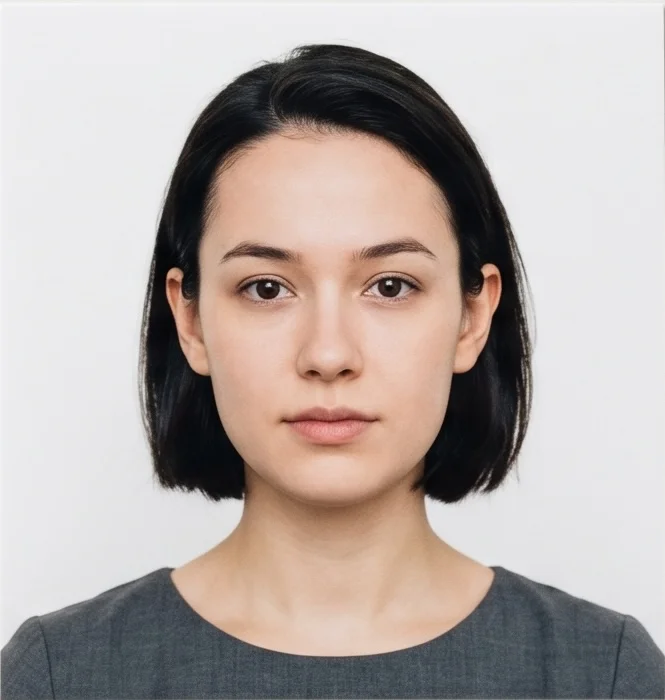

PhotoGov is an independent service. We are not affiliated with any government, embassy, or consulate. All information on this website is based on official government requirements and verified primary sources. Final acceptance is determined solely by the issuing authority.
Get Your 2x2 Passport Photo Now
Use our 2x2 photo converter to make a 2x2 passport photo from the comfort of your home or office. Follow the on-screen instructions below and get your photo in seconds.
Get photo for: Photo 2x2 inch (51x51 mm, 5x5 cm)
Drag to reposition · Scroll-free sliders below
or paste an image from your clipboard
Check this box if health issues affect your photo — a medical certificate is required.
Compliance
Human Photo Verification
A compliance expert reviews your photo and provides a report. 99.2% approval rate.
Print sheet (multiple copies)
2x2 in · 300 dpi · JPEG · United States
Batch processing — process multiple photos at once
0 loadedUpload several photos; they are all cropped to the current document size using the same background & adjustments, then downloaded together as a ZIP.
If you need assistance, don't hesitate to contact our Support team, which is always there to help.
How Our 2x2 Photo Converter Works
Our 2×2 photo converter automatically adjusts your original portrait to official U.S. Department of State specifications — 2×2 inches (51×51 mm), white or off-white background, head size 1–1⅜ inches (25–35 mm), filling 50–69% of the frame height.
At checkout, you can add our Human Verification service — your final photo is reviewed by a senior compliance expert to confirm it meets all State Department requirements. You can also request a casual-to-formal attire adjustment if your clothing doesn't meet ID standards.

Photo Upload
Take a selfie and upload it to PhotoGov

Processing
Wait while automatic resizing and cropping are applied

Service Selection
Add Human Verification or bundle other PhotoGov services

Download
Get your printable or 2x2 digital photo
On this page:
- Get Your 2x2 Passport Photo Now
- How Our 2x2 Photo Converter Works
- What Is a 2x2 Passport Photo?
- Your Final 2x2 Photo from PhotoGov
- 2x2 Photos That Pass the Checks
- 2x2 Photos That Don’t Pass the Checks
- Why Use the PhotoGov 2x2 Photo Converter
- PhotoGov and Official 2x2 Photo Standards
- Frequently Asked Questions
- Official Government Sources
- Other Documents — United States ID Photos
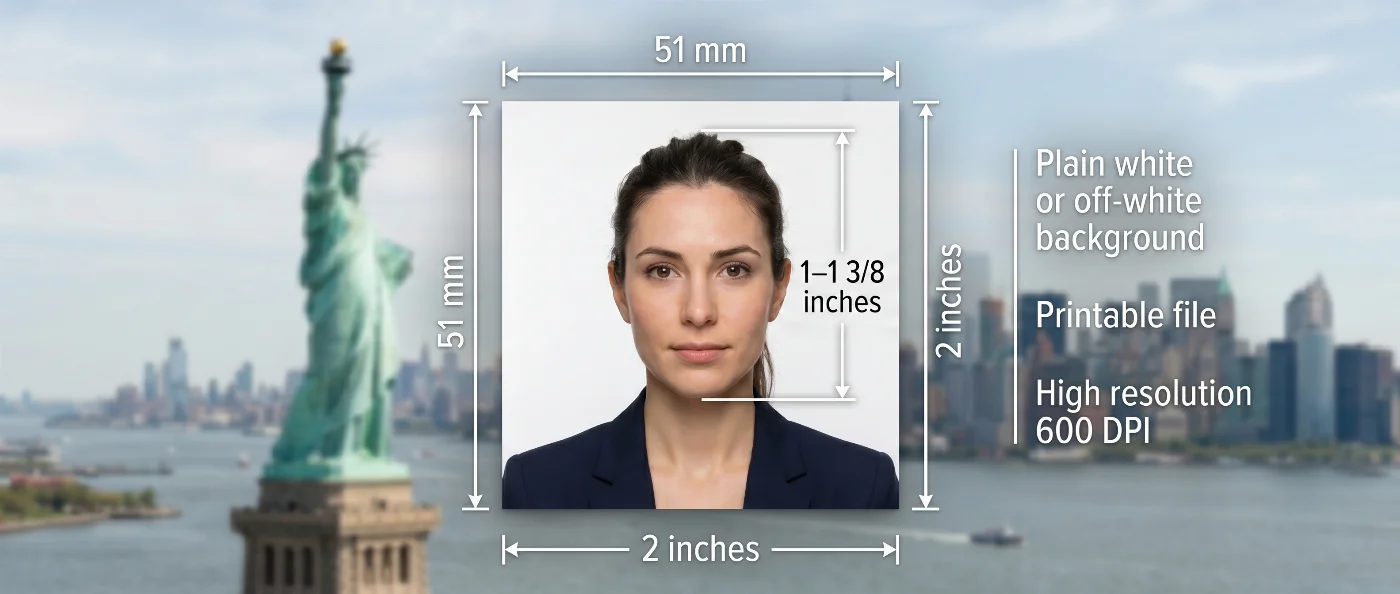
What Is a 2x2 Passport Photo?
The official 2×2-inch (51×51 mm) document photo required for U.S. passports, visas, USCIS immigration filings (also used in Philippine, Nigerian, Ghanaian, Caribbean, and Indian OCI applications).
Automatically resized and cropped by PhotoGov to U.S. Department of State and ICAO Doc 9303 specifications.
Instant download 2x2 ID photo for online forms, ready to print and be submitted with passport, visa, and other ID applications.
Your Final 2x2 Photo from PhotoGov
PhotoGov automatically applies all official U.S. Department of State requirements to your original photo. The final image is ready for submission and does not require any adjustments. Below are the key technical parameters of your final 2x2 photo from PhotoGov.
For a full overview of official standards, please see our US Passport Photo Requirements Guide.
| Parameter | Your Final Photo |
| Photo size | 2×2 inches / 51×51 mm / 5.08×5.08 cm |
| Head size | 1–1⅜ inches (25–35 mm), 50–69% of image height |
| Background | Plain white or off-white |
| File format | JPEG / Printable PDF |
| Head positioning | Automatically centered |
| Color | Full color |
| Resolution | High-resolution digital file at 600 DPI |
| Face visibility | Fully visible, no retouching |
| Submission | Ready for online submission or printing |
If your photo is rejected due to technical issues on PhotoGov’s side, we provide a free retake or a full refund.
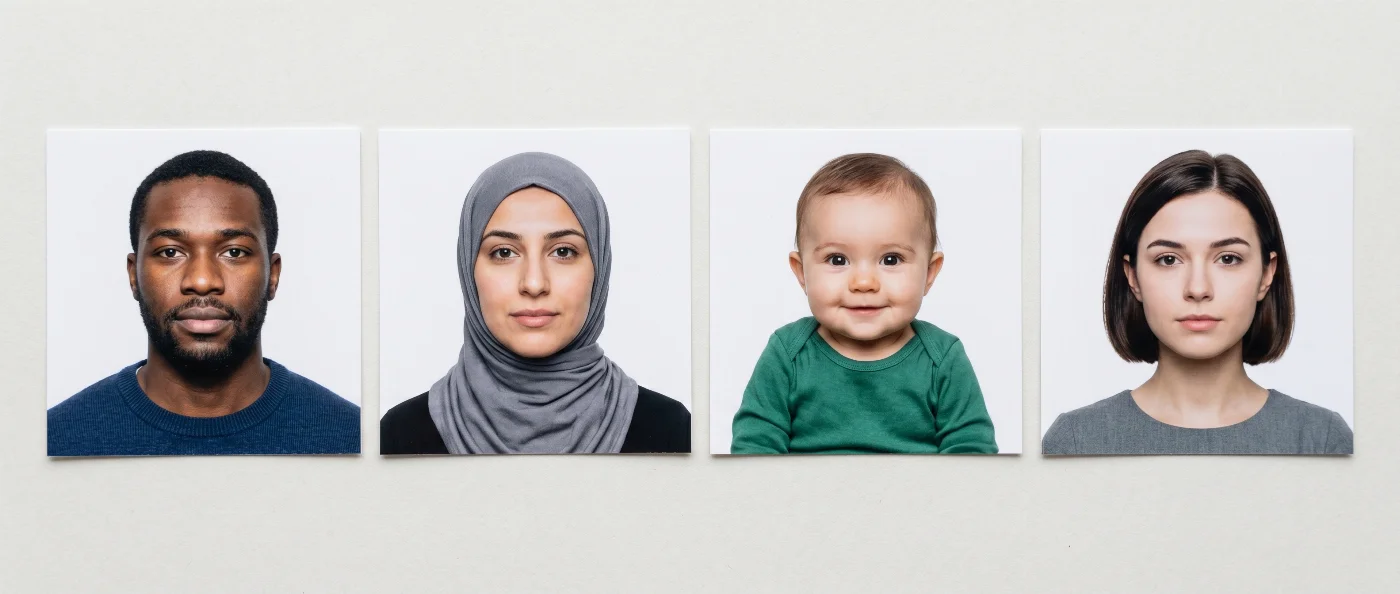
2x2 Photos That Pass the Checks
2x2 Photos That Don’t Pass the Checks
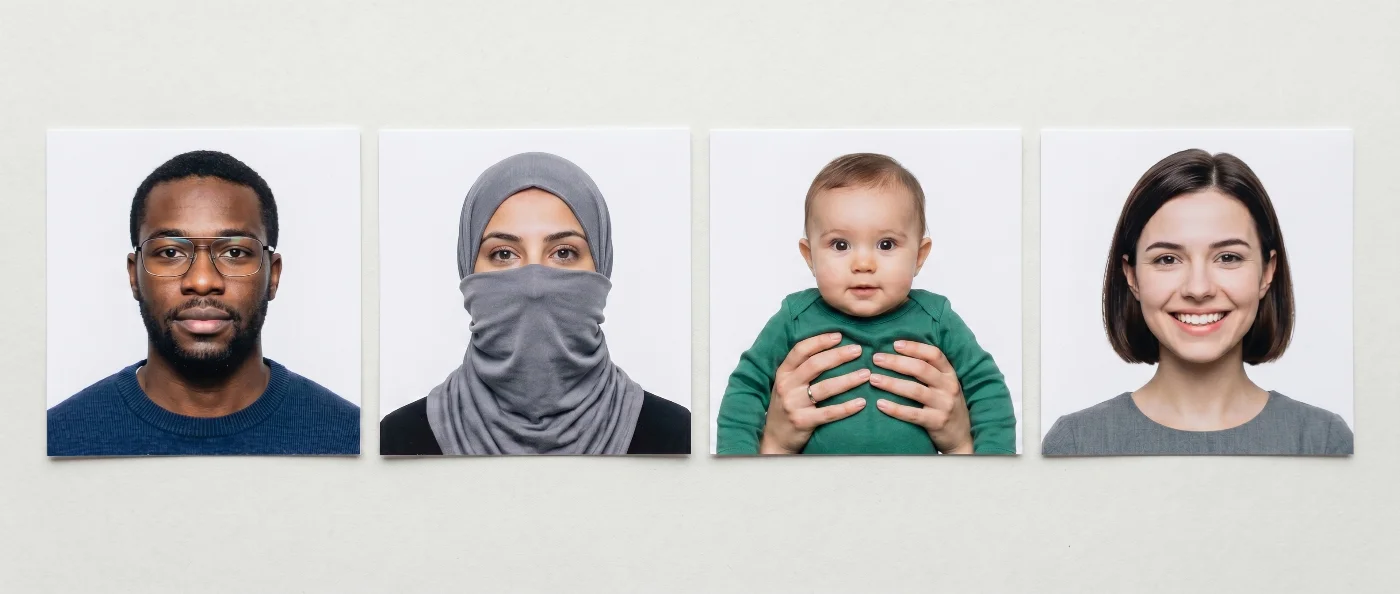
Your photo is processed in a private session in a secure environment. Facial features are never altered — the tool only resizes, crops, and replaces the background. If you want extra reassurance, optional Human Verification is available at checkout.

Why Use the PhotoGov 2x2 Photo Converter
Convenience
Photos accepted for online and in-person submissions
Compliance-Aligned Output
Technical alignment with the U.S. Department of State and USCIS guidelines
Availability
No registration, installation, or studio visits
Secure Processing
Your data is secure and not transferred to third parties
Our platform is designed to align with the U.S. Department of State and USCIS passport and visa photo rules. Final acceptance is at the discretion of the passport authority, consular officer, or issuing agency handling your application.
PhotoGov and Official 2x2 Photo Standards
PhotoGov formats 2x2 passport photos in line with requirements published by the authorities that use this format — primarily the U.S. Department of State and USCIS. They are grounded in ICAO Doc 9303 — the international biometric standard for document photos. PhotoGov monitors changes to official guidelines across all supported countries to keep the built-in parameters of the online passport photo maker up to date.
When you use the PhotoGov 2x2 photo converter, the output is a 2×2 inch (51×51 mm) photo with your head centered and sized at 1–1⅜ inches (25–35 mm) from chin to crown (50-69% of the shot, as required), with a plain white/off-white background. The tool adjusts only size, crop, and background. Facial structure and facial features remain exactly as they appear in your original photo — no retouching, filters, or reshaping are applied.
If you want a manual review before submitting, add Human Verification at checkout. A senior PhotoGov specialist checks your 2x2 passport photo online against the current requirements for your specific document — U.S. passport applications, DS-160 and DS-260 visa forms, USCIS filings. It is particularly useful for time-sensitive applications, renewals, or immigration processes where a rejected photo causes significant delays.
For other document photos, see our dedicated tools:
US Digital Passport Photo Tool
The U.S. Department of State and USCIS prohibit digital alterations of ID photographs. Our platform provides sizing and cropping services only and does not modify or enhance images.
Photos for Student ID Cards
Campus cards are a separate case, and our guide to the student ID card photo walks through the setup and the file settings.
Frequently Asked Questions
You can get a 2x2 photo from the comfort of your home or office by using a digital 2x2 photo maker for a visa and passport:
Take a selfie — use a plain light-colored wall as a backdrop. Stand by the window in the daytime. Avoid harsh lighting or anything that casts shadows on your face or the background.
Choose the best photo and upload it to the 2x2 photo converter. Select a country, a 2x2 photo size, and your document type.
Wait while the system processes the image. At PhotoGov, it takes about 30 seconds.
Choose add-on services such as Human Verification or casual-to-formal attire adjustment.
Download your printable PDF sheet or a digital 2x2 photo and submit it through an official channel. Your photo matches all official requirements and doesn’t need any adjustments.
Upload a selfie to the PhotoGov 2x2 photo maker on this page. The tool automatically crops and resizes your photo to 2×2 inches, applies a white/off-white background, adjusts your head size to government specifications — 1–1⅜ inches (25–35 mm), 50–69% of image height, crops it, and reframes for official biometric standards. Basically, it’s your digital home kit for taking professional 2x2 passport photos with no hassle.
You can take a 2x2 passport photo on your iPhone in 6 simple steps:
Open the Camera app on your iPhone. Turn off the Portrait mode. You can set framing to a 1:1 aspect ratio, but it’s not necessary.
Take your glasses off. Wear casual clothes in darker colors.
Stand against a plain white or light wall with even lighting — no shadows, reflections can be on your face.
Hold the phone at eye level and take a straight-on shot with a neutral expression, eyes open and mouth closed.
Upload the photo to the PhotoGov 2x2 photo converter: it automatically turns your selfie into a 2×2-inch passport photo, adjusting the background to white/off-white, cropping and framing it according to official biometric requirements.
Use your Android camera in standard mode. Stand against a plain white or light-colored wall with even, shadow-free lighting on your face. Take a straight-on photo at eye level with eyes open. Upload it to the PhotoGov 2x2 photo maker — the tool handles all resizing, head framing, and background removal automatically.
Use an online 2x2 photo converter to crop your selfie into a 2x2 passport photo:
Select a 2x2 passport photo as a document type
Upload your recent photo (no glasses, casual clothing in darker colors, taken within the past 6 months against a plain light background, looking directly into the camera with a neutral expression)
Wait while the system processes your selfie, cropping it into a 2x2 passport photo
Download a digital 2x2 passport photo or a printable sheet that you can print out in any print shop or at home.
The quickest way to get a 2x2 ID photo is to convert your selfie into it using an online 2x2 photo converter. All you need to do is upload your recent portrait and let the tool take care of the rest: adjust the crop, sizing, and framing, replace the background with white or off-white, and apply all biometric parameters required for a 2x2 ID photo.
CVS, Walgreens, Rite Aid, Costco, and Walmart all offer 2x2 passport photo same-day service, but it won’t be as fast as making the photo online.
You can order compliant 2x2 passport photos online from a reliable passport photo maker. At PhotoGov, a built-in official 2x2 passport photo template is used for creating your photos. It is manually reviewed by the compliance team every 8 weeks — the final 2x2 passport photo that you get is compliance-aligned and follows all official specs of the U.S. Department of State and USCIS. The final photo is application-ready and doesn’t require any manual adjustments.
PhotoGov delivers your 2x2 photo as a digital file you can upload directly to government portals, such as the U.S. passport online renewal system or visa application portals. Check the specific portal for accepted file size and format requirements before uploading.
None of the online services can legally guarantee the acceptance of your 2x2 visa photos, as it is at the full discretion of the issuing authority — USCIS or the U.S. Department of State. However, at PhotoGov, we offer compliance-aligned outputs with an extra level of assurance before you submit your 2x2 visa photo — select our Human Verification service upon checkout, and our senior compliance specialist will review your final photo, providing expert feedback on its compliance and acceptance likelihood.
Many apps create 2x2 ID photos; however, by using PhotoGov, you don’t need to download anything, register, or create an account. Our 2x2 photo maker works directly in your mobile browser. Open photogov.net on iPhone or Android, upload your selfie, and get a print-ready 2x2 photo in about 30 seconds. If you prefer a dedicated app, search for passport photo apps on the App Store or Google Play that support the 2×2 inch (51×51 mm) U.S. format.
You can print your 2×2 passport photo at any commercial print shop, at a pharmacy (CVS, Walgreens, Rite Aid), or at a Costco or Walmart photo center — just request a 2×2 passport photo print.
To print your 2x2 photo at home, use glossy or matte professional photo paper and print at 100% scale without resizing. The PhotoGov file is already formatted to the exact 2×2 inch dimensions.
Yes. CVS Photo centers print 2×2 passport photos in-store. Your PhotoGov file is already formatted as a print-ready 4×6 sheet — simply bring it to any CVS location, or upload it through the CVS Photo website for home delivery.
PhotoGov.net strictly adheres to the Global regulations for ID photos.
PhotoGov is an independent service. We are not affiliated with any government, embassy, or consulate. All information is provided for guidance only.
Official Government Sources
U.S. Passport Photo Requirements: The U.S. Department of State
U.S. Visa Photo Requirements: The U.S. Department of State
Biometric Regulations for International ID Documents: ICAO Document 9303
Other Documents — United States ID Photos

Written by Olia Potiagaeva, Managing Editor Reviewed by the PhotoGov Editorial Team ★ 4.8 / 5.0 Google Checked against Others
Free retake or full refund
If your photo is rejected because of an error on our side.
→ Refund PolicyChecked against 8 official parameters
Every file is validated before you download it.
→ Compliance checkRequirements re-checked every 8 weeks
Against the Others specification, so the template never falls behind a rule change. Last checked: 12.10.2026.
→ Official Government SourcesPhotoGov.net strictly adheres to the Global regulations for ID photos.
Related pages
Other Documents — Others ID Photos
Others
44 doc.
- Photo 1x1 inch1x1 inch (25.4x25.4 mm)
- Photo 26x32 mm1.02x1.26 inch (26x32 mm)
- Photo 2x2 cm0.79x0.79 inch (20x20 mm)
- Photo 30x40 mm1.18x1.57 inch (30x40 mm)
- Photo 35x40 mm1.38x1.57 inch (35x40 mm)
- Photo 35x45 mm aligned by the top1.38x1.77 inch (35x45 mm)
- Photo 45x45 mm1.77x1.77 inch (45x45 mm)
- Photo 4x4 cm1.57x1.57 inch (40x40 mm)
- Photo 50x50 mm1.97x1.97 inch (50x50 mm)
- Photo 600x800 pixel600x800 px
- Photo 6x9 cm2.36x3.54 inch (60x90 mm)
- Photo 9x12 cm3.54x4.72 inch (90x120 mm)
- Biometric passport photo1.38x1.77 inch (35x45 mm)
- Resume Photo 2x2 inch2x2 inch (50.8x50.8 mm)
- Resume Photo 35x45 mm1.38x1.77 inch (35x45 mm)
- Photo 25x35 mm (2.5x3.5 cm)0.98x1.38 inch (25x35 mm)
- UN passport 2x2 inch (51x51 mm)2.01x2.01 inch (51x51 mm)
- Photo 2x3 cm (20x30 mm)0.79x1.18 inch (20x30 mm)
- Photo 1.5x1.5 inch (38x38 mm, 3.8x3.8 cm)1.5x1.5 inch (38x38 mm)
- Photo 43x55 mm (4.3x5.5 cm)1.69x2.17 inch (43x55 mm)
- Photo 25x30 mm (2.5x3 cm)0.98x1.18 inch (25x30 mm)
- Photo 3x3 cm (30x30 mm)1.18x1.18 inch (30x30 mm)
- Photo 43x54 mm1.69x2.13 inch (43x54 mm)
- Photo 33x48 mm (3.3x4.8 cm)1.3x1.89 inch (33x48 mm)
- Photo 38x46 mm (3.8x4.6 cm)1.5x1.81 inch (38x46 mm)
- Photo 4x4.5 cm (40x45 mm)1.57x1.77 inch (40x45 mm)
- Photo 1.25x1.5 inch1.26x1.5 inch (32x38 mm)
- Photo 21x30 mm0.83x1.18 inch (21x30 mm)
- Photo 50x70 mm (5x7 cm)1.97x2.76 inch (50x70 mm)
- Photo 5x6.5 cm1.97x2.56 inch (50x65 mm)
- Photo 2x2.5 inch2.01x2.52 inch (51x64 mm)
- Photo 35x50 mm (3.5x5 cm)1.38x1.97 inch (35x50 mm)
- Photo 4.5x6 cm1.77x2.36 inch (45x60 mm)
- 2x2 inch photo (about 1 MB in size)2.01x2.01 inch (51x51 mm)
- Photo 40x50 mm (4x5 cm)1.57x1.97 inch (40x50 mm)
- Photo 30x35 mm1.18x1.38 inch (30x35 mm)
- Photo 45x57 mm1.77x2.24 inch (45x57 mm)
- Photo 37x37 mm1.46x1.46 inch (37x37 mm)
- Photo 25x25 mm (2.5x2.5 cm)0.98x0.98 inch (25x25 mm)
- Photo 35x35 mm (3.5x3.5 cm)1.38x1.38 inch (35x35 mm)
- Photo 40x60 mm (4x6 cm)1.57x2.36 inch (40x60 mm)
- Photo 32x42 mm1.26x1.65 inch (32x42 mm)
- Photo 1.5x2 inch (3.8x5 cm)1.5x1.97 inch (38x50 mm)
- IATA ID card 35x45 mm1.38x1.77 inch (35x45 mm)