Photo requirements at a glance
Official specification summary for this document, verified against the issuing authority's requirements.
- Photo size
- 35x45 mm · 1.38x1.77 in
- Pixel size
- 826x1062 px
- Resolution
- 600 DPI
- Background
- In color
- Head height
- 34 mm
- File format
- JPEG
- Glasses
- not allowed
- Expression
- Neutral, eyes open, mouth closed
Your Australia Passport Now (35 × 45 mm / 826 × 1062 Pixels)
FreeUpload a selfie, and our photo converter resizes and crops it to the exact specifications automatically. Works on iPhone, Android and desktop — no studio visit required.
Drag to reposition · Scroll-free sliders below
or paste an image from your clipboard
Check this box if health issues affect your photo — a medical certificate is required.
Compliance
Human Photo Verification
A compliance expert reviews your photo and provides a report. 99.2% approval rate.
Print sheet (multiple copies)
1.38x1.77 in · 600 dpi · JPEG · Australia
Batch processing — process multiple photos at once
0 loadedUpload several photos; they are all cropped to the current document size using the same background & adjustments, then downloaded together as a ZIP.
Make Australian Passport Photo Online, Free: From Home, No Appointments
Create your Australian passport photo online for free from the comfort of your home. Simply upload your selfie, and our passport photo maker will convert it into a correctly sized, technically compliant, and submission-ready photo.
No studio · No app · 30 seconds
Official Photo Requirements




Source: DFAT

PhotoGov is an independent service. We are not affiliated with any government, embassy, or consulate. All information on this website is based on official government requirements and verified primary sources. Final acceptance is determined solely by the issuing authority.
Convert Your Selfie to an Australian Passport-Size Photo for Free
Use our free Australian passport-size photo maker to get a DFAT-compliant passport photo from any device. Follow our on-screen instructions to upload, convert, and download your final image.
Get photo for: Australia Passport 35x45 mm (3.5x4.5 cm)
Drag to reposition · Scroll-free sliders below
or paste an image from your clipboard
Check this box if health issues affect your photo — a medical certificate is required.
Compliance
Human Photo Verification
A compliance expert reviews your photo and provides a report. 99.2% approval rate.
Print sheet (multiple copies)
2x2 in · 300 dpi · JPEG · United States
Batch processing — process multiple photos at once
0 loadedUpload several photos; they are all cropped to the current document size using the same background & adjustments, then downloaded together as a ZIP.
If you need assistance, don't hesitate to contact our Support team, which is always there to help.
How Our Australian Passport Photo Checker Works
Our free Australian passport photo maker automatically converts your selfie's size, head proportions, framing, and background to the official Australian passport standards. Choose additional services — casual-to-formal clothes change, human verification by our expert, or 9 extra clothing variations. Download the final digital photo, ready for submission.

Photo Upload
Take a selfie and upload it to PhotoGov

Service Selection
Add Human Verification or select other services

Processing
Wait while automatic adjustments are applied

Download
Get an Australian passport-size photo
On this page:
- Convert Your Selfie to an Australian Passport-Size Photo for Free
- How Our Australian Passport Photo Checker Works
- What is an Australian Passport Photo?
- Your Final Australian Passport Photo from PhotoGov
- Australian Passport Photos That Pass the Checks
- Australian Passport Photos That Don’t Pass the Checks
- Why Use the PhotoGov Service
- PhotoGov and DFAT Standards for Australian ID Pictures
- Frequently Asked Questions
- Official Government Sources
- Other Documents — Australian ID Photos
What is an Australian Passport Photo?
The official photo format required for an Australian passport.
Automatically prepared by PhotoGov as a correctly sized, DFAT‑compliant, and application-ready file.
Accepted for digital upload in online passport applications, and suitable for professional printing if required.
Your Final Australian Passport Photo from PhotoGov
PhotoGov automatically applies the official parameters to your original photo. You don’t need to adjust or verify any technical details manually. Below are the technical parameters of your final Australian passport photo from PhotoGov.
For a full overview of official standards, please see our Australian Passport Photo Requirements Guide.
| Parameter | Your Final Photo |
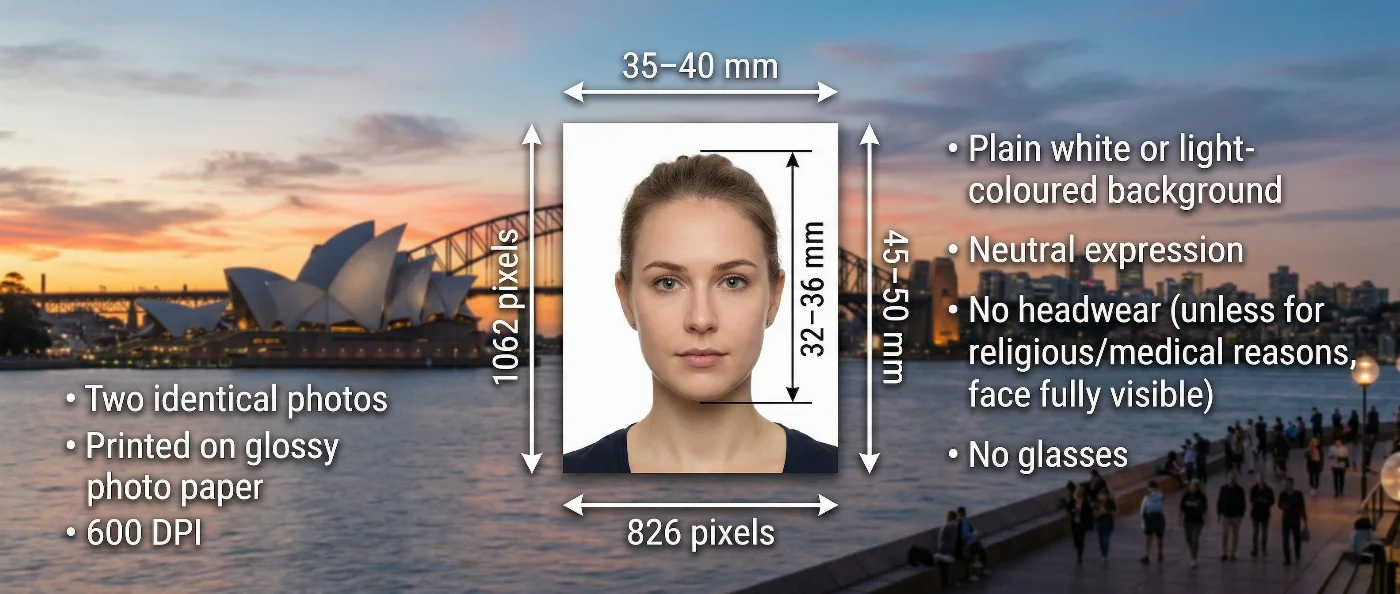
| Dimensions | 35–40 mm × 45–50 mm / 826 × 1062 pixels (at 600 DPI) |
| Head size | 32–36 mm (chin to crown), 45-50% of frame height |
| Head positioning | Automatically centered |
| File format | JPG in high resolution / PDF, printable format |
| Background | Plain white or light-coloured |
| Colour | Full colour |
| Face visibility | Fully visible, no retouching |
| Submission | Print at a photo lab, submit in person or by post / Submit through the DFAT online portal |
Your photo is processed in a private session in a secure environment. Facial features are never altered — our Australian passport photo checker only resizes, crops, and replaces the background. If you want extra reassurance, optional Human Verification is available at checkout.
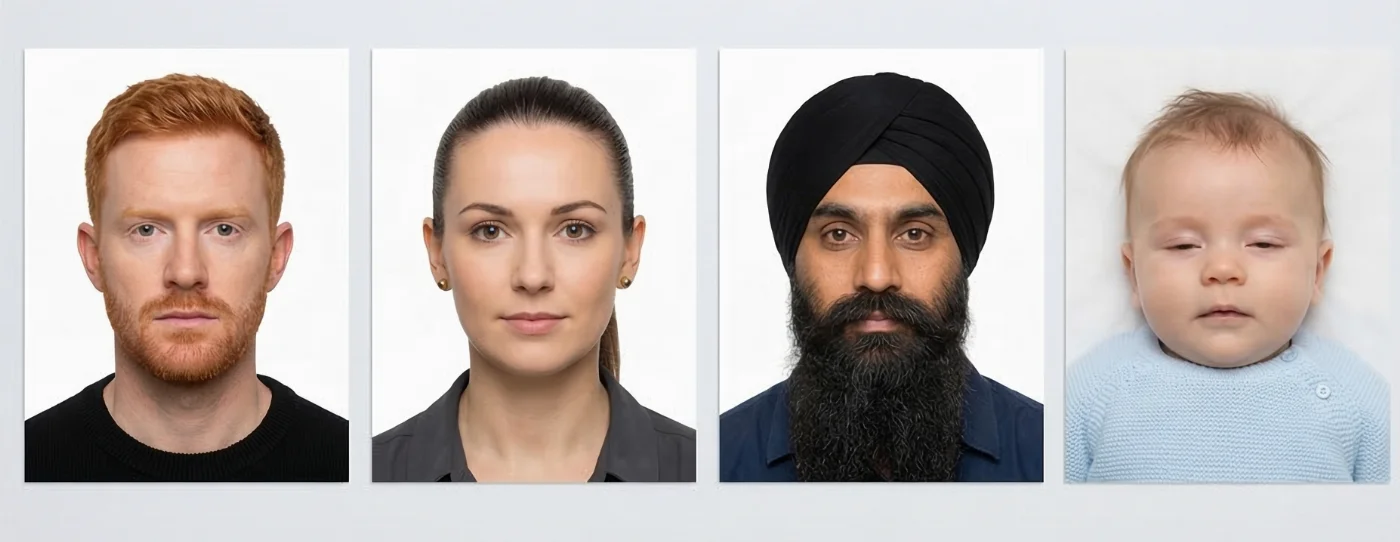
Australian Passport Photos That Pass the Checks
Australian Passport Photos That Don’t Pass the Checks
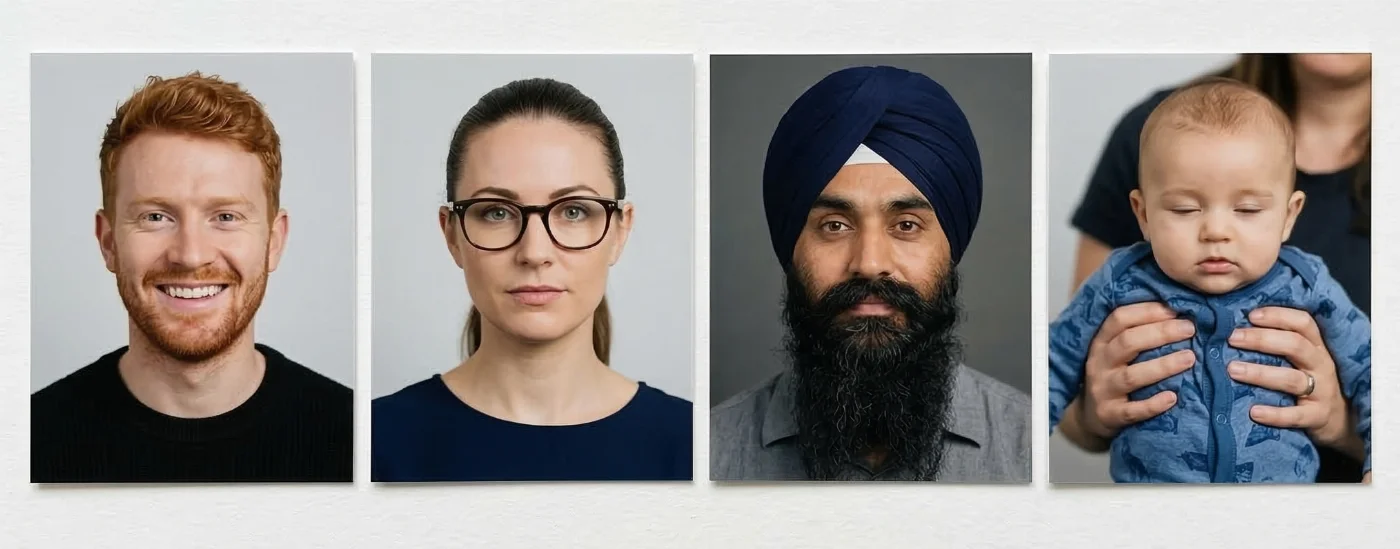

Why Use the PhotoGov Service
Convenience
Photos accepted for online and in-person submissions
Compliance-Aligned Output
Designed to meet the current DFAT photo specs
Availability
No registration, installation, or studio visits
Extra Assurance
Optional Human Verification by an in-house compliance specialist
Secure Processing
Your data is secure and not transferred to third parties
PhotoGov and DFAT Standards for Australian ID Pictures
PhotoGov adheres to the ID specifications issued by the Australian Passport Office, as well as the international rules for biometric images defined in ICAO Document 9303. Official guidelines are automatically applied to our Australian passport photo template and are manually updated by our ID photo and compliance experts on a regular basis.
Our online service is built to meet all current rules established by the Australian Passport Office. The image created through our service follows all critical parameters: the correct size 35–40 × 45–50 mm, 32–36 mm face scale, proper centering within the frame, light-coloured background, and even lighting. The platform processes the original portrait without modifying facial features. The final file can be downloaded in a digital or printable format, in under 30 seconds from the selfie upload.
For users who require an additional layer of certainty, we offer the Human Verification service — a manual review performed by a senior compliance expert. This optional step is helpful for applications that must meet strict acceptance criteria or need rapid approval.
Photo Rules for Australian Visas
A visa application follows a separate standard. The Australia visa photo requirements page describes the 35-40 mm by 45-50 mm image on a plain light grey background.
Frequently Asked Questions
The easiest way to take an Australian passport photo at home and edit it online for free to meet all rules is to use convenient tools like PhotoGov.
This is how to use our Australian photo checker, step-by-step:
Take a clear selfie against a plain, light‑coloured background, making sure your face is fully visible, and you are looking straight at the camera.
Browse PhotoGov.net on your desktop or smartphone, choose “Australia – Passport”, and upload your picture.
Wait for about 30 seconds — the tool will automatically crop and resize the image, adjust head position and margins, and prepare a digital file or printable that meets the
Department of Foreign Affairs and Trade
photo standards.
You can make an Australian passport photo online for free without installing any apps by using PhotoGov. It is available in any browser, without app installation or registration.
Take a selfie in good light, looking directly into the camera, with your shoulders square in the shot
Browse PhotoGov.net on your phone, tablet, or computer
Select “Australia – Passport” as your document type
Upload your photo and follow the on-screen instructions
The system will format it to the correct size, crop, and background for an Australian passport
Download the high‑resolution file and print it on high-quality photo paper at home, or at a local print shop.
You can use free online passport photo editors that specifically support Australian passport standards to create a compliant image from a picture taken with your phone or camera. These tools rely on a built‑in Australian passport photo template that converts your portrait to the official size (35–40 mm × 45–50 mm) and automatically applies the correct dimensions, background colour, head size, positioning, and framing rules. The result is a technically compliant file that you can download for digital use or printing, although final acceptance is always at the discretion of the Department of Home Affairs.
You can upload your image to an online Australian passport photo editor that prepares a ready‑to‑print template for standard photo paper. After upload, the tool will match your portrait to an Australian passport photo layout stored in its system, adjusting size, crop, head positioning, and background while leaving your facial features unaltered. Within about a minute, you typically receive a printable file (often in PDF or JPEG format) that you can print at home on photo paper or send to a professional print shop.
PhotoGov is a free online passport photo maker that supports Australian passport photos, making a downloadable high‑resolution file. Once you upload your image and select “Australia – Passport”, the tool will apply all the necessary technical parameters. After your original image has been processed, you can save a high‑quality digital copy suitable for both online lodgement and professional prints.
PhotoGov offers free automatic checks for Australian passport photos. The process is simple: you upload your selfie to our platform, and our Australian passport photo checker compares it to an Australian passport photo template stored in our system based on all the recent Department of Foreign Affairs and Trade standards.
This automatic check converts your original photo into an official Australian passport photograph. The accuracy and technical compliance are guaranteed by our service if your original photo has been shot according to the rules (it is a sharp, well-lit image without harsh shadows, with your head and shoulders squared in the frame, looking directly into the camera with a neutral expression, taken against a plain light background).
To make a compliant ID photo with your iPhone, follow these simple steps:
Stand about 1-1.5 meters from the camera in front of a plain, light, non‑textured wall, making sure the whole head and upper shoulders fit into the frame.
Use natural daylight from a window or soft, even indoor lighting, avoiding strong backlight, harsh shadows on the face, and any colour casts from lamps.
Hold the phone at eye level or place it on a stable surface, look straight into the camera with a neutral expression, keep your mouth closed, and remove hats, sunglasses, and large accessories that cover the face.
Take several photos to choose the sharpest one, checking that your face is in focus, eyes are clearly visible, and the background looks clean and evenly lit.
After that, upload your best photo to any reliable online passport‑photo editor that supports Australian passport official requirements, and let the tool crop, resize, and place it into a passport‑size template for digital use or printing.
You can resize your photo with the PhotGov Australian passport photo checker. Simply browse it, upload your selfie to the platform, and the algorithm, with a built-in Australian passport photo template, will automatically resize it to the correct format.
ID photos can be printed in many everyday locations across Australia, from office-supply chains to pharmacy photo counters. Most places offer walk-in printing. It is very convenient when you’ve saved your Australian passport photo from PhotoGov in a printable format.
No. You cannot smile or show any exaggerated emotions, such as frowning or raising eyebrows, in the official ID images. You must look directly into the camera with a neutral expression. Your mouth should be closed and your eyes open.
Official Government Sources
Australian Passports — General Information: Australian Government, Department of Foreign Affairs and Trade
Australian Passport Application/Renewal Portal: Australian Government, Department of Foreign Affairs and Trade
Other Documents — Australian ID Photos

Written by Olia Potiagaeva, Managing Editor Reviewed by the PhotoGov Editorial Team ★ 4.8 / 5.0 Google Checked against Australian Passport Office
Free retake or full refund
If your photo is rejected because of an error on our side.
→ Refund PolicyChecked against 8 official parameters
Every file is validated before you download it.
→ Compliance checkRequirements re-checked every 8 weeks
Against the Australian Passport Office specification, so the template never falls behind a rule change. Last checked: 12.10.2026.
→ Official Government SourcesPhotoGov.net strictly adheres to the Global regulations for ID photos.
Official Government Sources
Checked against the Australian Passport Office photo requirements: https://www.passports.gov.au/getting-passport-how-it-works/photo-guidelinesLast checked: 12.10.2026
Photo standards: passports.gov.au