Photo requirements at a glance
Official specification summary for this document, verified against the issuing authority's requirements.
- Photo size
- 35x45 mm · 1.38x1.77 in
- Pixel size
- 827x1063 px
- Resolution
- 600 DPI
- Background
- In color
- Head height
- 34.5 mm
- File format
- JPEG
- Glasses
- not allowed
- Expression
- Neutral, eyes open, mouth closed
Your Thailand Visa online Now (35 × 45 mm / 827 × 1063 Pixels)
FreeUpload a selfie, and our photo converter resizes and crops it to the exact specifications automatically. Works on iPhone, Android and desktop — no studio visit required.
Drag to reposition · Scroll-free sliders below
or paste an image from your clipboard
Check this box if health issues affect your photo — a medical certificate is required.
Compliance
Human Photo Verification
A compliance expert reviews your photo and provides a report. 99.2% approval rate.
Print sheet (multiple copies)
1.38x1.77 in · 600 dpi · JPEG · Thailand
Batch processing — process multiple photos at once
0 loadedUpload several photos; they are all cropped to the current document size using the same background & adjustments, then downloaded together as a ZIP.
Thailand Visa Photo Online: Get It Right 2025
Thinking of getting a Thai visa? Your application is not complete without a compatible photo whether it is a tourist, business, or education visa. The most frequent cause for rejection? Wrong pictures. Using only a selfie from your phone, PhotoGov.net helps you produce a flawless Thailand visa photo. We take care of the formatting, background, and compliance so no need for professional studios or photo booths.


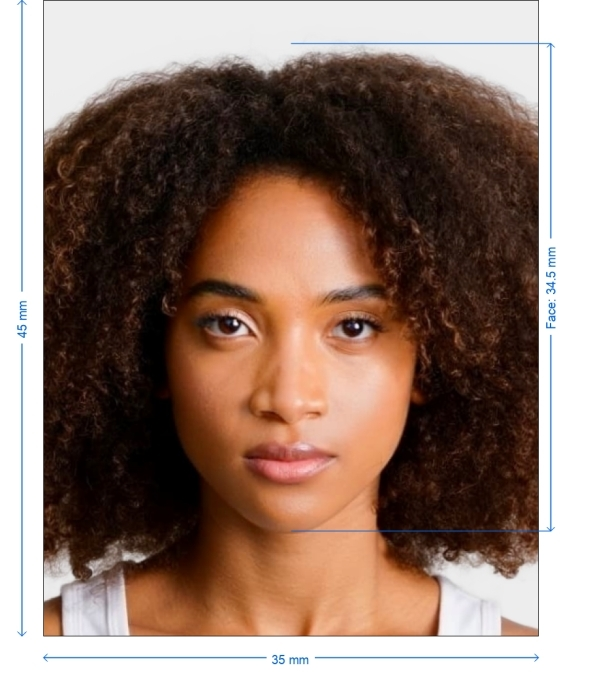
Get photo for: Thailand Visa online 35x45 mm (3.5x4.5 cm)
Drag to reposition · Scroll-free sliders below
or paste an image from your clipboard
Check this box if health issues affect your photo — a medical certificate is required.
Compliance
Human Photo Verification
A compliance expert reviews your photo and provides a report. 99.2% approval rate.
Print sheet (multiple copies)
2x2 in · 300 dpi · JPEG · United States
Batch processing — process multiple photos at once
0 loadedUpload several photos; they are all cropped to the current document size using the same background & adjustments, then downloaded together as a ZIP.
The Importance of Your Thailand Visa Photo
Photo criteria are strictly enforced by Thai immigration officials. A little incorrect size, posture, or background could postpone or reject your application. That's why employing a service like ours guarantees you get it correct the first time.

Here is our process
Crop and resize
Crop and resize your selfie automatically
Adjusts brightness, contrast, and sharpness
Change contrast and brightness
Background Perfection
Change background to a consistent light
Digital and Print-Ready Formats
Provide top-notch photos suitable for online submission and print
How to Make Your Thailand Visa Photo
PhotoGov.net makes it simple to create your visa photo in only a few minutes:
From our document list, choose "Thailand Visa Photo"
Use your phone to snap or upload a selfie
We automatically process your photo by changing size, format, and backdrop
Your ready-to-use image is available for download; print it or upload it online
Our approach guarantees 100% compliance by using the official criteria supplied by Thai authorities
Thailand Visa Photo Specifications (35x45 mm)
The table below provides a thorough breakdown of the technical criteria for a Thailand visa photo. Every aspect is closely examined when we create your picture:
| Photo Width | 35 mm (3.5 cm) |
| Photo Height | 45 mm (4.5 cm) |
| Image Definition Parameters | Clear, sharp image with no blurriness or glare |
| Head Height (up to top of hair) | Between 32–36 mm |
| Distance from top of photo to top of hair | 3–5 mm |
| Background Color | Plain white or light grey |
| Resolution (DPI) | Minimum 600 dpi |
| Printable | Yes |
| Suitable for Online Submission | Yes |
| Glasses | Allowed if not tinted; no glare |
| Head Coverings | Only for religious reasons; facial features must show clearly |
| Expression | Neutral, eyes open and looking straight at camera |
| Recentness | Must be taken within the last 6 months |
Example photos:
Below are examples of correct and incorrect photos
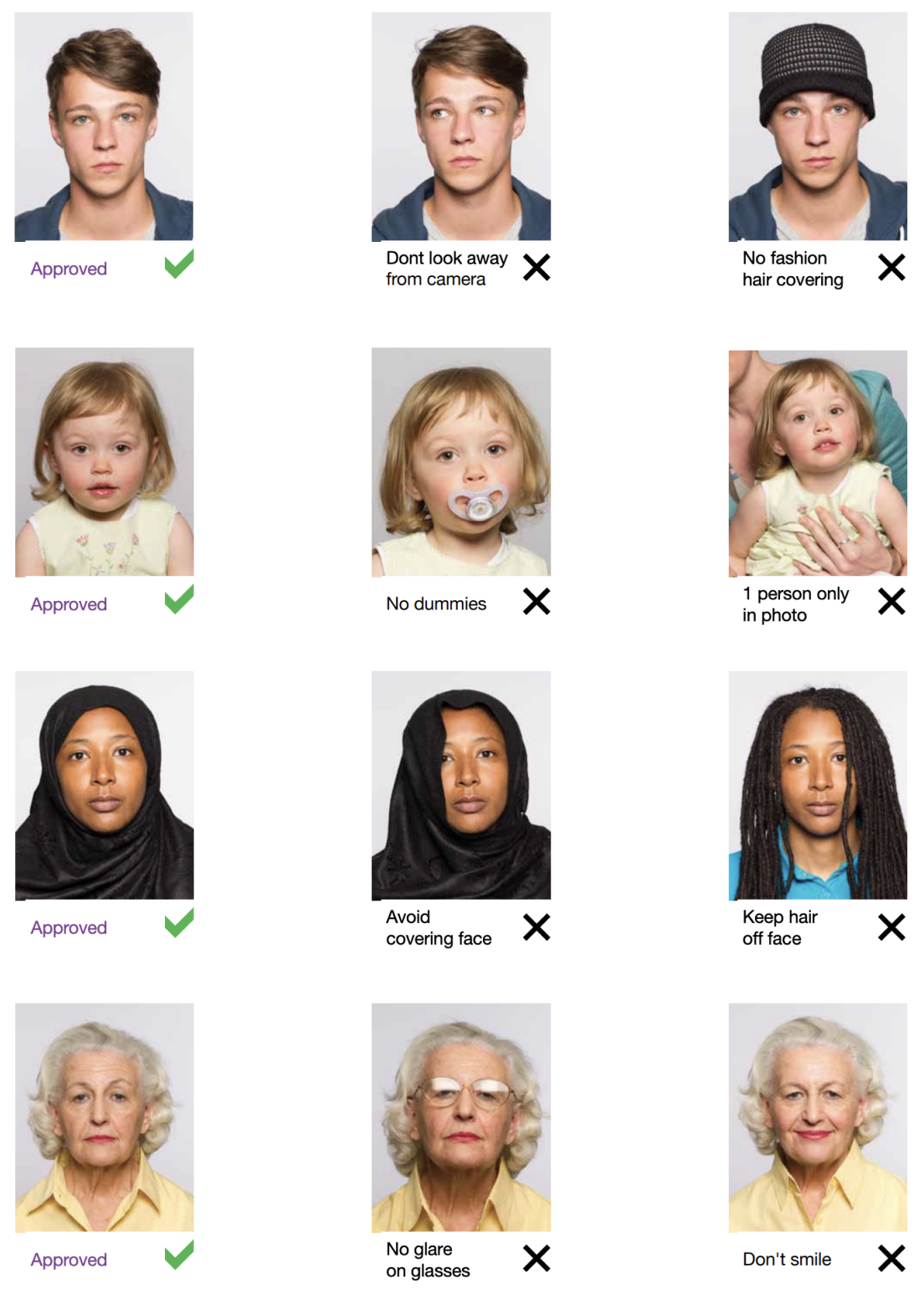
Typical Errors to Avoid
These typical mistakes to avoid when getting ready for a Thailand visa photo:
Backgrounds that are busy or patterned
Grinning or fake facial expressions
Low-quality cellphone selfies taken in shadowy or bad lighting
Wrong pixel resolution or size
Wearing uniforms, caps, or tinted glasses
PhotoGov helps you to prevent these issues. Before sending the last file, our computerized system checks every image to guarantee complete compliance.
How to take Thailand Visa online photos for babies and kids

When taking pictures of babies and children for visa, many of the same rules apply; for example, they must still adhere to the dress code, and the photograph must be high-quality and well-lit. With that being said, the State Department is generally more forgiving when it comes to the neutral expression requirement.
- If you are photographing a newborn:
- Spread a white sheet out over the floor.
- Place the baby down on the sheet and take their photograph against it.
For slightly older babies:
- Prop them up in a child’s chair against a white sheet.
- If they are still unable to hold up their head, prop it up for them using a hand behind the sheet. Ensure no one else is visible in the shot.
Instant Preview & Feedback
Be informed right away should the image violate the guidelines.
Your images are never shared and automatically destroyed after processing.
Advantages of Using PhotoGov.net
Quick and easy: No appointments required, upload from anywhere.
Low-cost: Cheap high-quality processing.
We adhere to the most recent official criteria.
Get both formats to meet all requirements.
Frequently Asked Questions
Other documents for the Thailand

Written by Olia Potiagaeva, Managing Editor Reviewed by the PhotoGov Editorial Team ★ 4.8 / 5.0 Google Checked against Thailand
Free retake or full refund
If your photo is rejected because of an error on our side.
→ Refund PolicyChecked against 8 official parameters
Every file is validated before you download it.
→ Compliance checkRequirements re-checked every 8 weeks
Against the Thailand specification, so the template never falls behind a rule change. Last checked: 12.10.2026.
→ Official Government SourcesOn this page:
PhotoGov.net strictly adheres to the Global regulations for ID photos.