照片规格要求一览
本文档的官方规格摘要,已对照签发机构的要求核验。
- 照片尺寸
- 90x120 mm · 3.54x4.72 in
- 像素尺寸
- 1063x1417 px
- 分辨率
- 300 DPI
- 背景
- In color
- 头部高度
- 75 %
- 文件格式
- JPEG
- 眼镜
- 不允许
- 表情
- Neutral, eyes open, mouth closed
立即制作Photo 9x12 cm(90 × 120 mm / 1063 × 1417 Pixels)
免费上传一张自拍,我们的照片转换器会自动调整尺寸并裁剪至精确规格。支持 iPhone、Android 与桌面端——无需前往照相馆。
拖动可重新定位 · 下方滑块免滚动
或从剪贴板粘贴照片
如健康问题影响照片,请勾选此框——需提供医疗证明。
合规检查
专家人工审核
合规专家审核您的照片并出具报告。通过率 99.2%。
打印排版页(多张)
3.54x4.72 in · 300 dpi · JPEG · 未知地区
批量处理——一次处理多张照片
已加载 0 张上传多张照片,它们将使用相同的背景和调整裁切到当前证件尺寸,然后一起打包为 ZIP 下载。
9x12 cm Photo – Perfect for Submission and Easy to Create
For some applications, such educational certificates, professional licenses, or specialist ID cards, you need to send in a 9x12 centimeter photo. To be accepted, the photo must be the right size, quality, and background. PhotoGov makes it easy to take the perfect 9x12 cm picture. We will resize, crop, and optimize your photo according to the required guidelines so that you can submit it digitally or in person. Smaller ID formats follow their own specification, and the rules for a 1x1 picture size are set out in a separate checklist.


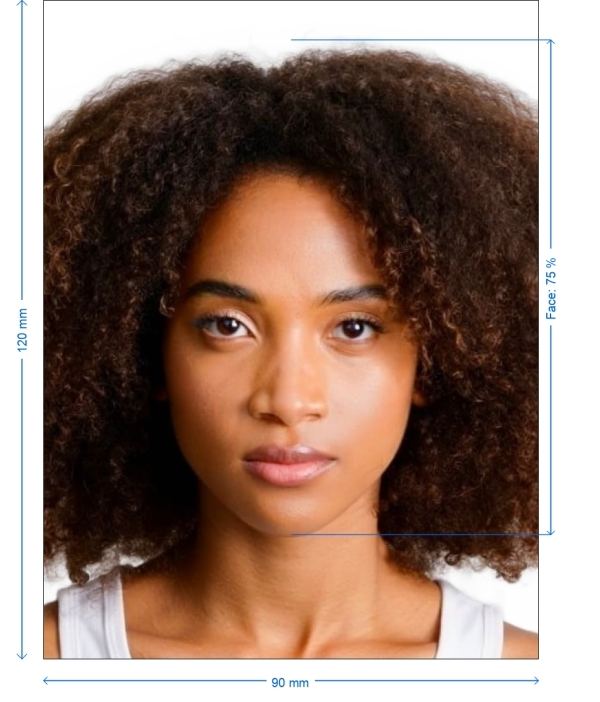
Get photo for: Photo 9x12 cm
拖动可重新定位 · 下方滑块免滚动
或从剪贴板粘贴照片
如健康问题影响照片,请勾选此框——需提供医疗证明。
合规检查
专家人工审核
合规专家审核您的照片并出具报告。通过率 99.2%。
打印排版页(多张)
2x2 in · 300 dpi · JPEG · 美国
批量处理——一次处理多张照片
已加载 0 张上传多张照片,它们将使用相同的背景和调整裁切到当前证件尺寸,然后一起打包为 ZIP 下载。

Why Use Our 9x12 cm Photo Service?
Backdrop Correction
This cleans up the backdrop and makes sure it is a solid white or light color
Image Enhancements
Makes the picture sharper, brighter, and more contrasty for a professional look
Digital and Print Versions
Get your photo ready to send in online and print off
Full Compliance Guarantee
Meets all required size and technical requirements
Requirements for 9x12 cm photos
When you have to send in a 9x12 centimeter photo, there are a few rules you need to follow. These include rules about how the photo should look and how it should be taken to make sure it is legal and may be used. Identity documents follow stricter rules, and a dedicated guide explains what a biometric photo is and how validators read it.
| Parameter Size | 9 x 12 cm (90 x 120 mm) |
| Resolution | at least 300 DPI |
| Image Format | JPEG or PNG |
| File Size | Usually less than 1 MB |
| Color | White or light-colored (plain) |
| Can be printed | Yes |
| Sending in digitally | Accepted for applications through official channels |
Best Ways to Take a 9x12 cm Photo
Lighting: To avoid harsh shadows or too much light, use soft, balanced lighting.
Background: The background should be a solid white or light color with no patterns or textures.
Positioning: Make sure your face is in the middle of the frame and facing the camera directly. Your face should take up 70–80% of the height of the photo. The same framing applies when making a 2x2 photo for US documents, where the head must fill a fixed share of the frame.
Clothes: Wear dark, solid colors to stand out against the background. Don't wear white tops
Step-by-step: How to Make Your 9x12 cm Photo
If you’d like to make your own photo for a Photo 9x12 cm, saving you the trouble of making an appointment with a professional photographer and turning up in person, there are a few important steps you’ll need to follow. We’ve broken them down for you below:
A separate guide describes a job application photo at home, from background and light to the framing employers expect.
Choose the Type of Document
From our list of supported documents, choose "9x12 cm Photo" on PhotoGov.net
Take a Picture
Use a smartphone or a camera with a lot of pixels. Make sure the lighting is good and stand 1.5 to 2 meters away from a light-colored background
Put Your Picture Up
Send your picture to PhotoGov. Make sure the face is easy to see and that the expression is neutral
Resize and Optimize Automatically
We will resize the picture to 9x12 cm, fix any flaws in the backdrop, and make the picture look better
Get it and send it
Prepare your picture for digital submission or print it out to use in real life
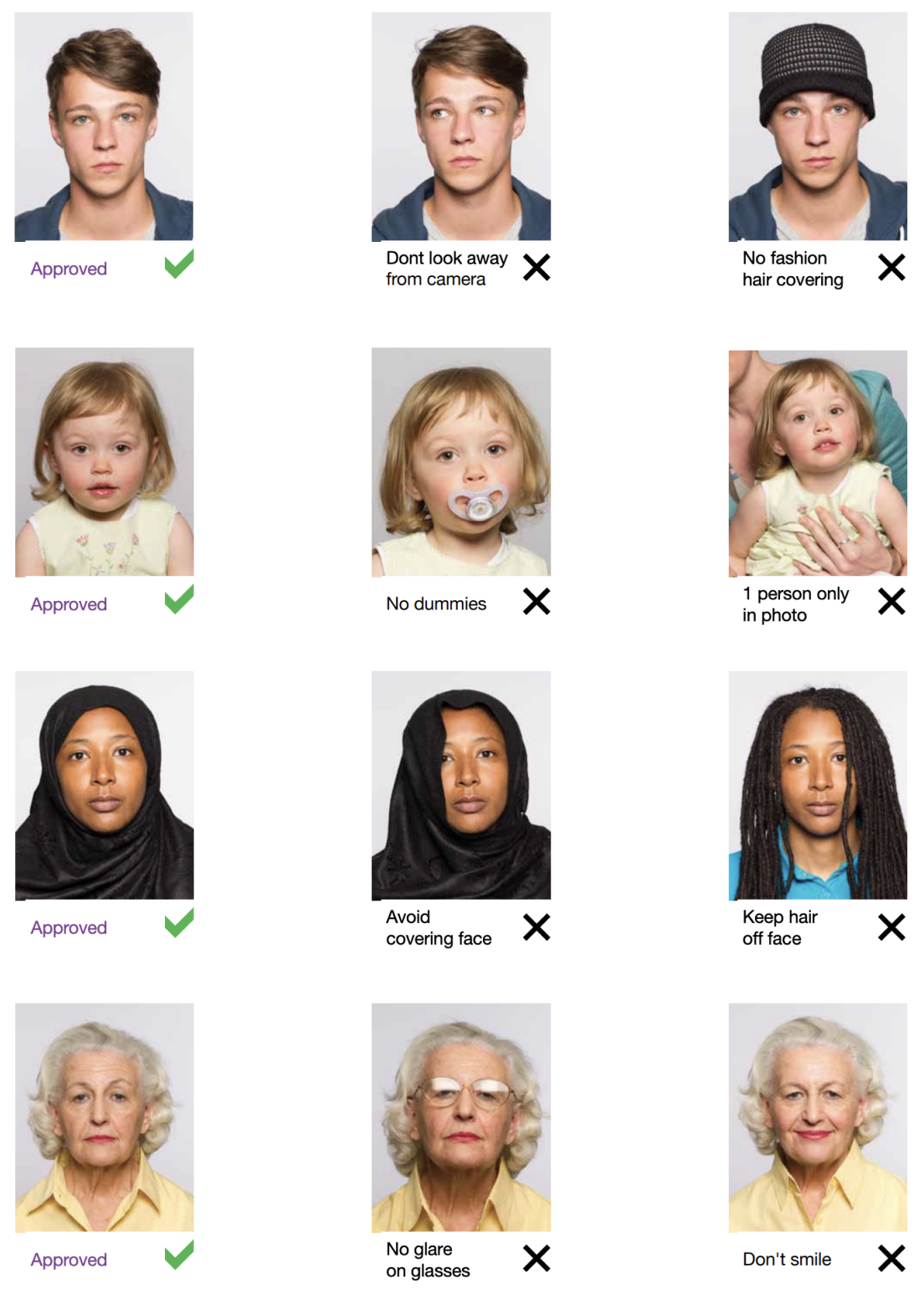
Example photos:
Below are examples of correct and incorrect photos
How to take your own Photo 9x12 cm photo
If you don’t want to go through the trouble and expense of locating and hiring a professional photographer to take your picture, you can simply take your own from home. So long as you follow the below instructions carefully, you can capture the perfect photo photo yourself:
1. Take a picture of yourself
Open up the PhotoGov.net photo service and take your picture. Make sure you’re not wearing any headcovers or glasses, do not wear a uniform, and keep your expression neutral. Ensure that the area is well-lit and that you are standing against a neutral background.
Watch "How to take a photo" (00:46)
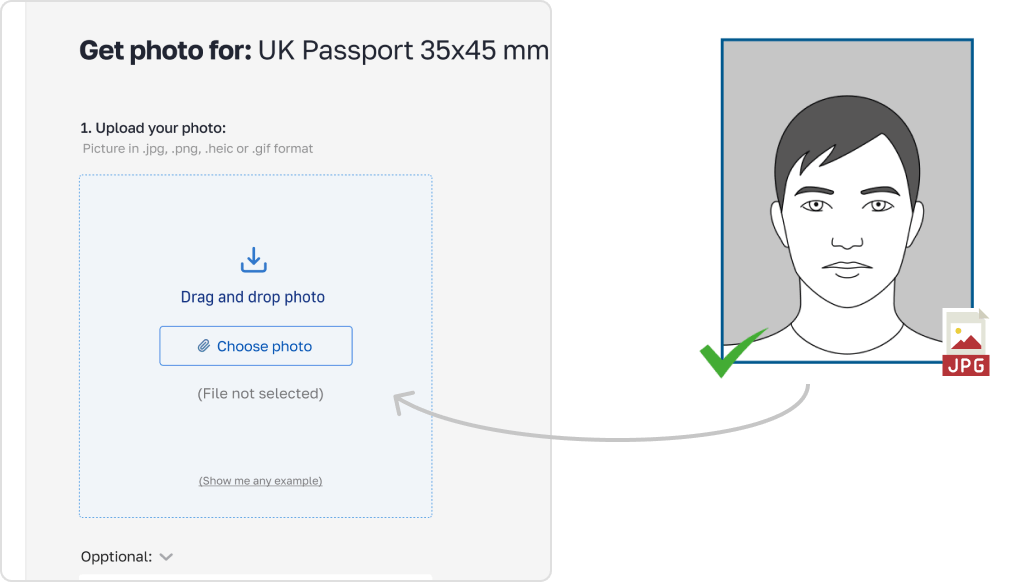
2. Upload your photo to PhotoGov AI
Next, upload your image and process it through our site.
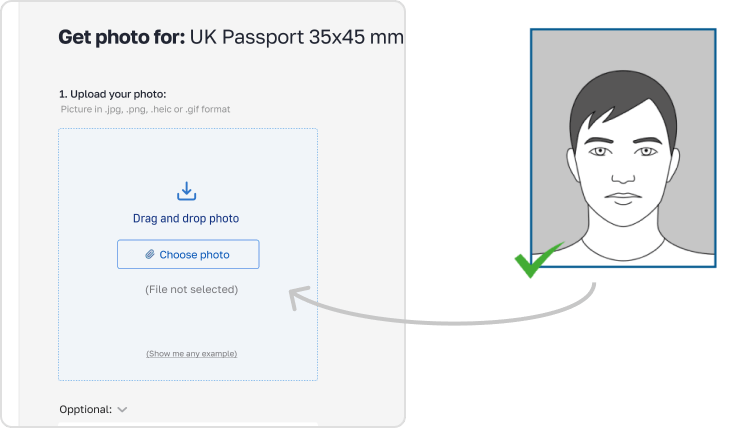
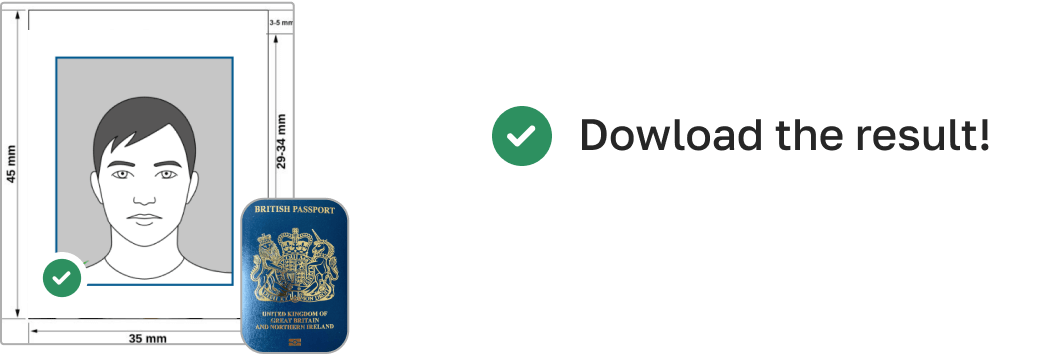
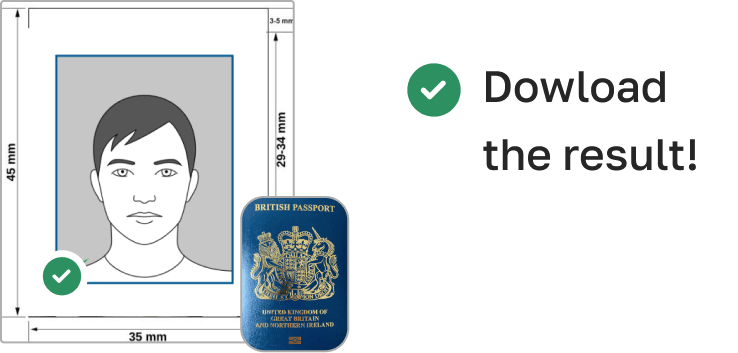
3. Receive your Passport Photo
Finally, you can download your ID photo. These images can be printed off, or you can simply use them as digital photos.
Things You Shouldn't Do:
Using the wrong size photo (such a passport photo instead of a 9x12 cm one)
Smiling or tilting your head
Putting on glasses or other things that block your face
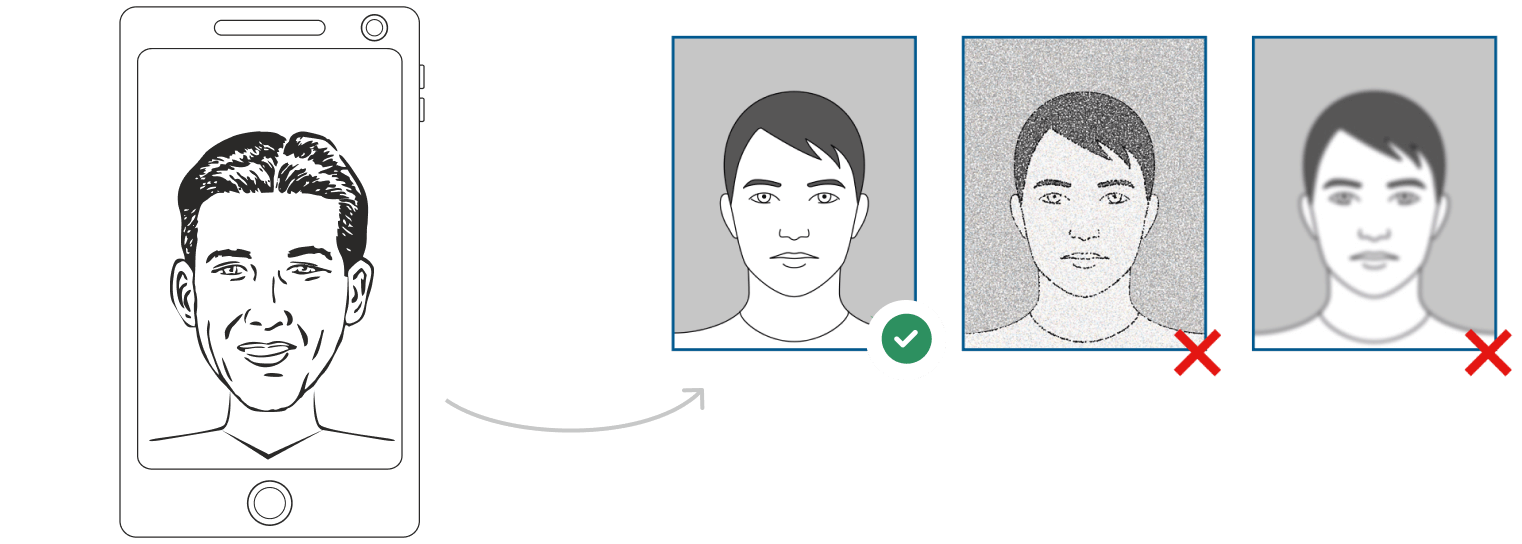
Photos that are too bright, too dark, or grainy
Background with patterns or shadows
PhotoGov finds and fixes these problems automatically while processing photos.
More tips for following the rules
No Retouching: Don't use digital filters or edits that change the way your face looks.
Sharpness: Make sure your picture is clean and in focus, with no pixelation or blurriness.
Face Coverage: Your face should take up 70–80% of the height of the picture.
File Format and Size: JPEG or PNG, less than 1 MB for digital submission
For Physical Submission: Make sure the size is exactly 9x12 cm when you print your photo on high-quality matte or glossy photo paper.
To submit digitally, put the file on the right official system or gateway. Check that the picture is the right size and resolution.
How to take a Photo 9x12 cm photo using a phone
So long as your smartphone has a good quality camera, you can certainly use it to take a picture for your photo. With that being said, however, selfies are not acceptable, so follow these steps:
- Ask someone to take your picture for you.
- Position them 5-7 feet away so that only your upper body is in the shot.
- Alternatively, use a tripod set up between 5-7 feet away. Move it as necessary to get the perfect picture.
PhotoGov Features
Our online passport photo tool offers several features to help you create the perfect photo:

Crop
Our in-built cropping feature allows you to trim new photo photos and ensure that they don’t have uneven edges. This allows you to neaten up your picture and ensure it’s the proper size for your photo.

Resize
You can also resize your picture as needed through PhotoGov, meaning that the end result will be a perfectly proportioned image that will fit just right into your photo. Additionally, you don’t need to worry about stretching or squishing the image and ruining the quality.

Background removal
If you can’t find a neutral background against which you can take a satisfactory picture, don’t worry; we have a background removal tool that can help you achieve the same results.

Auto-adjustment
With the click of a button, you can have our auto-adjustment tool immediately optimize your image to meet brightness, color, and contrast standards.
How to take Photo 9x12 cm photos for babies and kids

When taking pictures of babies and children for photo, many of the same rules apply; for example, they must still adhere to the dress code, and the photograph must be high-quality and well-lit. With that being said, the State Department is generally more forgiving when it comes to the neutral expression requirement.
- If you are photographing a newborn:
- Spread a white sheet out over the floor.
- Place the baby down on the sheet and take their photograph against it.
For slightly older babies:
- Prop them up in a child’s chair against a white sheet.
- If they are still unable to hold up their head, prop it up for them using a hand behind the sheet. Ensure no one else is visible in the shot.
How can i convert my photo to photo size?
While you can convert the size of pictures using a variety of methods, the best option is to use our photo photo tool - PhotoGov. That way, you can rest assured you’ll have a high-quality, properly sized end product, one that isn’t distorted or blurred by stretching or compressing.
I already have a digital photo photo. How do i print it?
If you have a digital photograph, unfortunately, you won’t just be able to print it out on printer paper. You specifically need a high-quality print on either matte or glossy photo paper. You can either achieve this by visiting any photo service or by using our tool to print your image off at home.
Where to get a photo photo
Pharmacies and drug stores
Well-known medicinal retail brands, namely Walgreens, CVS, and Rite Aid, proffer immediate passport photo solutions in-store. Do anticipate a charge, with most services priced around the $15 mark.
Shipping centers
Shipping giants like UPS, FedEx, and adjacent shipping facilities also cater to passport photo needs, mirroring the services of typical drugstores. At a going rate of around $15, it stands as a worthy alternative if you're considering external providers for your passport imagery.
Post offices and other passport acceptance agents
It's customary for post offices and agencies of a similar function to be equipped for passport applications, which includes offering photographic sessions. Maintaining the price consistency as observed earlier, you can typically expect a fee around the $15 ballpark.
Retail stores
Retail venues frequently host areas meant for passport photo shoots, assuring quality pictures in line with norms. Even though each establishment might set its own rate, you can usually anticipate a decent pricing range.
Frequently Asked Questions
Other documents for the Others

作者: Olia Potiagaeva,总编辑 审核: PhotoGov 编辑团队 ★ 4.8 / 5.0 Google 已核验: Others
本页目录:
- Get photo for: Photo 9x12 cm
- Why Use Our 9x12 cm Photo Service?
- Requirements for 9x12 cm photos
- Best Ways to Take a 9x12 cm Photo
- Step-by-step: How to Make Your 9x12 cm Photo
- Example photos:
- How to take your own Photo 9x12 cm photo
- Things You Shouldn't Do:
- More tips for following the rules
- How to take a Photo 9x12 cm photo using a phone
- PhotoGov Features
- How to take Photo 9x12 cm photos for babies and kids
- How can i convert my photo to photo size?
- I already have a digital photo photo. How do i print it?
- Where to get a photo photo
- Frequently Asked Questions
PhotoGov.net 严格遵守 全球证件照规范.
相关页面
其他证件 —— Others证件照
Others
44 个证件
- Photo 1x1 inch1x1 inch (25.4x25.4 mm)
- Photo 26x32 mm1.02x1.26 inch (26x32 mm)
- Photo 2x2 cm0.79x0.79 inch (20x20 mm)
- Photo 2x2 inch2x2 inch (50.8x50.8 mm)
- Photo 30x40 mm1.18x1.57 inch (30x40 mm)
- Photo 35x40 mm1.38x1.57 inch (35x40 mm)
- Photo 35x45 mm aligned by the top1.38x1.77 inch (35x45 mm)
- Photo 45x45 mm1.77x1.77 inch (45x45 mm)
- Photo 4x4 cm1.57x1.57 inch (40x40 mm)
- Photo 50x50 mm1.97x1.97 inch (50x50 mm)
- Photo 600x800 pixel600x800 px
- Photo 6x9 cm2.36x3.54 inch (60x90 mm)
- Biometric passport photo1.38x1.77 inch (35x45 mm)
- Resume Photo 2x2 inch2x2 inch (50.8x50.8 mm)
- Resume Photo 35x45 mm1.38x1.77 inch (35x45 mm)
- Photo 25x35 mm (2.5x3.5 cm)0.98x1.38 inch (25x35 mm)
- UN passport 2x2 inch (51x51 mm)2.01x2.01 inch (51x51 mm)
- Photo 2x3 cm (20x30 mm)0.79x1.18 inch (20x30 mm)
- Photo 1.5x1.5 inch (38x38 mm, 3.8x3.8 cm)1.5x1.5 inch (38x38 mm)
- Photo 43x55 mm (4.3x5.5 cm)1.69x2.17 inch (43x55 mm)
- Photo 25x30 mm (2.5x3 cm)0.98x1.18 inch (25x30 mm)
- Photo 3x3 cm (30x30 mm)1.18x1.18 inch (30x30 mm)
- Photo 43x54 mm1.69x2.13 inch (43x54 mm)
- Photo 33x48 mm (3.3x4.8 cm)1.3x1.89 inch (33x48 mm)
- Photo 38x46 mm (3.8x4.6 cm)1.5x1.81 inch (38x46 mm)
- Photo 4x4.5 cm (40x45 mm)1.57x1.77 inch (40x45 mm)
- Photo 1.25x1.5 inch1.26x1.5 inch (32x38 mm)
- Photo 21x30 mm0.83x1.18 inch (21x30 mm)
- Photo 50x70 mm (5x7 cm)1.97x2.76 inch (50x70 mm)
- Photo 5x6.5 cm1.97x2.56 inch (50x65 mm)
- Photo 2x2.5 inch2.01x2.52 inch (51x64 mm)
- Photo 35x50 mm (3.5x5 cm)1.38x1.97 inch (35x50 mm)
- Photo 4.5x6 cm1.77x2.36 inch (45x60 mm)
- 2x2 inch photo (about 1 MB in size)2.01x2.01 inch (51x51 mm)
- Photo 40x50 mm (4x5 cm)1.57x1.97 inch (40x50 mm)
- Photo 30x35 mm1.18x1.38 inch (30x35 mm)
- Photo 45x57 mm1.77x2.24 inch (45x57 mm)
- Photo 37x37 mm1.46x1.46 inch (37x37 mm)
- Photo 25x25 mm (2.5x2.5 cm)0.98x0.98 inch (25x25 mm)
- Photo 35x35 mm (3.5x3.5 cm)1.38x1.38 inch (35x35 mm)
- Photo 40x60 mm (4x6 cm)1.57x2.36 inch (40x60 mm)
- Photo 32x42 mm1.26x1.65 inch (32x42 mm)
- Photo 1.5x2 inch (3.8x5 cm)1.5x1.97 inch (38x50 mm)
- IATA ID card 35x45 mm1.38x1.77 inch (35x45 mm)