照片规格要求一览
本文档的官方规格摘要,已对照签发机构的要求核验。
- 照片尺寸
- 35x45 mm · 1.38x1.77 in
- 像素尺寸
- 420x540 px
- 分辨率
- 305 DPI
- 背景
- In color
- 头部高度
- 34.7 mm
- 文件格式
- JPEG
- 眼镜
- 不允许
- 表情
- Neutral, eyes open, mouth closed
立即制作Canada Visa(35 × 45 mm / 420 × 540 Pixels)
免费上传一张自拍,我们的照片转换器会自动调整尺寸并裁剪至精确规格。支持 iPhone、Android 与桌面端——无需前往照相馆。
拖动可重新定位 · 下方滑块免滚动
或从剪贴板粘贴照片
如健康问题影响照片,请勾选此框——需提供医疗证明。
合规检查
专家人工审核
合规专家审核您的照片并出具报告。通过率 99.2%。
打印排版页(多张)
1.38x1.77 in · 305 dpi · JPEG · 加拿大
批量处理——一次处理多张照片
已加载 0 张上传多张照片,它们将使用相同的背景和调整裁切到当前证件尺寸,然后一起打包为 ZIP 下载。
Make a Canada Visa Photo Size Online for Free
Applying for a Canadian visa? Use our Canada visa photo editor tool to make a 35 x 45 mm Canada visa photo size for free. Your final visa photo is submission-ready and aligned with the Government of Canada standards.
No registration · No app · 30 seconds
Official Photo Requirements




Source: IRCC


PhotoGov is an independent service. We are not affiliated with any government, embassy, or consulate. All information on this website is based on official government requirements and verified primary sources. Final acceptance is determined solely by the issuing authority.
Convert Your Selfie to a Canadian Visa Photo
Convert your selfie to a Canadian visa photo — simply upload it to our free Canada visa photo tool, and download a submission-ready digital or printable file. Just follow the on-screen instructions below.
Get photo for: Canada Visa 35x45 mm (3.5x4.5 cm)
拖动可重新定位 · 下方滑块免滚动
或从剪贴板粘贴照片
如健康问题影响照片,请勾选此框——需提供医疗证明。
合规检查
专家人工审核
合规专家审核您的照片并出具报告。通过率 99.2%。
打印排版页(多张)
2x2 in · 300 dpi · JPEG · 美国
批量处理——一次处理多张照片
已加载 0 张上传多张照片,它们将使用相同的背景和调整裁切到当前证件尺寸,然后一起打包为 ZIP 下载。
If you need assistance, don't hesitate to contact our Support team, which is always there to help.
How Our Canada Visa Photo Checker Works
PhotoGov is an independent software platform with a built‑in Canada visa photo checker. It adjusts your uploaded portrait to match the current Government of Canada photo specifications. You don’t need to worry about the correct size, framing, or background: the service prepares a biometrically accurate 35 × 45 mm visa photo, ready to submit and available as both a digital download and a printable file. Canadian passports use a different print size from visas, and the rules for Canadian passport photos are covered on a dedicated page.

Photo Upload
Upload your passport-size photo to PhotoGov

Service Selection
Add Human Verification or select other services

Processing
Wait while automatic adjustments are applied

Download
Get your Canada visa-ready 35x45 mm photo
本页目录:
- Convert Your Selfie to a Canadian Visa Photo
- How Our Canada Visa Photo Checker Works
- What is a Canadian Visa Photo?
- Your Final Canada Visa Photo from PhotoGov
- Canada Visa Photo That Passes the Checks
- Canada Visa Photo That Doesn’t Pass the Checks
- Why Use the PhotoGov Service
- Your Canada Visa Photo With PhotoGov & IRCC Standards
- Frequently Asked Questions
- Official Government Sources
- Other Documents — Canadian ID Photos
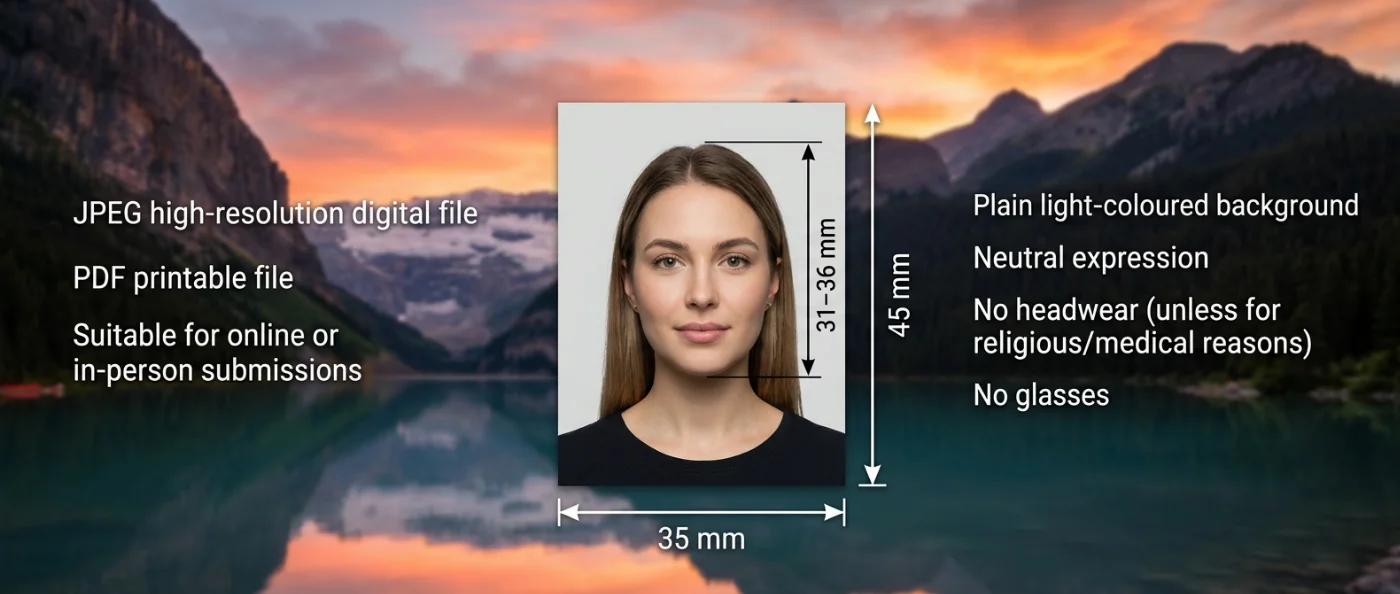
What is a Canadian Visa Photo?
The official photo format required specifically for Canadian visa applications.
Automatically prepared by PhotoGov as a Canada visa photo to follow the current IRCC photo specifications
A biometrically accurate image, available as a digital download or a printable file.
Your Final Canada Visa Photo from PhotoGov
PhotoGov automatically applies all official requirements to your original photo. The final image is ready for online or in-person submission and doesn’t require any adjustments from you. Below are the key technical parameters of your final Canada visa photo from PhotoGov.
For a full overview of official standards, please see our Canadian Visa Photo Requirements Guide.
| Parameter | Your Final Photo |
| Photo size | 35 x 45 mm |
| Head size | 31 - 36 mm (1 ¼ - 1 7⁄16 inches) |
| Background | Plain, white/light-coloured |
| Colour | Full colour |
| File Format | JPEG / optional PDF file for printing |
| Resolution | High-resolution file at 600 DPI |
| Head Positioning | Automatically centered |
| Face visibility | Fully visible, no retouching |
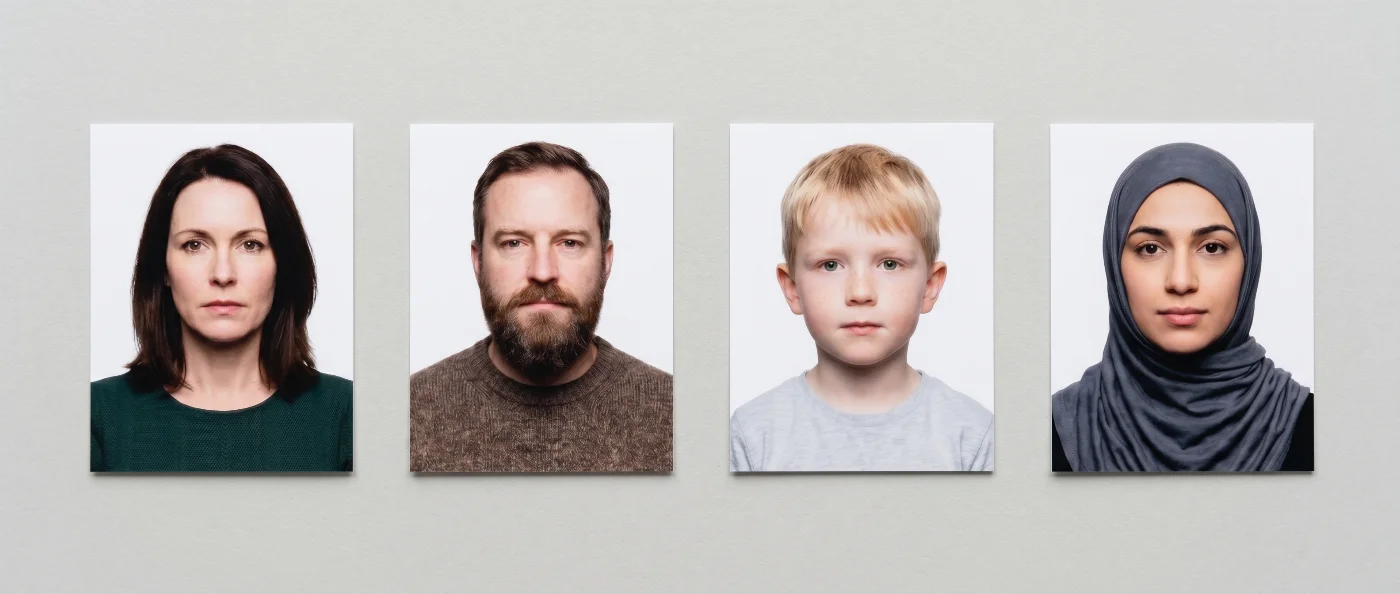
Canada Visa Photo That Passes the Checks
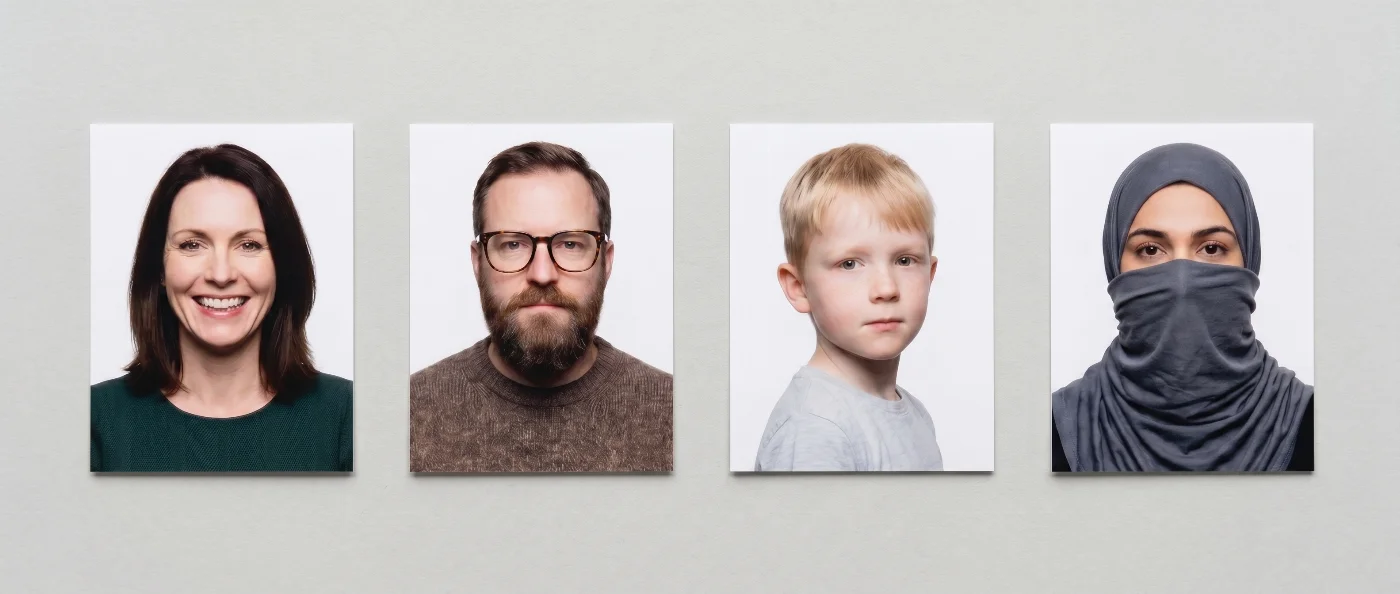
Canada Visa Photo That Doesn’t Pass the Checks

Why Use the PhotoGov Service
Convenience
Photos accepted for online and in-person submissions
Compliance-Aligned Output
Designed to meet the current IRCC guidelines
Availability
No registration or app installation
Extra Assurance
Optional Human Verification by an in-house compliance specialist
Secure Processing
Your data is secure and not transferred to third parties
If your photo is rejected due to technical issues on PhotoGov's side, we provide a free retake or a full refund.
Our service is built to meet all current Canadian visa photo rules. However, the final acceptance of your photo is always at the full discretion of the Immigration, Refugees and Citizenship Canada (IRCC).
Your Canada Visa Photo With PhotoGov & IRCC Standards
PhotoGov is a technology platform powered by advanced software that works as a Canada visa photo editor. The service matches the uploaded image to the official Canadian visa photo specifications stored in the system. The database is regularly updated, and our photo specialists, together with compliance experts, manually review all standards every eight weeks.
Citizenship is a different application: the citizenship photo requirements in Canada call for a larger 50 x 70 mm image.
Our service is built to meet all current requirements set by Immigration, Refugees and Citizenship Canada (IRCC). The photo you create with our service meets all key criteria: correct size (35×45 mm), framing, head position, and lighting. PhotoGov also lets you refine clothing in the image without changing facial features. As a result, you receive a compliant photograph ready to submit with your Canadian visa application. The PR card template is not interchangeable: how to make a PR card photo is explained on its own page.
PhotoGov users can select Human Verification as an add-on service — a detailed manual check performed by an experienced compliance expert. This extra review provides maximum accuracy and is especially useful for applications that require strict official approval or faster processing.
For other Canadian ID photo services, see our dedicated pages: Canada Passport Photo Tool, Canada PR Card Photo Maker, Canada Temporary Resident Visa Photo Maker.
Full Canada Visa Photo Rules
Our Canada visa photo requirements 2026 guide documents the specification behind this page: size, crop, background, and file quality.
Frequently Asked Questions
To get a Canada visa photo size online free, you can upload a regular portrait taken with your phone to a dedicated Canadian visa photo tool, like PhotoGov, and choose “Canada visa 35x45 mm” as the target format. The tool will automatically crop, center, and resize the image to the correct dimensions in millimeters and DPI. After that, you can download the ready file and either print it or use it for an online application.
A Canada visa photo tool is an online service or an app that automatically adjusts your picture to official Canadian visa photo standards. You upload your image, choose “Canada visa” as the document type, and the tool sets the canvas to 35x45 mm, adjusts head size, and aligns your eyes within the acceptable area. A reliable IRCC photo editing tool also prepares a printable and digital version of the photo.
A Canada visa photo checker has a built-in Canadian visa template. After you upload your photo, it analyses the biometric properties of your face, then crops and resizes the image to the required 35 x 45 mm frame. It centers your face, ensures enough space above the head, keeps the shoulders visible, and corrects the background to a plain white or light color. If you use a PhotoGov Canada visa photo checker, it also offers casual-to-formal clothes change and professional lighting correction. As a result, you receive a studio-grade visa photo with a higher chance of acceptance.
Yes, many websites offer a Canada visa photo tool for free, where you can create a compliant photo without paying. Typically, you can upload your picture, let the system crop and resize it to 35x45 mm, and then download the result. Some services may charge only for optional extras such as advanced retouching or printed delivery.
A reputable online Canada visa photo editor provides studio-grade results, but without travel costs or studio fees. You can retake and upload your photo as many times as needed until you are satisfied with your appearance and lighting. The tool also applies Canada-specific rules automatically, so you do not have to remember exact measurements and specifications.
Yes, you can create a Canada visa photo online from your phone, using a web-based tool like PhotoGov. Take a clear picture in good, even lighting against a plain background, and upload it via your mobile browser. The service will crop and resize the image to 35 x 45 mm, adjust the framing, and give you downloadable files suitable for printing or online submission.
A correct Canada visa photo crop results in an image that is exactly 35 x 45 mm, with your head covering 70–80% of the frame. There should be a small amount of space above your head, and your eyes should sit roughly in the middle of the vertical axis, within the allowed range shown in official diagrams. The crop must include the top of your shoulders so that your full face and a portion of the upper body are visible. To avoid manual manipulations, crop your Canadian visa photo by uploading it to a free Canada visa photo tool — it will automatically adjust your original image to the current IRCC specs.
To convert a photo to Canada visa size for free, upload a clear portrait to an online Canada visa photo tool that follows IRCC photo rules and select “Canada visa 35x45 mm” as the target format. The service will automatically rescale the image, set the correct DPI, and narrow the frame so that your head falls within the required height range. After processing, you can download the final image and use it for printing or online submission.
Instead of Photoshop, you can use a browser-based Canada visa photo editor. It will crop the picture to the correct size, adjust the background, brightness, and contrast so your face is clearly visible. It will save you a lot of time compared to doing it in Photoshop.
If you browse PhotoGov, it works as a free IRCC photo-editing tool. Upload a correctly taken selfie, and it will adjust it to match Immigration, Refugees and Citizenship Canada visa photo rules. It uses IRCC guidelines for size, head position, and background, but runs independently from the Canadian government.
To minimize the risk of your visa photo rejection. A Canada visa photo checker automatically verifies your photo against the biometric ICAO and the IRCC visa requirements — 35 x 45 mm size, head height, crop, background color, and image clarity. It can warn you if your face is too small or too large, the background is not plain enough, or the lighting is uneven. A Canada visa photo validator often adds more detailed checks, such as eye level, distance to the top edge, and file size limits for online applications.
An IRCC photo is any photograph submitted with an application to Immigration, Refugees and Citizenship Canada, such as a visa, permit, or residence request. These photos must follow strict IRCC rules on size, head height, background, and recency. If your IRCC photo does not meet those standards, your application may be delayed or even rejected.
To make a Canada visa photo online, first take a clear portrait against a plain light background, and upload it to a Canada visa photo tool. Select “Canada visa,” and the service will convert your image to the proper digital dimensions, file size, and biometric characteristics. As a result, you get a digital photo file that can be uploaded online with your visa application.
If you already have a good portrait, the easiest way to convert a photo for a visa application is to use a dedicated Canada visa photo editor. Choose the country and document type — “Canada visa,” it will convert it to the correct size, proportions, adjusting the background colour, if needed. After that, you can print it out or upload the digital file with your online visa application, without manually editing measurements or head size.
Here is a little step-by-step guide to making your Canadian visa photo at home:
Stand in front of a plain light wall, with even lighting and no harsh shadows on your face or background.
Keep a neutral expression, look straight at the camera, and ensure your whole head and upper shoulders are visible.
Take a few shots and choose the best image — sharp, properly lit, with your head and upper part of the shoulders square in the frame.
Upload the picture to an online Canada visa photo editor. Choose “Canada” as your country and “Visa” as your document type.
Wait until the service makes necessary adjustments to your original photo, resizing, cropping, and adjusting the background to the Canadian visa photo specs.
Download the final visa photo in the required format. You’re ready for submission!
Official Government Sources
Canadian Visa Photo Requirements: Immigration, Refugees and Citizenship Canada (IRCC)
Biometric Regulations for International ID Documents: International Civil Aviation Organization (ICAO) Document 9303
Other Documents — Canadian ID Photos

PhotoGov.net 严格遵守 全球证件照规范.
相关页面
官方政府来源
已对照 Immigration, Refugees and Citizenship Canada 的照片要求核验: http://www.cic.gc.ca/english/information/applications/photospecs.asp最后核验:12.10.2026
照片标准: cic.gc.ca
cic.gc.ca: cic.gc.ca
cic.gc.ca: cic.gc.ca
其他证件 —— Canada证件照
Canada
10 个证件
- Canada Citizenship1.97x2.76 inch (50x70 mm)
- Canada Passport1.97x2.76 inch (50x70 mm)
- Canada Permanent Resident card2000x2800 px
- Canada Permanent Resident Card1.97x2.76 inch (50x70 mm)
- Canada Temporary Resident Visa1.38x1.77 inch (35x45 mm)
- Canada firearms licence 45x57 mm1.77x2.24 inch (45x57 mm)
- Canada indian status 5x7 cm1.97x2.76 inch (50x70 mm)
- Canada security licence 5x7 cm1.97x2.76 inch (50x70 mm)
- Canada personnel screening 43x54 mm1.69x2.13 inch (43x54 mm)
- Canada Veteran's Service Card 5x7 cm1.97x2.76 inch (50x70 mm)