照片规格要求一览
本文档的官方规格摘要,已对照签发机构的要求核验。
- 照片尺寸
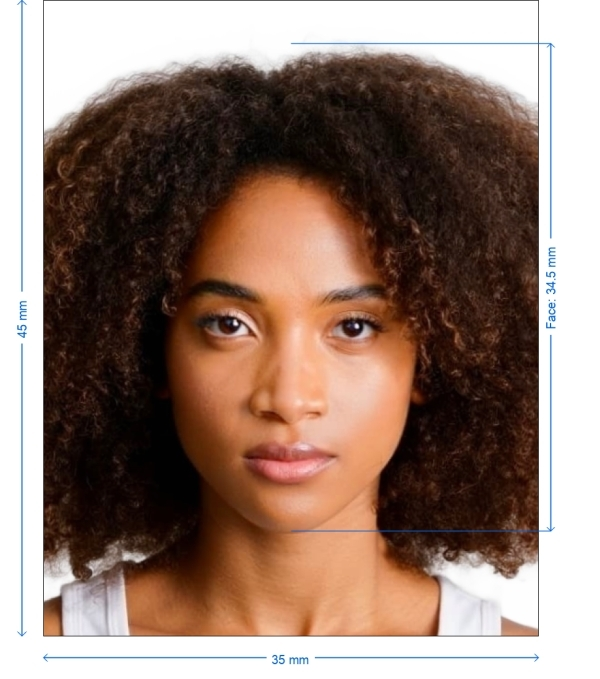
- 35x45 mm · 1.38x1.77 in
- 像素尺寸
- 413x531 px
- 分辨率
- 300 DPI
- 背景
- In color
- 头部高度
- 34.5 mm
- 文件格式
- JPEG
- 眼镜
- 不允许
- 表情
- Neutral, eyes open, mouth closed
立即制作Uzbekistan visa(35 × 45 mm / 413 × 531 Pixels)
免费上传一张自拍,我们的照片转换器会自动调整尺寸并裁剪至精确规格。支持 iPhone、Android 与桌面端——无需前往照相馆。
拖动可重新定位 · 下方滑块免滚动
或从剪贴板粘贴照片
如健康问题影响照片,请勾选此框——需提供医疗证明。
合规检查
专家人工审核
合规专家审核您的照片并出具报告。通过率 99.2%。
打印排版页(多张)
1.38x1.77 in · 300 dpi · JPEG · 乌兹别克斯坦
批量处理——一次处理多张照片
已加载 0 张上传多张照片,它们将使用相同的背景和调整裁切到当前证件尺寸,然后一起打包为 ZIP 下载。
Uzbekistan Visa Photo Maker - 35x45mm
A key first step in your application process is making sure your Uzbekistan visa photo satisfies all official criteria. Our sophisticated web platform streamlines the process and offers tools to rapidly and effectively produce excellent, compliant images. We have you covered whether your require a printed copy or a digital file.


Source: official website evisa.mfa.uz
Get photo for: Uzbekistan visa 3.5x4.5 cm (35x45 mm)
拖动可重新定位 · 下方滑块免滚动
或从剪贴板粘贴照片
如健康问题影响照片,请勾选此框——需提供医疗证明。
合规检查
专家人工审核
合规专家审核您的照片并出具报告。通过率 99.2%。
打印排版页(多张)
2x2 in · 300 dpi · JPEG · 美国
批量处理——一次处理多张照片
已加载 0 张上传多张照片,它们将使用相同的背景和调整裁切到当前证件尺寸,然后一起打包为 ZIP 下载。

Why Use Our Photo Service?
Automatic Resizing
Exactly changes your picture to 35x45mm size.
Correcting background colors
Correcting background colors guarantees a simple white or light-colored background free of shadows.
Improved image
Improved image quality maximizes brightness, contrast, and clarity for a professional output.
Requirements
Flexible output choices help with both digital and physical photo requirements.
Guarantees of official compliance
Guarantees of compliance make sure your picture satisfies requirements for Uzbekistan visa application.

Photo requirements for the Uzbekistan Visa
Preventing delays or rejections depends on meeting the official standards. Here are the guidelines your picture has to follow:
Technical Details and Dimensions
Size
35 x 45 mm
Aspect ratio
7:9
Background
Simple white or light-colored free of patterns or shadows
DPI
300–600 resolution
File format
JPEG, PNG, or BMP
Digital entries
ranging from 20 to 100 KB
Guidelines on Appearance
- Neutral facial expression: closed mouth and wide eyes.
- Head Position: Centered, covering seventy to eighty percent of the picture height.
- Dress: Steer clear of too casual or uniform wear; solid colors against the backdrop are advised.
Steps for Making Your Uzbekistan Visa Photo
Use these guidelines to guarantee complete compliance of your picture:
On our site, select "Uzbekistan Visa Photo" as the Document Type.
Position yourself 1.5–2 meters from the high-resolution camera or smartphone in capture your image.
Upload the picture and forward it to our system. Guarantee correct background compliance and lighting.
Using our tools, crop, resize, and improve the picture to fit the 35x45mm standard.
Download and Send: Save your picture either digitally or on print for submission.
Advice on Getting the Perfect Visa Photo
Lighting & Shadows
- Steer clear of shadows by using either naturally occurring daylight or uniformly spaced artificial light.
- Make sure the background is clear of patterns or textures and very simple and light-colored.
- Use a tripod or a steady surface to stop blurring in your camera.
Alignment and Posture
- Either sit or stand straight, directly facing the camera with shoulders level.
Steer clear of typical problems by
- Remove glasses or change the lighting to stop reflections on glass.
- Correct Dimensions: Verify size criteria with our resizing tools twice-through.
- Use our backdrop adjustment tool for a uniform appearance from uneven backgrounds.
Other Advice for Compliance
- Keep hair away from the eyes and make sure the whole face is clear-viewable.
- The picture should be sharp and free of pixelation or blurring.
- Use our site to confirm your picture satisfies digital submission criteria.
Printing and Submission Rules
Print your photo on high-quality matte or glossy paper, keeping the exact 35x45mm proportions, for physical entries. Before uploading your digital picture for online applications, make sure it conforms with file size and format criteria.
Frequently Asked Questions
Other documents for the Uzbekistan

作者: Olia Potiagaeva,总编辑 审核: PhotoGov 编辑团队 ★ 4.8 / 5.0 Google 已核验: Uzbekistan
PhotoGov.net 严格遵守 全球证件照规范.
相关页面
官方政府来源
已对照 Uzbekistan 的照片要求核验: http://evisa.mfa.uz/evisa_en/最后核验:12.10.2026
照片标准: evisa.mfa.uz
uzbekistan.org: uzbekistan.org