照片规格要求一览
本文档的官方规格摘要,已对照签发机构的要求核验。
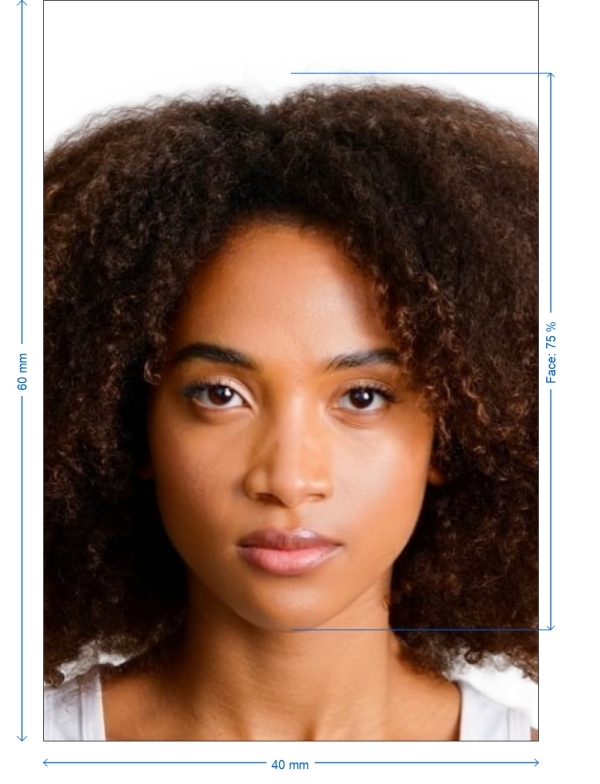
- 照片尺寸
- 40x60 mm · 1.57x2.36 in
- 像素尺寸
- 472x709 px
- 分辨率
- 300 DPI
- 背景
- In color
- 头部高度
- 75 %
- 文件格式
- JPEG
- 眼镜
- 不允许
- 表情
- Neutral, eyes open, mouth closed
立即制作Thailand visa on arrival(40 × 60 mm / 472 × 709 Pixels)
免费上传一张自拍,我们的照片转换器会自动调整尺寸并裁剪至精确规格。支持 iPhone、Android 与桌面端——无需前往照相馆。
拖动可重新定位 · 下方滑块免滚动
或从剪贴板粘贴照片
如健康问题影响照片,请勾选此框——需提供医疗证明。
合规检查
专家人工审核
合规专家审核您的照片并出具报告。通过率 99.2%。
打印排版页(多张)
1.57x2.36 in · 300 dpi · JPEG · 泰国
批量处理——一次处理多张照片
已加载 0 张上传多张照片,它们将使用相同的背景和调整裁切到当前证件尺寸,然后一起打包为 ZIP 下载。
Getting the Ideal Thailand Visa on Arrival
Thinking about visiting Thailand? You must submit a visa on arrival application. Providing the right photo is one of the main criteria. Getting it properly could occasionally be perplexing, but don't panic! From your phone, PhotoGov.net can assist you in producing the ideal Thailand visa on arrival image.
- This post will walk you through the required photo criteria for your Thailand visa on arrival, help you to snap a great selfie, and let you know how PhotoGov can make sure your photo satisfies all the official criteria fast and effortlessly.


Get photo for: Thailand visa on arrival 4x6 cm (40x60 mm)
拖动可重新定位 · 下方滑块免滚动
或从剪贴板粘贴照片
如健康问题影响照片,请勾选此框——需提供医疗证明。
合规检查
专家人工审核
合规专家审核您的照片并出具报告。通过率 99.2%。
打印排版页(多张)
2x2 in · 300 dpi · JPEG · 美国
批量处理——一次处理多张照片
已加载 0 张上传多张照片,它们将使用相同的背景和调整裁切到当前证件尺寸,然后一起打包为 ZIP 下载。
The Importance of Your Thailand Visa on Arrival Photo
One of the most important components of your Thailand visa on arrival application is the photo you provide. It must satisfy certain size, quality, and even facial expression criteria. A photo that fails to fulfill official criteria could postpone or even reject your visa application.
Fortunately, PhotoGov runs checks and adjustments on everything for you, so you don't have to stress about errors. We ensure your photo satisfies all technical requirements, so saving you time and trouble.
How PhotoGov Enables You to Capture a Perfect Thailand Visa Photo
All you have to do is:
Use your phone to snap a quick selfie. Be sure your face is obvious and in ideal lighting
Post Your Photo to PhotoGov.net: Once you've taken the selfie, post it to our platform
Our artificial intelligence adjusts automatically to fit the Thailand visa on arrival photo requirements by resizing, cropping, and modifying your image
Get Your Photo: Once processed, save the photo in the appropriate submission format
We take care of everything for you, so no more stressing about size or lighting
Thailand Visa on Arrival Picture Specifications (4x6 cm)
Here is a thorough chart of the technical specifications for the Thailand visa on arrival photo:
| Width x Height of Photo | 40 mm by 60 mm (4x6 cm) |
| Picture Definition | Clear, crisp, high-quality picture without any blurriness |
| Head Height (to top of hair) | About 75% of photo height, 40–45 mm |
| Distance from top of photo to top of hair | 3–5 mm |
| Background Color | Light gray or plain white |
| DPI, or resolution | At least 600 DPI |
| Print-ready | Certainly |
| Appropriate for online submission | Indeed |
| Exhibition | Eyes open, mouth closed, neutral expression |
| Format | JPG or JPEG |
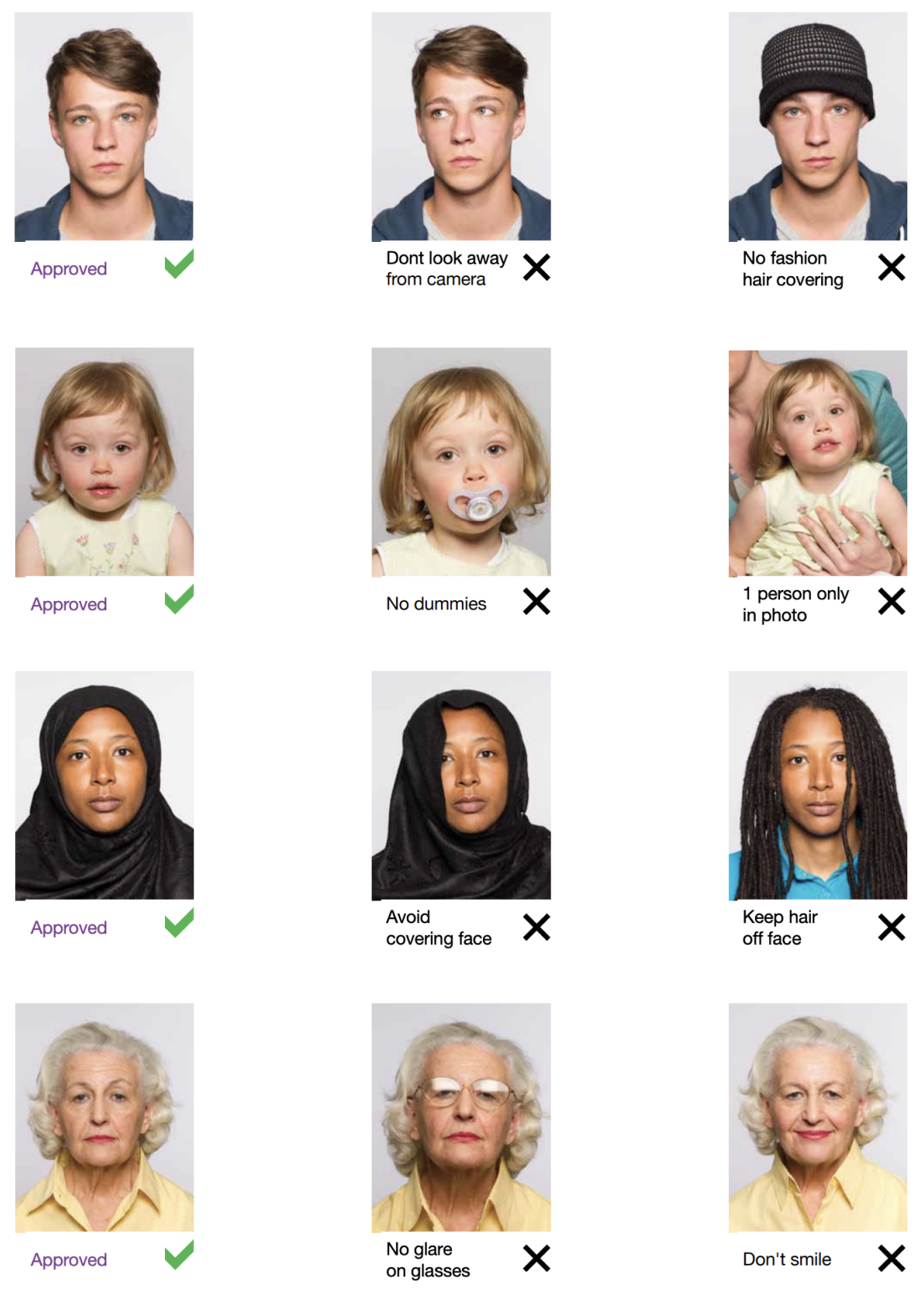
Example photos:
Below are examples of correct and incorrect photos
Mistakes Often Made
Many people make minor errors while snapping their visa photos, which can lead to rejections or delays. Here are few typical problems to be on the lookout for:
Wrong background: Dark, busy, or colorful backgrounds will create issues. Keep to white or light grey
Incorrect measurements: The photo has to be precisely 40x60 mm
Thai visa photos call for a neutral face, hence keep your mouth closed and refrain from smiling
Glasses with glare: If you wear glasses, make sure there’s no glare or reflection, and your eyes are clearly visible
PhotoGov guarantees your photo passes every time by automatically correcting these frequent errors for you
Advantages of Using PhotoGov.net
Easy: Stay at home. Your phone lets you do everything
Efficient: Get your compliant photo quickly and without errors
Affordable: We provide a budget-friendly service with excellent outcomes, so save on studio expenses
Our approach guarantees your images will always satisfy the official criteria
Main Features of PhotoGov
PhotoGov is the simplest and most consistent method to capture your Thailand visa on arrival photo for the following reasons:

Crop
Our in-built cropping feature allows you to trim new photos and ensure that they don’t have uneven edges. This allows you to neaten up your picture and ensure it’s the proper size

Resize
You can also resize your picture as needed through PhotoGov and the end result will be a perfectly proportioned image that will fit just right. Additionally, you don’t need to worry about stretching or squishing the image and ruining the quality

Auto-adjustment
With the click of a button, you can have our auto-adjustment tool immediately optimize your image to meet brightness, color, and contrast standards
Frequently Asked Questions
Other documents for the Thailand

作者: Olia Potiagaeva,总编辑 审核: PhotoGov 编辑团队 ★ 4.8 / 5.0 Google 已核验: Thailand
本页目录:
PhotoGov.net 严格遵守 全球证件照规范.