照片规格要求一览
本文档的官方规格摘要,已对照签发机构的要求核验。
- 像素尺寸
- 400x514 px
- 分辨率
- 600 DPI
- 背景
- In color
- 头部高度
- 74 %
- 文件格式
- JPEG
- 眼镜
- 不允许
- 表情
- Neutral, eyes open, mouth closed
立即制作Singapore passport online()
免费上传一张自拍,我们的照片转换器会自动调整尺寸并裁剪至精确规格。支持 iPhone、Android 与桌面端——无需前往照相馆。
拖动可重新定位 · 下方滑块免滚动
或从剪贴板粘贴照片
如健康问题影响照片,请勾选此框——需提供医疗证明。
合规检查
专家人工审核
合规专家审核您的照片并出具报告。通过率 99.2%。
打印排版页(多张)
in · 600 dpi · JPEG · 新加坡
批量处理——一次处理多张照片
已加载 0 张上传多张照片,它们将使用相同的背景和调整裁切到当前证件尺寸,然后一起打包为 ZIP 下载。
Create a Passport Photo for Singapore: ICA-Compliant & Free
Use our Singapore passport photo size editor for free to get a 100% technically compliant, ICA submission-ready Singapore passport photo.
No studio · No app · 30 seconds
Official Photo Requirements




Source: ICA
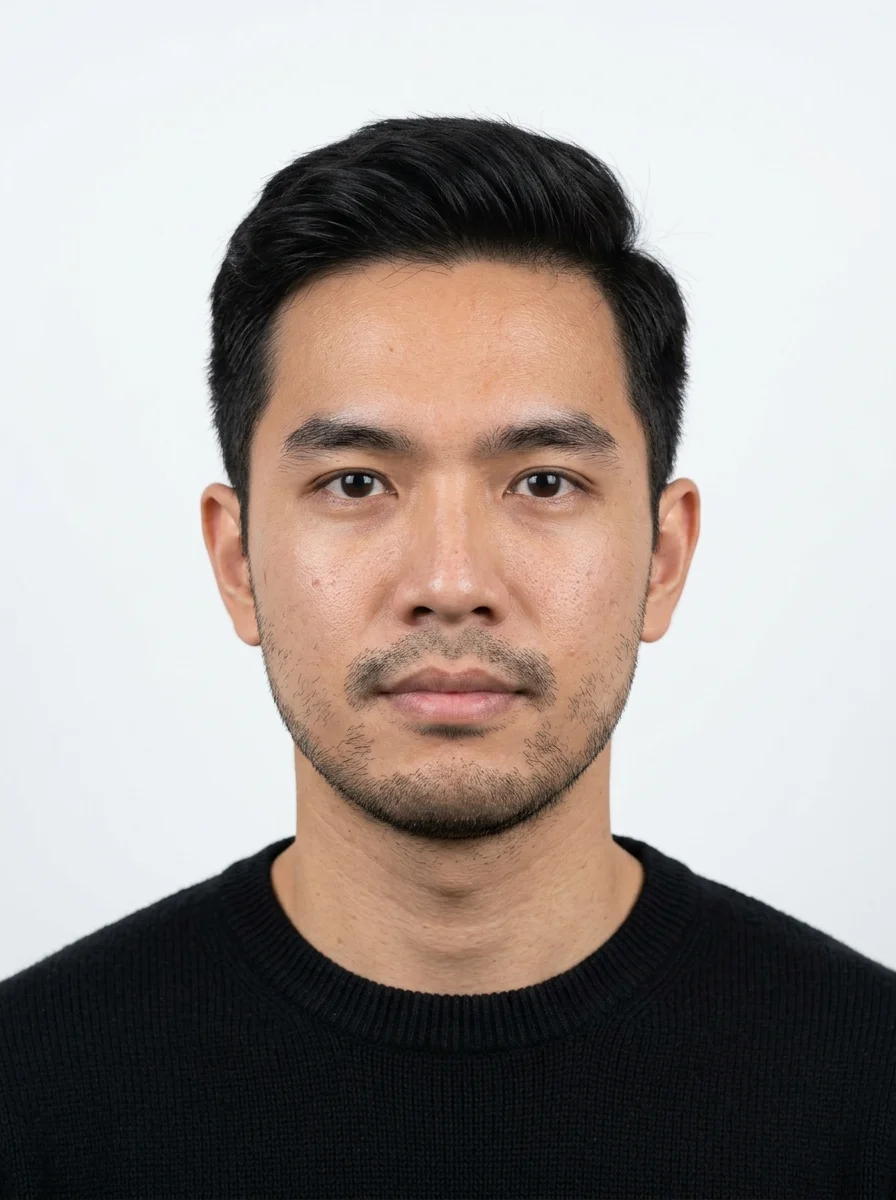

PhotoGov is an independent service. We are not affiliated with any government, embassy, or consulate. All information on this website is based on official government requirements and verified primary sources. Final acceptance is determined solely by the issuing authority.
Make Your Singapore Passport Photo Online
Create a passport photo for Singapore with our ICA photo editor tool for free. Take a selfie with your iPhone or digital camera, upload it to the platform, and follow the guided steps on the screen.
Get photo for: Singapore passport online 400x514 px
拖动可重新定位 · 下方滑块免滚动
或从剪贴板粘贴照片
如健康问题影响照片,请勾选此框——需提供医疗证明。
合规检查
专家人工审核
合规专家审核您的照片并出具报告。通过率 99.2%。
打印排版页(多张)
2x2 in · 300 dpi · JPEG · 美国
批量处理——一次处理多张照片
已加载 0 张上传多张照片,它们将使用相同的背景和调整裁切到当前证件尺寸,然后一起打包为 ZIP 下载。
If you need assistance, don't hesitate to contact our Support team, which is always there to help.
We recommend that you download and use mobile apps that are specifically designed to take photographs for passport or identity card applications. These apps usually come with features that will help you take photographs in the required dimensions. The photograph will be accepted if it complies with our photo guidelines.The Immigration and Checkpoints Authority SingaporeWe recommend that you download and use mobile apps that are specifically designed to take photographs for passport or identity card applications. These apps usually come with features that will help you take photographs in the required dimensions. The photograph will be accepted if it complies with our photo guidelines.
The Immigration and Checkpoints Authority Singapore
How Our Singapore Passport Photo Editor Works
Our free Singapore passport photo editor automatically converts your selfie's size, head proportions, framing, and background to the official Singapore passport standards. Choose additional services — casual-to-formal clothes change, human verification by our expert, or 9 extra clothing variations. Download the final digital photo, ready for submission.

Photo Upload
Take a selfie and upload it to PhotoGov

Service Selection
Add Human Verification or select other services

Processing
Wait while automatic adjustments are applied

Download
Get an ICA resized photo to 400 by 514 pixels for free
本页目录:
- Make Your Singapore Passport Photo Online
- How Our Singapore Passport Photo Editor Works
- What is a Singapore Passport Photo?
- Your Final Singapore Passport Photo from PhotoGov
- Singapore Passport Photos That Pass the Checks
- Singapore Passport Photos That Don’t Pass the Checks
- Why Use the PhotoGov Service
- PhotoGov and the ICA Rules for Passport Photos
- Frequently Asked Questions
- Official Government Sources
- Other Documents — Singapore ID Photos
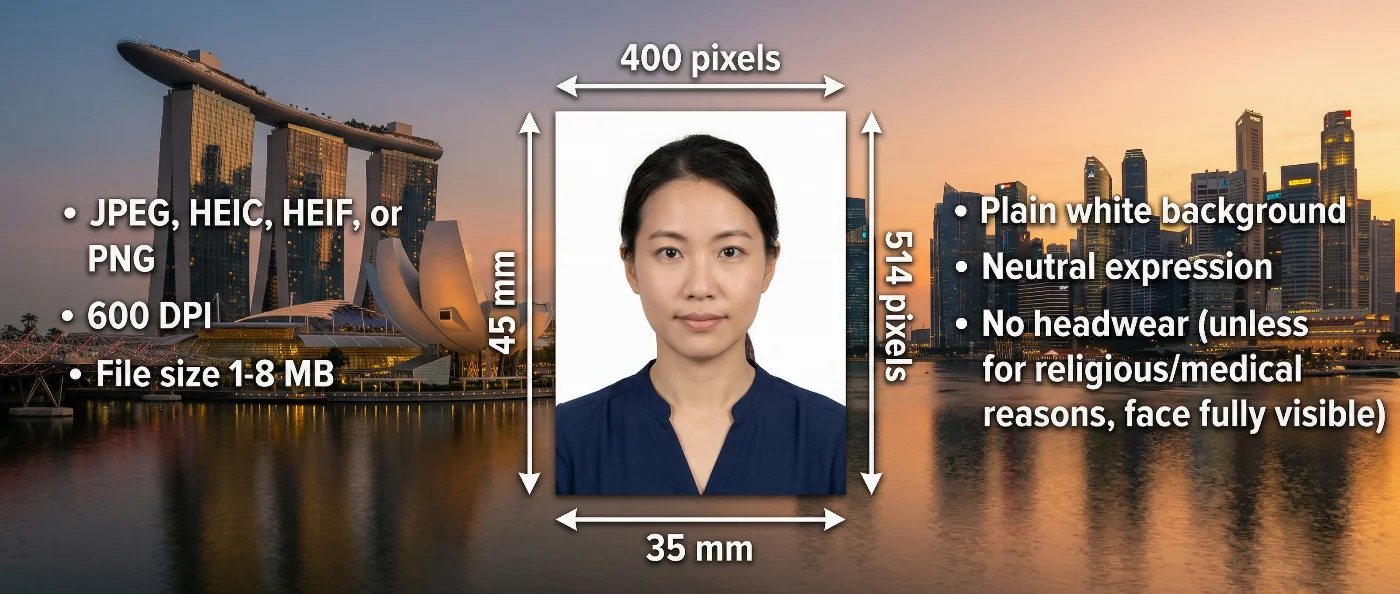
What is a Singapore Passport Photo?
The official photo format required for a Singapore passport.
Automatically prepared by PhotoGov as a correctly sized, ICA‑compliant, and application-ready file.
Accepted for digital upload in online passport applications, and suitable for professional printing if required.
Your Final Singapore Passport Photo from PhotoGov
PhotoGov automatically applies the official parameters to your original photo. You don’t need to adjust or verify any technical details manually. Below are the technical parameters of your final Singapore passport photo from PhotoGov.
For a full overview of official standards, please see our Singapore Passport Photo Requirements Guide.
| Parameter | Your Final Photo |
| Photo size | 400 × 514 pixels |
| Head size | 70-80% of the image |
| Background | Plain, white |
| File format | JPEG |
| Resolution | High‑resolution digital file at 600 DPI |
| Head positioning | Automatically centered |
| Color | Full color |
| Face visibility | Fully visible, no retouching |
| Submission | Ready for online upload / professional printing |
Your photo is processed in a private session in a secure environment. Facial features are never altered — the tool only resizes, crops, and replaces the background. If you want extra reassurance, optional Human Verification is available at checkout.
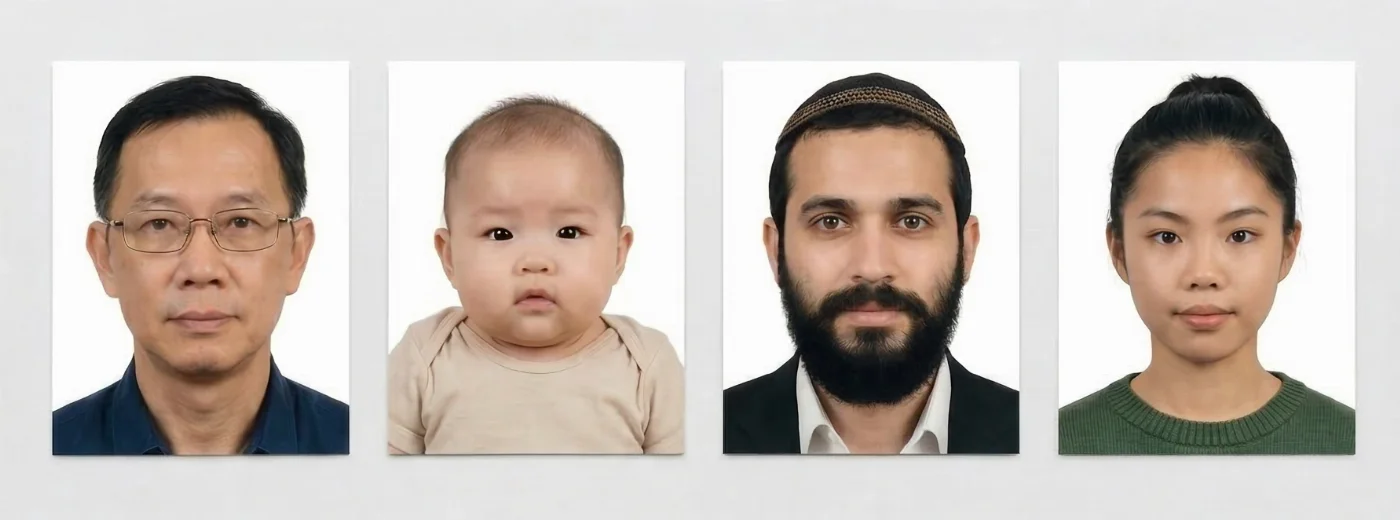
Singapore Passport Photos That Pass the Checks
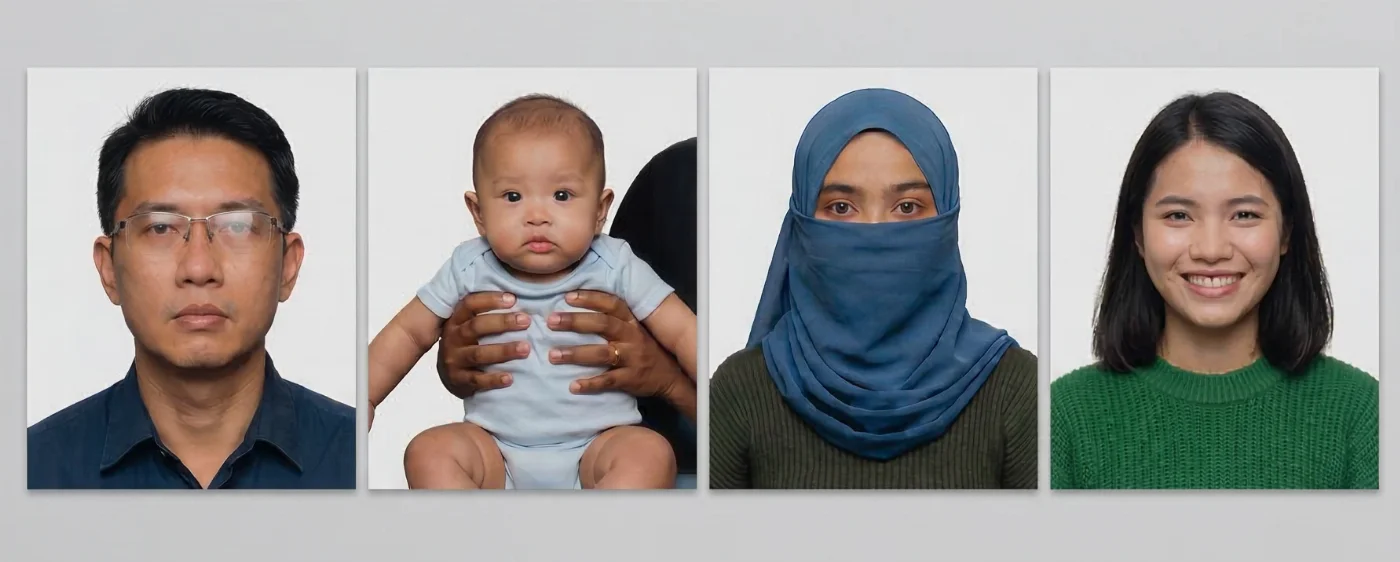
Singapore Passport Photos That Don’t Pass the Checks

Why Use the PhotoGov Service
Convenience
Photos accepted for online and in-person submissions
Compliance-Aligned Output
Designed to meet the current ICA guidelines
Availability
No registration, installation, or studio visits
Extra Assurance
Optional Human Verification by an in-house compliance specialist
Secure Processing
Your data is secure and not transferred to third parties
If your photo is rejected due to technical issues on PhotoGov's side, we provide a free retake or a full refund.
PhotoGov and the ICA Rules for Passport Photos
PhotoGov is an online service designed to meet all current ICA photo standards. Our free Singapore passport photo editor, PhotoGov, automatically applies them to your original photo, adjusting background, proportions, head position, and lighting without digitally altering facial features.
These standards are reviewed by PhotoGov’s compliance team and updated regularly to stay aligned with the latest government guidelines. Please note that final acceptance of your photo remains at the discretion of the Immigration & Checkpoints Authority.
For applications requiring the highest level of precision, users can choose Human Verification — a detailed manual review performed by an experienced compliance expert before submission.
For other Singapore document services, see our dedicated pages: Singapore Visa Photo Tool.
Singapore Visa Photo Standards
A visa application has its own rules. Our Singapore visa photo requirements in 2026 page describes the 35 x 45 mm print and the 400 x 514 pixel file on a plain white background.
Frequently Asked Questions
You can get professional passport photos in Singapore at photo studios, passport‑photo booths located in major MRT stations and shopping centres, and some pharmacies and retail chains. When choosing a provider, make sure they explicitly state that their photos follow ICA specifications (35 × 45 mm, 400 × 514 pixels, white background) and, if you plan to travel, ICAO biometric standards as well.
PhotoGov offers mobile passport photo services in Singapore — you can take photos at home or in the office, without the need to book a professional studio visit. Simply browse the website on your phone or computer, upload a casual snapshot, and let the automated system handle cropping, background removal, and sizing. Receive your ICA-compliant photo instantly via download.
To ensure your photo meets ICA rules without going to a studio, take a picture against a plain white wall in good, even lighting, avoid shadows on the face, keep a neutral expression, and make sure your head and shoulders are fully visible. Then use a reliable online editor or printing service that supports Singapore’s 35 × 45 mm format and 400 × 514 pixel resolution to crop and resize the image before you submit or print it.
You can get high‑quality passport photos in Singapore either by visiting professional photo studios that offer controlled lighting and background correction, or by taking a picture at home and processing it through an online editor that supports Singapore passport standards. In both cases, the goal is to get a sharp, ICA-compliant image with a plain white background, professional lighting, no shadows, and cropped to 400x514 pixels. The final result must be comparable to a studio‑grade image suitable for passport applications.
Based on Google reviews — a 4.7-star average rating from 2,500+ users — one of the best online tools to edit and resize your image to the exact Singapore passport photo dimensions and file size is PhotoGov. The platform resizes your image to exactly 400 × 514 pixels (35 × 45 mm at 600 DPI), compresses the file to meet ICA upload requirements, and outputs a JPEG with the correct color profile — all automatically without manual adjustments or technical knowledge.
You can use a PhotoGov online Singapore passport photo size editor to convert your phone photo into a compliant biometric photo in three simple steps:
First, upload any clear headshot from your phone gallery.
Second, wait approximately 30 seconds while the system automatically crops, centers, and formats the image to Singapore's 35 × 45 mm specifications with a white background.
Third, download your ICA-compliant JPEG file immediately, ready for Singapore passport application submission.
Use PhotoGov to edit a headshot to meet Singapore passport photo size, resolution, and background rules without visiting a studio. The platform validates your image against ICA rules — checking 35 × 45 mm / 400 × 514 pixels dimensions, 600 DPI resolution, pure white background, and proper facial proportions, and automatically applies corrections, if necessary. You receive a compliant digital file without booking an appointment or stepping into a physical photo studio in Singapore.
Parents can either visit studios that explicitly advertise baby and child passport photography, or take photos at home and then process them through online services that support Singapore passport standards. For infants, the key is a plain background, open eyes where possible, and no supporting hands or objects visible in the frame, while still allowing for some flexibility compared with adult photos.
You can either visit a professional photo studio or use a reliable online photo editor from home or the office to create passport photos that meet Singapore passport and visa requirements. When choosing a provider, look for a clear mention of compliance with ICA rules, including correct photo size, head size 70-80% of the image (å25-35 mm from chin to crown), white background, and proper facial positioning. It is also helpful to check user feedback and examples of previous work to ensure consistent quality before you book a session or upload your photo.
Yes, our ICA photo editor tool is free. Just upload your selfie to the platform, choose the country, and the document type. Wait about 30 seconds for the online photo-maker to convert your portrait into a Singapore passport photo. Choose additional services such as clothes match or human verification, and download your free Singapore passport photo in a digital or printable format.
Yes, PhotoGov offers Human Verification for your Singapore passport photo. Once you’ve uploaded your selfie to our free IC photo Singapore tool, select Human Verification upon checkout. Our senior compliance specialist will manually review the resulting image and provide their expert feedback. If the photo is suitable for an ICA‑compliant application, it will be approved; if our specialist has any doubts about its parameters, we will offer a free retake.
The Immigration & Checkpoints Authority (ICA) recommends using professional photo platforms — such as PhotoGov — instead of editing images manually. To resize your picture to the official Singapore passport dimensions with our free passport photo app, Singapore, simply upload your picture, and the system will:
Detect your face and crop the frame to the correct dimensions.
Adjust background, head size, and margins according to ICA standards.
Instantly generate a print-ready and digital-submission-ready file.
Yes. Your final Singapore digital passport photo adheres to all ICA technical parameters and is ready for an instant online submission.
If your Singapore passport photo is rejected due to a processing or technical error on our side, you will receive either a full refund or a new photo at no extra cost. When the refusal is linked to the original image itself — for example, uneven lighting, shadows on the face, or the head not being properly aligned — you will need to take another picture and upload it again.
To reduce the likehood of rejection, you can add Human Verification at checkout, and our specialist will review your photo against the latest ICA passport photo guidelines before you submit your application.
No, you don’t need any other equipment besides your smartphone. Take a clear headshot selfie, facing the camera directly, and upload it to our Singapore passport photo maker. In under 30 seconds, it will prepare an application-ready Singapore passport photo. Download it, and you’re ready to submit!
Yes, absolutely. We take the personal information of our users very seriously. The PhotoGov platform only uses your data to create an official ID photo, and after it’s done, deletes it from the servers. We never transfer the information to any third parties or AI services. Learn more about our Privacy Policy.
Official Government Sources
Apply for a Singapore Passport Online: Immigration and Checkpoints Authority Singapore (ICA)
Check Your Singapore Passport Application Status or Make an Appointment: Immigration and Checkpoints Authority Singapore
Other Documents — Singapore ID Photos

作者: Olia Potiagaeva,总编辑 审核: PhotoGov 编辑团队 ★ 4.8 / 5.0 Google 已核验: Singapore
PhotoGov.net 严格遵守 全球证件照规范.
官方政府来源
已对照 Singapore 的照片要求核验: https://apples.ica.gov.sg/apples/index.xhtml最后核验:12.10.2026
照片标准: apples.ica.gov.sg
其他证件 —— Singapore证件照
Singapore
7 个证件
- Singapore visa online400x514 px
- Singapore visa offline1.38x1.77 inch (35x45 mm)
- Singapore ID card 35x45 mm (3.5x4.5 cm)1.38x1.77 inch (35x45 mm)
- Singapore passport offline 35x45 mm (3.5x4.5 cm)1.38x1.77 inch (35x45 mm)
- Singapore Certificate of Identity 35x45 mm (3.5x4.5 cm)1.38x1.77 inch (35x45 mm)
- Singapore Citizenship Certificate 35x45 mm (3.5x4.5 cm)1.38x1.77 inch (35x45 mm)
- Singapore driving license 35x45 mm1.38x1.77 inch (35x45 mm)