照片规格要求一览
本文档的官方规格摘要,已对照签发机构的要求核验。
- 照片尺寸
- 35x45 mm · 1.38x1.77 in
- 像素尺寸
- 827x1063 px
- 分辨率
- 600 DPI
- 背景
- In color
- 头部高度
- 29 mm
- 文件格式
- JPEG
- 眼镜
- 不允许
- 表情
- Neutral, eyes open, mouth closed
立即制作Dutch ID card(35 × 45 mm / 827 × 1063 Pixels)
免费上传一张自拍,我们的照片转换器会自动调整尺寸并裁剪至精确规格。支持 iPhone、Android 与桌面端——无需前往照相馆。
拖动可重新定位 · 下方滑块免滚动
或从剪贴板粘贴照片
如健康问题影响照片,请勾选此框——需提供医疗证明。
合规检查
专家人工审核
合规专家审核您的照片并出具报告。通过率 99.2%。
打印排版页(多张)
1.38x1.77 in · 600 dpi · JPEG · 荷兰
批量处理——一次处理多张照片
已加载 0 张上传多张照片,它们将使用相同的背景和调整裁切到当前证件尺寸,然后一起打包为 ZIP 下载。
Amazing Dutch Passport Photos: 35 mm x 45 mm
If you apply for a Dutch passport, a correctly formatted photo is mandatory. The Dutch Government has strict 35mm x 45mm photo specifications to ensure biometric accuracy. Not up to standards get you delays or rejection. PhotoGov is a solution that will create passport photos quickly and easily along with full compliance.


Source: official website www.rijksoverheid.nl
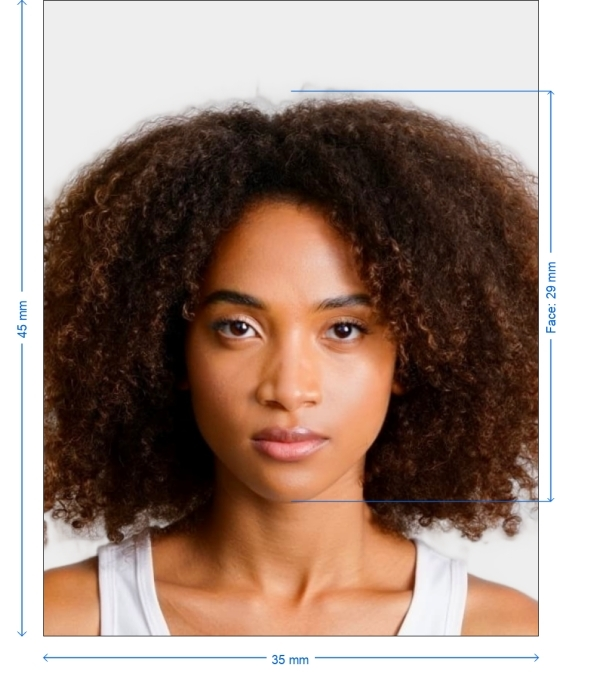
Get photo for: Dutch ID card 35x45 mm (3.5x4.5 cm)
拖动可重新定位 · 下方滑块免滚动
或从剪贴板粘贴照片
如健康问题影响照片,请勾选此框——需提供医疗证明。
合规检查
专家人工审核
合规专家审核您的照片并出具报告。通过率 99.2%。
打印排版页(多张)
2x2 in · 300 dpi · JPEG · 美国
批量处理——一次处理多张照片
已加载 0 张上传多张照片,它们将使用相同的背景和调整裁切到当前证件尺寸,然后一起打包为 ZIP 下载。

Why Should You Use PhotoGov for Your Dutch Passport Photo?
Guaranteed Strict Compliance
Your photo meets Dutch passport requirements.
Auto-Sizing Functionality
Automatically crops your image to the size of 35mm x 45mm.
Background Perfection
Guarantees a consistent, white or light background.
High-Resolution Optimization
Balances brightness, contrast and sharpness.
Print and Digital
Optimized for online or physical passport applications.
Fast Processing
Get a perfectly compliant passport photo in minutes.

*Data from government agencies
Technical & Size Requirements
Photo Size
35mm x 45mm
Aspect Ratio
7:9
Background
Solid white, light gray, no shadows, or no patterns
Resolution
At least 600 DPI
Accepted File Types
JPEG or PNG
File Size
Between 50 KB and 10 MB
Facial & Positioning Rules
- Neutral Expression - Both eyes opened, mouth closed.
- Degree of Fingers - On a 45-degree line with thumb tip pointing towards the camera.
How to Take a Dutch Passport Photo at Home
Have Adequate Lighting
– Use fully fledged lightings to get rid of darkness.
Simple White or Light Grey Backdrop
- Best is a smooth wall.
Stand Straight
— Directly engage with the camera with a neutral face.
PhotoGov Upload
— Our system auto-validates and optimizes your photo.
Download & Print
– Get Your 100% Gov. Approved Dutch Passport Photo Instantly!
Common Reasons for Photo Rejections
- Inadequate Lighting – Shadows on the face or background are grounds for rejection.
- Wrong Background - Background must be white or light gray only.
- Left/Right Head Tilt or Misalignment - The head positioning needs to be straight and centered.
- Glare From Glasses - Remove the glasses or angle them so that they do not reflect the light.
Pro Compliance Tips
- No Image Retouching – No manipulation of facial features.
- No Scarves or Masks (Unless Medically Needed) – Make sure your whole face is visible.
- No Crop, Blurry Pictures – Only high-quality photos accepted.
- No Filter or Color Correction – Keep raw skin tones.
Instructions for Printing & Digital Submission
- For Online Applications – Before uploading, please ensure the appropriate file format and resolution.
- For Physical Passport Submissions – Print the photo on a matte or glossy paper.
Required Documents for Dutch Passport Application
Also, make sure you have the following before submitting your Dutch passport photo:
A Valid ID – National ID, a previous passport or recognized document.
Notarized Copies of the Completed Application Forms – Verify that you attached everything.
Payment Proof – Payment for the Dutch passport is required before processing.
How to Print Your Dutch Passport Photo?
- Retail Locations – Print your photo at CVS, Walgreens, or Walmart.
- PhotoGov Digital Copy – High-resolution digital passport photo ready to submit.
Frequently Asked Questions

作者: Olia Potiagaeva,总编辑 审核: PhotoGov 编辑团队 ★ 4.8 / 5.0 Google 已核验: Netherlands
PhotoGov.net 严格遵守 全球证件照规范.
相关页面
官方政府来源
已对照 Netherlands 的照片要求核验: https://www.rijksoverheid.nl/onderwerpen/paspoort-en-identiteitskaart/eisen-pasfoto-paspoort-id-kaart最后核验:12.10.2026
照片标准: rijksoverheid.nl