照片规格要求一览
本文档的官方规格摘要,已对照签发机构的要求核验。
- 像素尺寸
- 300x369 px
- 分辨率
- 1 DPI
- 背景
- In color
- 头部高度
- 72 %
- 文件格式
- JPEG
- 眼镜
- 不允许
- 表情
- Neutral, eyes open, mouth closed
立即制作UAE Visa online Emirates.com()
免费上传一张自拍,我们的照片转换器会自动调整尺寸并裁剪至精确规格。支持 iPhone、Android 与桌面端——无需前往照相馆。
拖动可重新定位 · 下方滑块免滚动
或从剪贴板粘贴照片
如健康问题影响照片,请勾选此框——需提供医疗证明。
合规检查
专家人工审核
合规专家审核您的照片并出具报告。通过率 99.2%。
打印排版页(多张)
in · 1 dpi · JPEG · 阿拉伯联合酋长国
批量处理——一次处理多张照片
已加载 0 张上传多张照片,它们将使用相同的背景和调整裁切到当前证件尺寸,然后一起打包为 ZIP 下载。
United Arab Emirates Visa Requirements – Photograph – 43×55mm or 300×369px
When applying for a United Arab Emirates offline visa, you will be required to submit a photo that meets the specifications outlined in the official photo guidelines. Incorrect photos can slow down or even cause your application to be rejected. However, to prevent these issues, it’s important to make sure that your 43×55mm or 300×369px visa photo adheres to all the rules set by the UAE government. Our platform ensures your photo will be formatted as per requirements to be submitted properly. PhotoGov's summary of official UAE visa photo rules covers the photo specifications for this document.
The identity card uses a different format, described in the Emirates ID photo requirements guide.
The travel document itself follows separate rules, set out in our UAE passport photo requirements guide.


Source: official website emirates.com
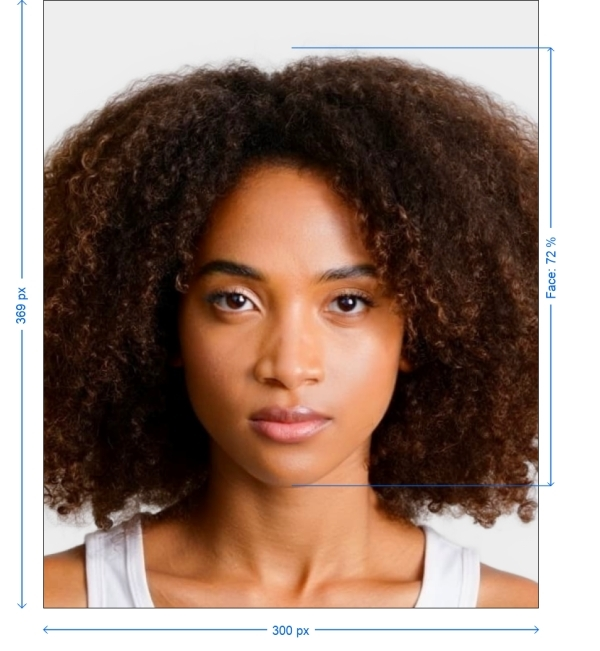
Get photo for: UAE Visa online Emirates.com 300x369 pixels
拖动可重新定位 · 下方滑块免滚动
或从剪贴板粘贴照片
如健康问题影响照片,请勾选此框——需提供医疗证明。
合规检查
专家人工审核
合规专家审核您的照片并出具报告。通过率 99.2%。
打印排版页(多张)
2x2 in · 300 dpi · JPEG · 美国
批量处理——一次处理多张照片
已加载 0 张上传多张照片,它们将使用相同的背景和调整裁切到当前证件尺寸,然后一起打包为 ZIP 下载。
Ensuring Government Photo Standards
Your data security and privacy are our priorities. Our online service utilizes intelligence to process photos from your phone for official government documents while ensuring compliance with all mandated standards.
UAE Visa online Emirates.com Photo Generator
Including the photograph is crucial for any application process as it helps immigration officials verify your identity. By adhering to the specified guidelines you can easily capture this photo at home using either a smartphone or digital camera. Discover how below!
Steps to Make UAE Visa online Emirates.com Photos Online
To create your UAE Visa online Emirates.com photo without the need for a photographers appointment simply follow these steps on PhotoGov.com.
Choose Document Type. Select the document type you require a photo for such, as a passport or visa.
Capture and Upload Your Photo. Take a picture. Upload it to our UAE Visa online Emirates.com photo generator.
Make sure you follow the instructions, for creating a photo.
Enhance Your Photo. Use our platform to improve your picture making sure it meets standards like lighting and correct centering.
Get Your Photo. Your picture is now set for use as a file.
Official Basic and Main Technical Requirements
| Document | UAE Visa online Emirates.com 300x369 pixels |
| Country | United Arab Emirates |
| Type | Visa |
| Quality | 1 DPI |
| Background Color | White |
| Size | Width: 300px, Height: 369px |
| Compliance | Meets requirements |
| Image Definition | Correct and clear |
| Printable | No |
| Suitable for Online Submission | No |

*Data from government agencies
UAE Visa Photo — Size and Requirements
Ensure your photo adheres to these specifications:
Technical Requirements: If you are processing the photo yourself through Photoshop or other services:
Size:
300x369 pixels
Color
Photos must be in color with a white or off-white background
Resolution
1-2 DPI, file size between 1 MB and 15 MB
Attire
Wear normal clothes, avoid uniforms, camouflage, head coverings, and glasses
For image quality and background
• Ensure that the photo is clear focused, free of blur or noise and not pixelated. • Use a background without any shadows.
Here's how to take your UAE Visa online Emirates.com photo.
1. Preparation. Find a lit area with a background.
2. Taking the Photo. Make sure there are no shadows present wear clothing stand upright and either use a tripod or have someone take the picture from 5-7 feet away.
3. Upload and Edit. Submit your image to PhotoGov AI for adjustments and optimization.
4. Download. Receive your finalized photo for use.
Tips for photographing babies and children
• For newborns. Lay them on a sheet.
• For infants. Seat them in a chair with a sheet, in the background. Here are some tips, for taking passport photos.
Lighting Tips
• Opt for light whenever possible. Position yourself in front of a window to avoid shadows.
• If artificial light is necessary use sources to minimize shadows. Place the lights evenly around you. Avoid overhead lighting that can create unwanted shadows on your face.
Camera Settings
• Set your camera or smartphone to the resolution setting.
• Make sure the camera is focused on your face. Use autofocus if its available.
• Keep your camera stable by using a tripod or placing it on a surface to prevent images.
Posture and Expression
• Stand upright with shoulders back.
• Maintain an expression. don't smile relax your face with eyes open and mouth closed.
• Look directly at the camera ensuring that your eyes are visible and not obstructed by hair or glasses.
Background Preparation
• Opt for a background such, as a white or off white wall.
• Make sure to avoid any decorations or designs.
• Distance. Position yourself a couple of feet away, from the wall to prevent shadows from appearing.
• Substitute Background. If you don't have a wall hang up a sheet behind you for a neat backdrop.
Outfit Choice
• Opt for casual, attire. Steer clear of uniforms and camouflage clothing.
• Avoid headwear. Unless its for reasons refrain from wearing hats or head coverings.
• Eyewear. Take off your glasses to avoid reflections and ensure your eyes are clearly visible.
Preparing for Photo Submission
Preparing Digital Files:
• File Format. Save your photo, in the specified format (JPEG, PNG, etc.).
• Naming Guidelines. Follow any naming rules provided by the application instructions.
• File Size. Make sure the file size falls within the required limits. Use tools to compress it if needed.
Printing Your Photo
• Paper Selection. Use high quality photo paper, whether matte or glossy finish.
• Print Resolution. Set your printer to the quality setting. If uncertain seek assistance from a photo printing service.
Before you submit your photo make sure it meets all the specified requirements and consider getting feedback from someone.
Our online photo tool provides features to assist you in creating the photo, including cropping and resizing background removal and auto adjustment of brightness, color and contrast.
When printing your photo opt, for matte or glossy paper. Visit a photo service if necessary.
Frequently Asked Questions
• Shipping centers such as UPS, FedEx and similar places also offer passport photo services at rates.
• Post offices and passport acceptance agents at many locations provide passport photo services for about $15.
• Various retail stores have dedicated areas for passport photo shoots usually offering reasonable prices.
• Keeping a still chill expression
• Adhering to the specified according dress code
• Ensuring high quality photos
• Avoiding any digital modifications
1. Upload your photo. Complete the processing, on our website.
2. Make the service payment using your bank card.
3. Upon payment confirmation you will receive a resolution copy of the photo via email.
PhotoGov ensures that the provided photo meets all document specifications ensuring its quality and compliance. If you have a document that includes photo editing services just share your email address. You can expect to receive the finalized photo, within 30-40 seconds.
Other documents for the United Arab Emirates

作者: Olia Potiagaeva,总编辑 审核: PhotoGov 编辑团队 ★ 4.8 / 5.0 Google 已核验: United Arab Emirates
本页目录:
- Get photo for: UAE Visa online Emirates.com 300x369 pixels
- Ensuring Government Photo Standards
- UAE Visa online Emirates.com Photo Generator
- Steps to Make UAE Visa online Emirates.com Photos Online
- Official Basic and Main Technical Requirements
- UAE Visa Photo — Size and Requirements
- Here's how to take your UAE Visa online Emirates.com photo.
- Tips for photographing babies and children
- Lighting Tips
- Camera Settings
- Posture and Expression
- Background Preparation
- Outfit Choice
- Preparing for Photo Submission
- Printing Your Photo
- Frequently Asked Questions
PhotoGov.net 严格遵守 全球证件照规范.
相关页面
其他证件 —— United Arab Emirates证件照

United Arab Emirates
8 个证件
- Emirates ID / residence visa for UAE ICP1.38x1.57 inch (35x40 mm)
- UAE ID card1.57x2.36 inch (40x60 mm)
- UAE ID card online1.38x1.77 inch (35x45 mm)
- UAE Visa offline1.69x2.17 inch (43x55 mm)
- UAE passport 4x6 cm1.57x2.36 inch (40x60 mm)
- UAE residence 4x6 cm1.57x2.36 inch (40x60 mm)
- UAE family book 35x45 mm1.38x1.77 inch (35x45 mm)
- UAE driving license 4x6 cm1.57x2.36 inch (40x60 mm)