Requisitos de la foto de un vistazo
Resumen de las especificaciones oficiales de este documento, verificado con los requisitos de la autoridad emisora.
- Tamaño de foto
- 26x32 mm · 1.02x1.26 in
- Tamaño en píxeles
- 614x756 px
- Resolución
- 600 DPI
- Fondo
- In color
- Altura de la cabeza
- 23.5 mm
- Formato de archivo
- JPEG
- Gafas
- no permitidas
- Expresión
- Neutral, eyes open, mouth closed
Tu Photo 26x32 mm ahora (26 × 32 mm / 614 × 756 Pixels)
GratisSube un selfie y nuestro conversor de fotos lo redimensiona y recorta automáticamente a las especificaciones exactas. Funciona en iPhone, Android y escritorio — sin visita a estudio.
Arrastra para reposicionar · Controles deslizantes sin scroll abajo
o pega una imagen desde el portapapeles
Marca esta casilla si problemas de salud afectan tu foto — se requiere certificado médico.
Conformidad
Verificación humana
Un experto en cumplimiento revisa tu foto y emite un informe. 99,2% de aprobación.
Hoja de impresión (varias copias)
1.02x1.26 in · 600 dpi · JPEG · Región desconocida
Procesamiento por lotes — procesa varias fotos a la vez
0 cargadasSube varias fotos; todas se recortan al tamaño del documento actual usando el mismo fondo y ajustes, luego se descargan juntas como un ZIP.
Get your 26x32 mm photo for free with PhotoGov
Easily generate authentic 26x32 mm photos online through our user-friendly service. Simply upload a picture from your phone. We'll transform it into a passport photo that meets all criteria. You can trust that your photos will be accepted without any complications. Employers ask for their own format, so the guide to taking a photo for a job application explains what to send them.


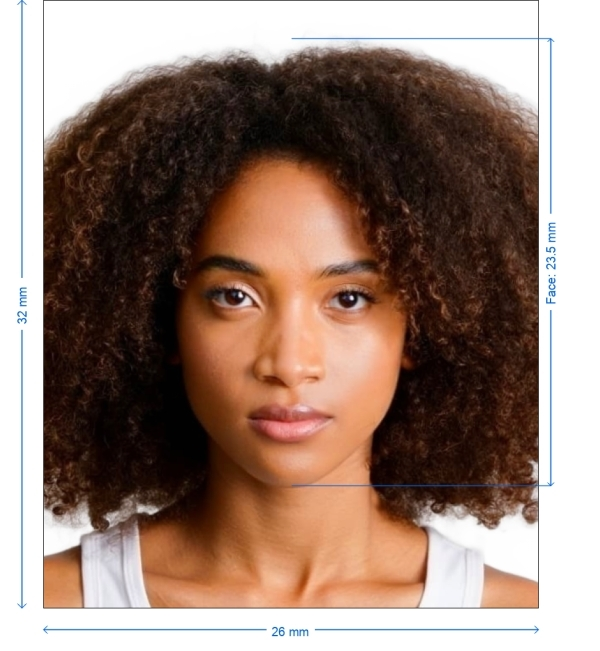
Get photo for: Photo 26x32 mm
Arrastra para reposicionar · Controles deslizantes sin scroll abajo
o pega una imagen desde el portapapeles
Marca esta casilla si problemas de salud afectan tu foto — se requiere certificado médico.
Conformidad
Verificación humana
Un experto en cumplimiento revisa tu foto y emite un informe. 99,2% de aprobación.
Hoja de impresión (varias copias)
2x2 in · 300 dpi · JPEG · Estados Unidos
Procesamiento por lotes — procesa varias fotos a la vez
0 cargadasSube varias fotos; todas se recortan al tamaño del documento actual usando el mismo fondo y ajustes, luego se descargan juntas como un ZIP.
Ensuring Adherence to Official Standards
Rest assured that we prioritize the security and confidentiality of your data. Our online platform uses technology to process photos from your device for official government purposes ensuring full compliance with regulations.
Creating Your 26x32 mm Photos
Having the photo is crucial for various applications. This image plays a role in allowing immigration officers to verify your identity. You can easily take this photo at home using a smartphone or digital camera by following guidelines. Learn below! Machine-readable images follow a standard set of parameters, and the biometric passport photo definition page explains each of them.
Steps for Creating 26x32 mm Photos Online
If you prefer making your 26x32 mm photo of relying on a professional photographer follow these important steps.
Select Document Type. Begin by choosing the type of document you need the photo for—such as a passport or visa—on PhotoGov.com.
Capture and Upload Photo. Take a picture. Upload it to our 26x32 mm photo creator while ensuring it meets all standards, for images.
Improve Your Photo. Use our platform to enhance your image. PhotoGov.com automatically adjusts your picture to meet standards, such, as lighting and positioning it at the center.
Receive Your Image. After processing download your photo file. It is now prepared for use as needed. Guidelines and Requirements for a 26x32 mm Photo.
For a successful application, follow these 26x32 mm photo requirements:
• Recent Photo: Taken within the last month.
• Size: 26x32 mms.
• Background: Light and plain, preferably white.
• Expression: Neutral with an unobstructed, full-face view.
• Restrictions: No glasses, headgear, or shadows, except for religious reasons.
| Name of Document | Photo 26x32 mm |
| Country | Others |
| Type of Document | Photo |
| Photo Size | Width: 26mm, Height: 32mm |
| Quality | 600 DPI |
| Background Color | White or Off-White |
| Image Definition Parameters | Correct for requirements |
| Printable | Yes |
| Suitable for Online Submission | No |

*Data from government agencies
26x32 mm Photo - Size and Specifications
Ensure that your photo meets all printing requirements and save it in the specified format. Here are some key technical aspects. US applications call for a larger square image, described in our 2x2 photo requirements guide for 51 x 51 mm files.
Technical requirements if you are going to process the photo yourself through Photoshop or other services:
Size
26x32 mm photos must be 26x32 mm without any deviations Documents in the Philippines use a square format instead, and the 1x1 picture size requirements in 2026 set out its measurements.
Color
Photos should be in color, for identification purposes. • When selecting a background, for your photo opt for a shadeless white to maintain clarity and focus. Avoid any adjustments, including color balancing.
Resolution and file size
For the resolution and file size aim for quality by using a resolution of least 600 DPI, preferably 1200 DPI. The file size should be between 1 MB and 15 MB to ensure details.
Attire, clothing, dress code
Dress in attire without uniforms, camouflage clothing, head coverings or glasses for the photo. Make sure the image is well lit and of quality for approval.
Image definition parameters
Check that the image meets defined parameters for clarity. It should be sharp focused correctly without blur or noise printed on matte or glossy photo paper of printer paper.
Background, contrast, and shadows
Maintain background contrast and detail in the image. Capture it against a off white backdrop with no visible shadows, on the face.
How to Capture Your Photo, for the US Electronic Diversity Visa Lottery
If you'd rather skip the cost of hiring a photographer you can snap your own photo at home by following these steps:
1. Utilize the services of PhotoGov.com.
2. Take your picture.
3. Make sure to have no head coverings, glasses or uniforms on and maintain an expression.
4. Select a lit area with a backdrop.
Using Self Portraits for Visa Purposes
1. Upload Your Photo to PhotoGov. Then upload your image to our platform for processing.
2. Receive Your ID Picture.
3. Lastly download your passport photo. You can print it out or use it digitally.
Tips for Getting a 26x32 mm Photo
• Body, to Camera Distance. Include the body with head and hair. Position the camera 5-7 feet (1.5-2 meters). Take shots to choose the one.
• Posture. Maintain an upright posture and calm demeanor while looking directly at the camera for a clear facial view.
• Lighting. Ensure that the photo is well lit and devoid of shadows.
Here are some tips, for taking a visa photo at home
• Make sure the lighting is from all sides.
• Follow the dress code guidelines.
• Use a neutral background for the photo.
If you're wondering about taking your 26x32 mm photo using a phone
• Use a smartphone with a camera quality.
• Avoid selfies. have someone take the photo.
For babies and kids photos

• For newborns place them on a sheet on the floor.
• For babies use a kids chair with a sheet as background. Support their head if needed ensuring no one else is in the frame.
PhotoGov Features
When it comes to using AI based tools like PhotoGov you can benefit from features such, as

Crop
Cropping to remove edges and resizing to fit your visa requirements perfectly. Avoid altering the dimensions of your image.

Background removal
Utilize our tool to generate a backdrop if one is not available.

Automatic Adjustment
Enhance image brightness, color and contrast, with a click.
Frequently Asked Questions
• Extensive Editing Features. crop, resize, auto adjust and remove backgrounds.
• Diverse Document Options. We accommodate passports, IDs, visas, citizenship documents, licenses and work permits.
• No Expensive Gear Required. Just a smartphone or digital camera along with internet access will suffice.
• No Studio Necessary. Save time and money by capturing photos at home or in your office.
• No Specialized Skills Needed. Our AI technology and machine learning algorithms guarantee that your photo meets all standards.
• Shipping centers such as UPS, FedEx and similar places also offer passport photo services.
• Post offices and other passport acceptance agents are equipped to handle passport applications and photo services.
• Retail stores often have designated areas for passport photo sessions with standard pricing.
You can get the photo done close to the same price of around $15.
• Maintain a neutral facial expression.
• Make sure to dress according to the dress code.
• Ensure that the picture is of high-quality.
• Avoid any kind of photo editing.
For capturing a visa photo it is recommended to:
• Use consistent lighting without any shadows.
• Choose an off-white background.
• Capture the image in resolution, with an expression.
To ensure the accuracy of your appearance remember that photos should be taken within the six months. Using photos may lead to delays or rejections.
• Make payment using your bank card for service fees.
• Receive a copy of your high-res photo via email after payment.
PhotoGov guarantees compliance, with document requirements. If free processing is available provide your email address to receive the photo within 40 seconds.
Other documents for the Others

Escrito por Olia Potiagaeva, editora jefe Revisado por el equipo editorial de PhotoGov ★ 4.8 / 5.0 Google Verificado con Others
Repetición gratuita o reembolso total
Si rechazan su foto por un error de nuestra parte.
→ Política de reembolsoVerificado con 8 parámetros oficiales
Cada archivo se valida antes de la descarga.
→ Comprobación de cumplimientoRequisitos revisados cada 8 semanas
Frente a la especificación de Others, para que la plantilla nunca quede desfasada. Última verificación: 12.10.2026.
→ Fuentes gubernamentales oficialesEn esta página:
- Get photo for: Photo 26x32 mm
- Ensuring Adherence to Official Standards
- Creating Your 26x32 mm Photos
- Steps for Creating 26x32 mm Photos Online
- For a successful application, follow these 26x32 mm photo requirements:
- 26x32 mm Photo - Size and Specifications
- How to Capture Your Photo, for the US Electronic Diversity Visa Lottery
- Using Self Portraits for Visa Purposes
- Tips for Getting a 26x32 mm Photo
- Here are some tips, for taking a visa photo at home
- If you're wondering about taking your 26x32 mm photo using a phone
- For babies and kids photos
- PhotoGov Features
- Frequently Asked Questions
PhotoGov.net cumple estrictamente con la normativa global de fotos de identidad.
Páginas relacionadas
Otros documentos — fotos de identidad de Others
Others
15 doc.
- Photo 1x1 inch1x1 inch (25.4x25.4 mm)
- Photo 2x2 cm0.79x0.79 inch (20x20 mm)
- Photo 2x2 inch2x2 inch (50.8x50.8 mm)
- Photo 30x40 mm1.18x1.57 inch (30x40 mm)
- Photo 35x40 mm1.38x1.57 inch (35x40 mm)
- Photo 35x45 mm aligned by the top1.38x1.77 inch (35x45 mm)
- Photo 45x45 mm1.77x1.77 inch (45x45 mm)
- Photo 4x4 cm1.57x1.57 inch (40x40 mm)
- Photo 50x50 mm1.97x1.97 inch (50x50 mm)
- Photo 600x800 pixel600x800 px
- Photo 6x9 cm2.36x3.54 inch (60x90 mm)
- Photo 9x12 cm3.54x4.72 inch (90x120 mm)
- Biometric passport photo1.38x1.77 inch (35x45 mm)
- Resume Photo 2x2 inch2x2 inch (50.8x50.8 mm)
- Resume Photo 35x45 mm1.38x1.77 inch (35x45 mm)