Requisitos de la foto de un vistazo
Resumen de las especificaciones oficiales de este documento, verificado con los requisitos de la autoridad emisora.
- Tamaño de foto
- 35x45 mm · 1.38x1.77 in
- Tamaño en píxeles
- 400x514 px
- Resolución
- 290 DPI
- Fondo
- In color
- Altura de la cabeza
- 74 %
- Formato de archivo
- JPEG
- Gafas
- no permitidas
- Expresión
- Neutral, eyes open, mouth closed
Tu Singapore visa offline ahora (35 × 45 mm / 400 × 514 Pixels)
GratisSube un selfie y nuestro conversor de fotos lo redimensiona y recorta automáticamente a las especificaciones exactas. Funciona en iPhone, Android y escritorio — sin visita a estudio.
Arrastra para reposicionar · Controles deslizantes sin scroll abajo
o pega una imagen desde el portapapeles
Marca esta casilla si problemas de salud afectan tu foto — se requiere certificado médico.
Conformidad
Verificación humana
Un experto en cumplimiento revisa tu foto y emite un informe. 99,2% de aprobación.
Hoja de impresión (varias copias)
1.38x1.77 in · 290 dpi · JPEG · Singapur
Procesamiento por lotes — procesa varias fotos a la vez
0 cargadasSube varias fotos; todas se recortan al tamaño del documento actual usando el mismo fondo y ajustes, luego se descargan juntas como un ZIP.
Getting Singapore Visa Photo Correct 2025
Thinking about visiting Singapore? You must submit a visa application. Submitting the right photo is among the most crucial criteria. A tiny error could even result in your visa application being denied or delayed. But relax! PhotoGov.net lets you quickly produce the ideal Singapore visa photo from your phone, without requiring a photo booth or a professional photographer.
- This post will walk you through the guidelines for your Singapore visa photo and demonstrate how PhotoGov enables you to satisfy all the official criteria. If a passport application comes next, the Singapore passport photo requirements guide explains the ICA rules for that document.


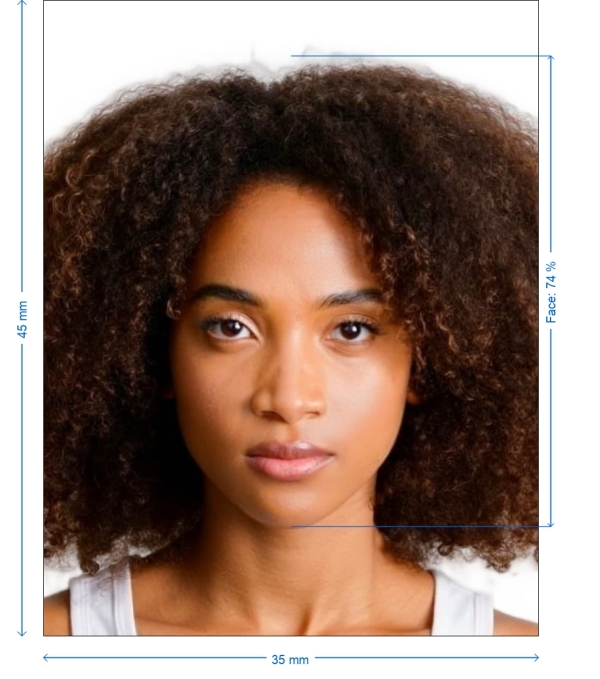
Get photo for: Singapore visa offline 35x45 mm (3.5x4.5 cm)
Arrastra para reposicionar · Controles deslizantes sin scroll abajo
o pega una imagen desde el portapapeles
Marca esta casilla si problemas de salud afectan tu foto — se requiere certificado médico.
Conformidad
Verificación humana
Un experto en cumplimiento revisa tu foto y emite un informe. 99,2% de aprobación.
Hoja de impresión (varias copias)
2x2 in · 300 dpi · JPEG · Estados Unidos
Procesamiento por lotes — procesa varias fotos a la vez
0 cargadasSube varias fotos; todas se recortan al tamaño del documento actual usando el mismo fondo y ajustes, luego se descargan juntas como un ZIP.
The Importance of Your Singapore Visa Photograph
Your Singapore visa photo is more than simply a straightforward picture. It is quite necessary for the official papers for biometric identification. Small errors like wrong sizes or an inappropriate background could cause visa denial or delays. The full Singapore visa photo requirements, including the 35 x 45 mm print and the 400 x 514 pixel file, are set out in our guide.
The good news is that PhotoGov.net guarantees your photo satisfies all required technical criteria by automatically verifying and changing everything for you, so enabling you to submit it with confidence.
How PhotoGov Helps You Produce the Ideal Singapore Visa Photo
Capturing your Singapore visa photo has never been simpler. Forget about standing in lengthy photo booth queues. PhotoGov operates as follows:
Use your phone to snap a crisp selfie in favorable lighting
Post Your Photo: PhotoGov.net needs your selfie uploaded
Our system guarantees your photo satisfies the Singapore visa criteria, automatically cropping, resizing, changing the backdrop, and so on
Once the procedure is finished, download your photo in the appropriate format, prepared for online submission as well as print
How to take your own Singapore visa offline photo
If you don’t want to go through the trouble and expense of locating and hiring a professional photographer to take your picture, you can simply take your own from home. So long as you follow the below instructions carefully, you can capture the perfect visa photo yourself:
1. Take a picture of yourself
Open up the PhotoGov.net photo service and take your picture. Make sure you’re not wearing any headcovers or glasses, do not wear a uniform, and keep your expression neutral. Ensure that the area is well-lit and that you are standing against a neutral background.
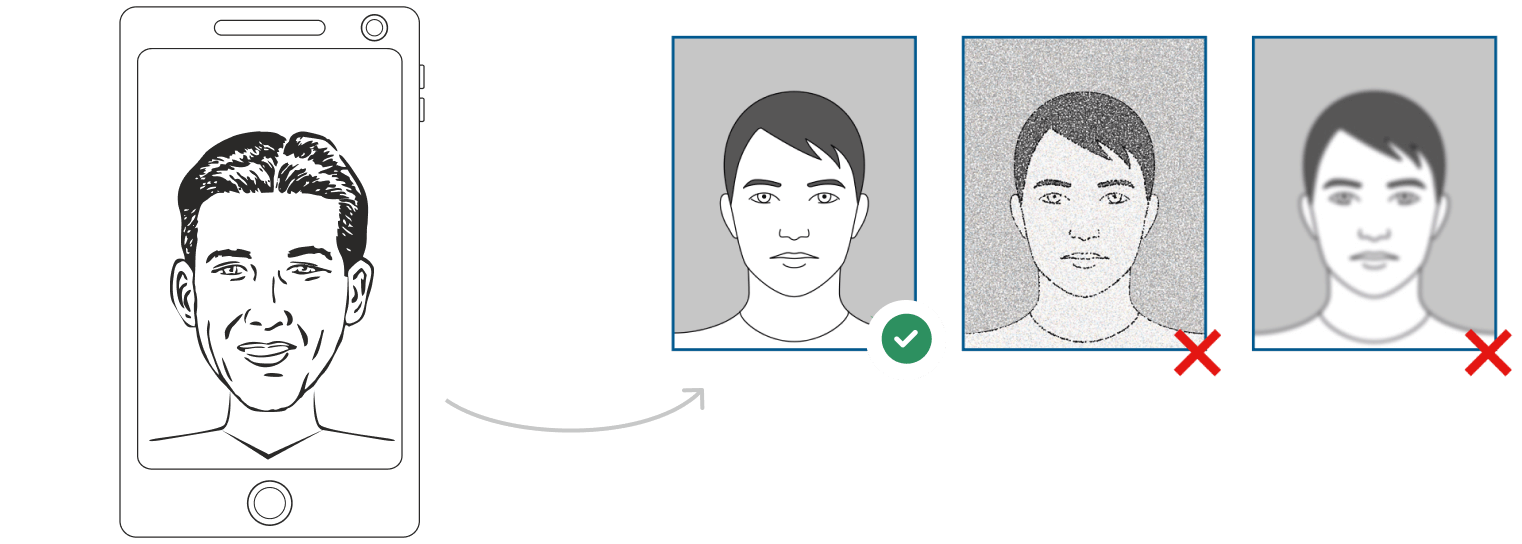
Watch "How to take a photo" (00:46)
2. Upload your photo to PhotoGov AI
Next, upload your image and process it through our site.
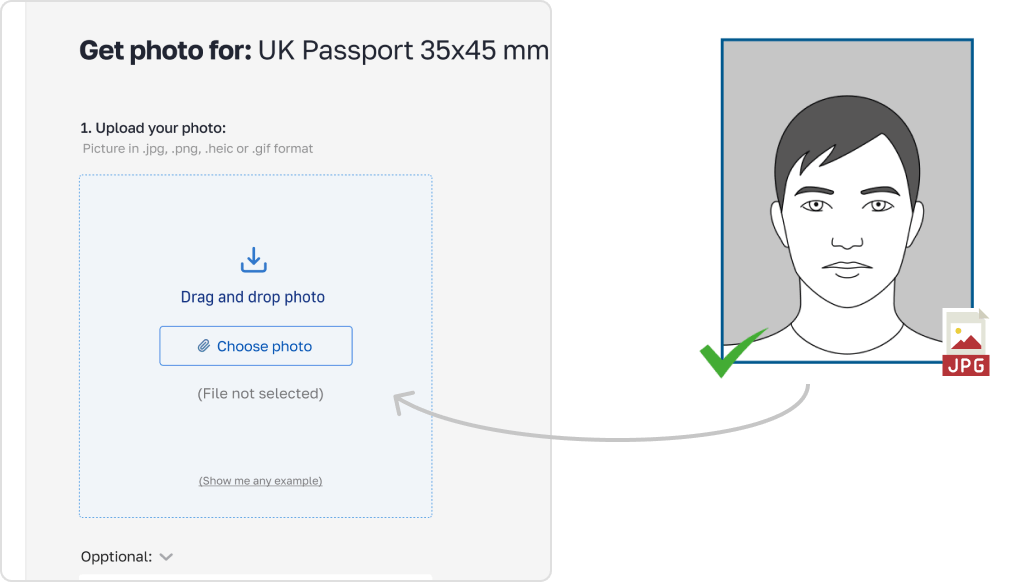
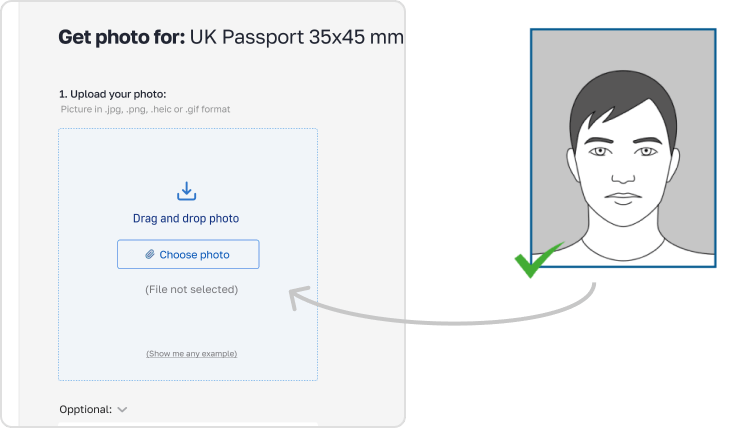
3. Receive your Passport Photo
Finally, you can download your ID photo. These images can be printed off, or you can simply use them as digital photos.
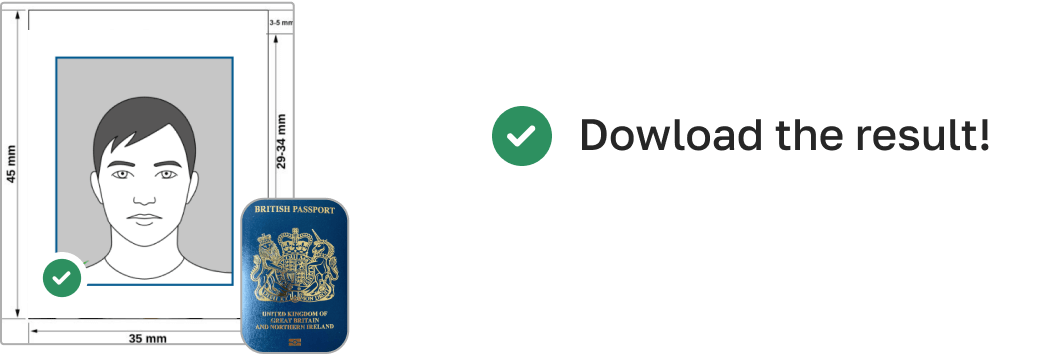
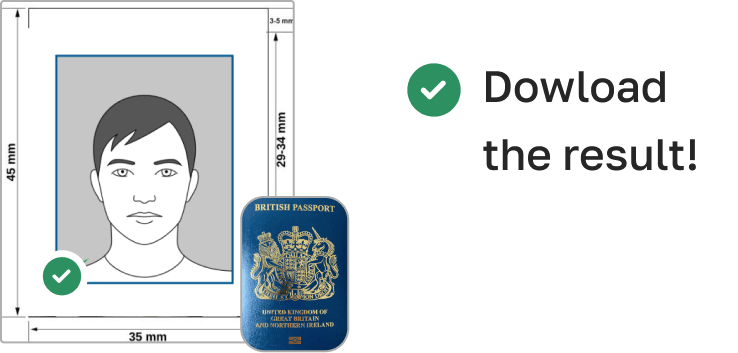
Singapore Visa Photo Specifications (35x45 mm)
Here is a thorough chart of the technical specifications for the Singapore visa photo:
| Photo Size (Width x Height) | 35 mm x 45 mm (3.5 cm x 4.5 cm) |
| Image Definition | Clear, sharp image with no blurriness or glare |
| Head Height (up to top of hair) | 32–36 mm (approximately 75% of photo height) |
| Distance from top of photo to top of hair | 3–5 mm |
| Background Color | Plain white or light grey |
| Resolution (DPI) | Minimum 600 DPI |
| Printable | Yes |
| Suitable for Online Submission | Yes |
| Expression | Neutral expression, mouth closed, eyes open |
| Glasses | Allowed, but no glare or reflections |
| Head Coverings | Only for religious reasons; facial features must be clearly visible |
| Recentness | Must be taken within the last 6 months |
| File Format | JPG or JPEG |
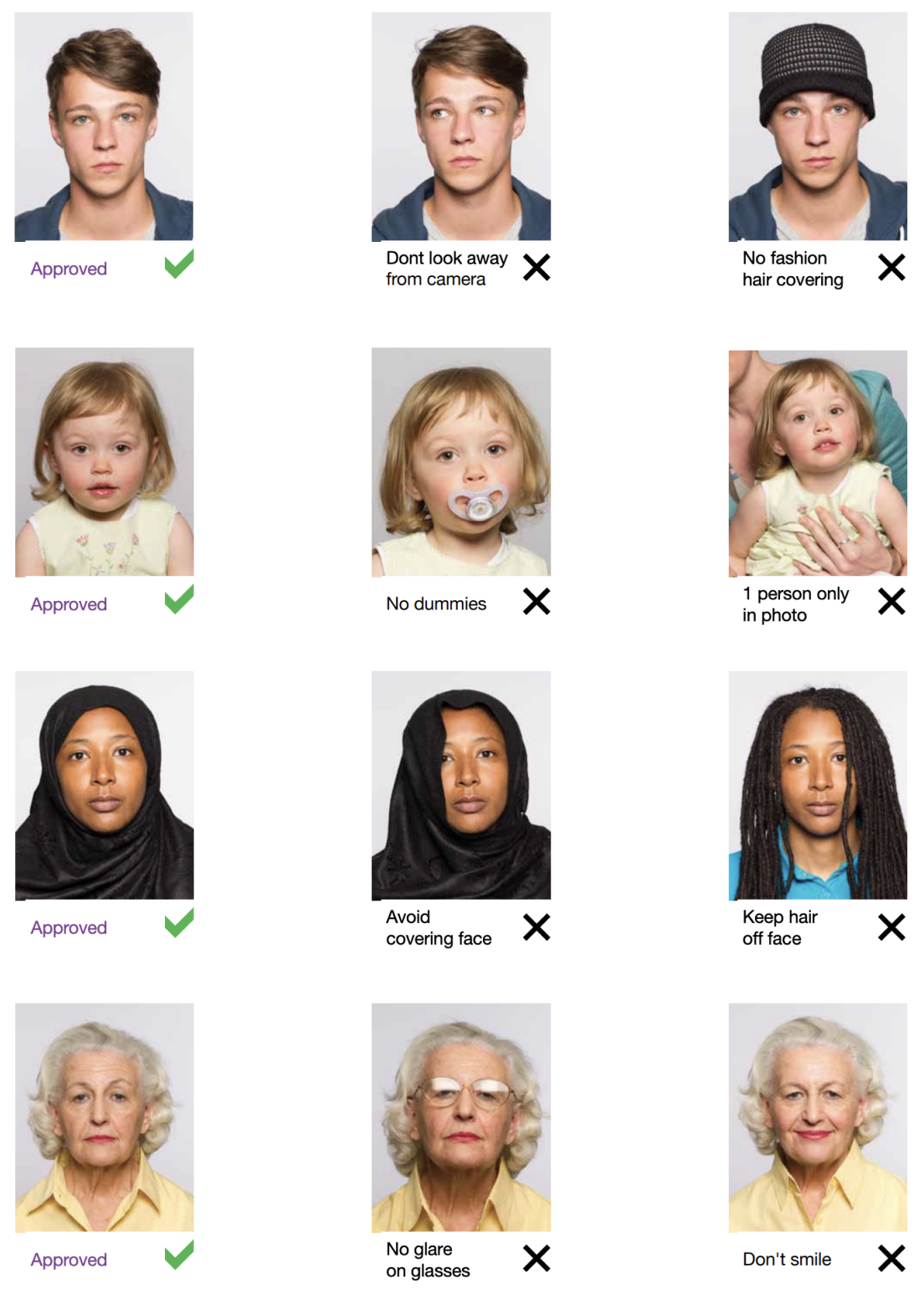
Example photos:
Below are examples of correct and incorrect photos
Typical Errors to Avoid
While it may seem easy to shoot the appropriate picture, tiny errors could lead to rejection or delays. Here are few typical errors to be on lookout for:
The background should be plain white or light gray, with no patterns or shadows.
Your picture has to be precisely 35x45 mm.
Bad lighting: Stay away from dark spots and shadows in the picture.
Facial expression: You want a neutral expression, neither a grin nor a frown.
Wearing glasses: Ensure your spectacles show no reflection or glare.
PhotoGov guarantees your photo is legal by automatically correcting these frequent errors for you.
Main Features of PhotoGov
PhotoGov is the simplest and most consistent method to capture your Singapore visa photo for this reason:

Crop
Automatically crops the image to fit the proper size for your Singapore visa.

Resize
Resizes your photo to meet the official 35x45 millimeter size criteria.

Background removal
Removes any distracting background and replaces it with a plain, conforming hue (white or light grey).

Auto-adjustment
Ensures a clear, high-quality image by means of lighting, sharpness, and contrast adjustments.
Advantages of Using PhotoGov.net
Fast and Simple: Send us your selfie; we'll handle everything else. Stay at home.
Reasonably priced: Skip the expense of photo booths to obtain professional-quality images.
We make sure your photo always satisfies the official criteria.
We offer both printable and digital formats so you are prepared for any submission technique.
How to take Singapore visa offline photos for babies and kids

When taking pictures of babies and children for visa, many of the same rules apply; for example, they must still adhere to the dress code, and the photograph must be high-quality and well-lit. With that being said, the State Department is generally more forgiving when it comes to the neutral expression requirement.
- If you are photographing a newborn:
- Spread a white sheet out over the floor.
- Place the baby down on the sheet and take their photograph against it.
For slightly older babies:
- Prop them up in a child’s chair against a white sheet.
- If they are still unable to hold up their head, prop it up for them using a hand behind the sheet. Ensure no one else is visible in the shot.
Frequently Asked Questions
Other documents for the Singapore

Escrito por Olia Potiagaeva, editora jefe Revisado por el equipo editorial de PhotoGov ★ 4.8 / 5.0 Google Verificado con Singapore
Repetición gratuita o reembolso total
Si rechazan su foto por un error de nuestra parte.
→ Política de reembolsoVerificado con 8 parámetros oficiales
Cada archivo se valida antes de la descarga.
→ Comprobación de cumplimientoRequisitos revisados cada 8 semanas
Frente a la especificación de Singapore, para que la plantilla nunca quede desfasada. Última verificación: 12.10.2026.
→ Fuentes gubernamentales oficialesEn esta página:
- Get photo for: Singapore visa offline 35x45 mm (3.5x4.5 cm)
- The Importance of Your Singapore Visa Photograph
- How PhotoGov Helps You Produce the Ideal Singapore Visa Photo
- How to take your own Singapore visa offline photo
- Singapore Visa Photo Specifications (35x45 mm)
- Example photos:
- Typical Errors to Avoid
- Main Features of PhotoGov
- How to take Singapore visa offline photos for babies and kids
- Frequently Asked Questions
PhotoGov.net cumple estrictamente con la normativa global de fotos de identidad.
Páginas relacionadas
Otros documentos — fotos de identidad de Singapore
Singapore
7 doc.
- Singapore passport online400x514 px
- Singapore visa online400x514 px
- Singapore ID card 35x45 mm (3.5x4.5 cm)1.38x1.77 inch (35x45 mm)
- Singapore passport offline 35x45 mm (3.5x4.5 cm)1.38x1.77 inch (35x45 mm)
- Singapore Certificate of Identity 35x45 mm (3.5x4.5 cm)1.38x1.77 inch (35x45 mm)
- Singapore Citizenship Certificate 35x45 mm (3.5x4.5 cm)1.38x1.77 inch (35x45 mm)
- Singapore driving license 35x45 mm1.38x1.77 inch (35x45 mm)