Requisitos de la foto de un vistazo
Resumen de las especificaciones oficiales de este documento, verificado con los requisitos de la autoridad emisora.
- Tamaño en píxeles
- 300x369 px
- Resolución
- 1 DPI
- Fondo
- In color
- Altura de la cabeza
- 72 %
- Formato de archivo
- JPEG
- Gafas
- no permitidas
- Expresión
- Neutral, eyes open, mouth closed
Tu UAE Visa online Emirates.com ahora ()
GratisSube un selfie y nuestro conversor de fotos lo redimensiona y recorta automáticamente a las especificaciones exactas. Funciona en iPhone, Android y escritorio — sin visita a estudio.
Arrastra para reposicionar · Controles deslizantes sin scroll abajo
o pega una imagen desde el portapapeles
Marca esta casilla si problemas de salud afectan tu foto — se requiere certificado médico.
Conformidad
Verificación humana
Un experto en cumplimiento revisa tu foto y emite un informe. 99,2% de aprobación.
Hoja de impresión (varias copias)
in · 1 dpi · JPEG · Emiratos Árabes Unidos
Procesamiento por lotes — procesa varias fotos a la vez
0 cargadasSube varias fotos; todas se recortan al tamaño del documento actual usando el mismo fondo y ajustes, luego se descargan juntas como un ZIP.
United Arab Emirates Visa Requirements – Photograph – 43×55mm or 300×369px
When applying for a United Arab Emirates offline visa, you will be required to submit a photo that meets the specifications outlined in the official photo guidelines. Incorrect photos can slow down or even cause your application to be rejected. However, to prevent these issues, it’s important to make sure that your 43×55mm or 300×369px visa photo adheres to all the rules set by the UAE government. Our platform ensures your photo will be formatted as per requirements to be submitted properly. PhotoGov's summary of official UAE visa photo rules covers the photo specifications for this document.
The identity card uses a different format, described in the Emirates ID photo requirements guide.
The travel document itself follows separate rules, set out in our UAE passport photo requirements guide.


Source: official website emirates.com
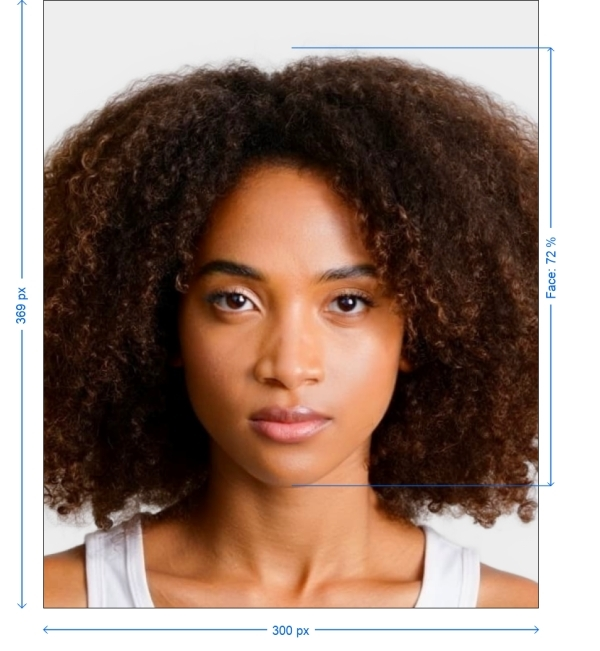
Get photo for: UAE Visa online Emirates.com 300x369 pixels
Arrastra para reposicionar · Controles deslizantes sin scroll abajo
o pega una imagen desde el portapapeles
Marca esta casilla si problemas de salud afectan tu foto — se requiere certificado médico.
Conformidad
Verificación humana
Un experto en cumplimiento revisa tu foto y emite un informe. 99,2% de aprobación.
Hoja de impresión (varias copias)
2x2 in · 300 dpi · JPEG · Estados Unidos
Procesamiento por lotes — procesa varias fotos a la vez
0 cargadasSube varias fotos; todas se recortan al tamaño del documento actual usando el mismo fondo y ajustes, luego se descargan juntas como un ZIP.
Ensuring Government Photo Standards
Your data security and privacy are our priorities. Our online service utilizes intelligence to process photos from your phone for official government documents while ensuring compliance with all mandated standards.
UAE Visa online Emirates.com Photo Generator
Including the photograph is crucial for any application process as it helps immigration officials verify your identity. By adhering to the specified guidelines you can easily capture this photo at home using either a smartphone or digital camera. Discover how below!
Steps to Make UAE Visa online Emirates.com Photos Online
To create your UAE Visa online Emirates.com photo without the need for a photographers appointment simply follow these steps on PhotoGov.com.
Choose Document Type. Select the document type you require a photo for such, as a passport or visa.
Capture and Upload Your Photo. Take a picture. Upload it to our UAE Visa online Emirates.com photo generator.
Make sure you follow the instructions, for creating a photo.
Enhance Your Photo. Use our platform to improve your picture making sure it meets standards like lighting and correct centering.
Get Your Photo. Your picture is now set for use as a file.
Official Basic and Main Technical Requirements
| Document | UAE Visa online Emirates.com 300x369 pixels |
| Country | United Arab Emirates |
| Type | Visa |
| Quality | 1 DPI |
| Background Color | White |
| Size | Width: 300px, Height: 369px |
| Compliance | Meets requirements |
| Image Definition | Correct and clear |
| Printable | No |
| Suitable for Online Submission | No |

*Data from government agencies
UAE Visa Photo — Size and Requirements
Ensure your photo adheres to these specifications:
Technical Requirements: If you are processing the photo yourself through Photoshop or other services:
Size:
300x369 pixels
Color
Photos must be in color with a white or off-white background
Resolution
1-2 DPI, file size between 1 MB and 15 MB
Attire
Wear normal clothes, avoid uniforms, camouflage, head coverings, and glasses
For image quality and background
• Ensure that the photo is clear focused, free of blur or noise and not pixelated. • Use a background without any shadows.
Here's how to take your UAE Visa online Emirates.com photo.
1. Preparation. Find a lit area with a background.
2. Taking the Photo. Make sure there are no shadows present wear clothing stand upright and either use a tripod or have someone take the picture from 5-7 feet away.
3. Upload and Edit. Submit your image to PhotoGov AI for adjustments and optimization.
4. Download. Receive your finalized photo for use.
Tips for photographing babies and children
• For newborns. Lay them on a sheet.
• For infants. Seat them in a chair with a sheet, in the background. Here are some tips, for taking passport photos.
Lighting Tips
• Opt for light whenever possible. Position yourself in front of a window to avoid shadows.
• If artificial light is necessary use sources to minimize shadows. Place the lights evenly around you. Avoid overhead lighting that can create unwanted shadows on your face.
Camera Settings
• Set your camera or smartphone to the resolution setting.
• Make sure the camera is focused on your face. Use autofocus if its available.
• Keep your camera stable by using a tripod or placing it on a surface to prevent images.
Posture and Expression
• Stand upright with shoulders back.
• Maintain an expression. don't smile relax your face with eyes open and mouth closed.
• Look directly at the camera ensuring that your eyes are visible and not obstructed by hair or glasses.
Background Preparation
• Opt for a background such, as a white or off white wall.
• Make sure to avoid any decorations or designs.
• Distance. Position yourself a couple of feet away, from the wall to prevent shadows from appearing.
• Substitute Background. If you don't have a wall hang up a sheet behind you for a neat backdrop.
Outfit Choice
• Opt for casual, attire. Steer clear of uniforms and camouflage clothing.
• Avoid headwear. Unless its for reasons refrain from wearing hats or head coverings.
• Eyewear. Take off your glasses to avoid reflections and ensure your eyes are clearly visible.
Preparing for Photo Submission
Preparing Digital Files:
• File Format. Save your photo, in the specified format (JPEG, PNG, etc.).
• Naming Guidelines. Follow any naming rules provided by the application instructions.
• File Size. Make sure the file size falls within the required limits. Use tools to compress it if needed.
Printing Your Photo
• Paper Selection. Use high quality photo paper, whether matte or glossy finish.
• Print Resolution. Set your printer to the quality setting. If uncertain seek assistance from a photo printing service.
Before you submit your photo make sure it meets all the specified requirements and consider getting feedback from someone.
Our online photo tool provides features to assist you in creating the photo, including cropping and resizing background removal and auto adjustment of brightness, color and contrast.
When printing your photo opt, for matte or glossy paper. Visit a photo service if necessary.
Frequently Asked Questions
• Shipping centers such as UPS, FedEx and similar places also offer passport photo services at rates.
• Post offices and passport acceptance agents at many locations provide passport photo services for about $15.
• Various retail stores have dedicated areas for passport photo shoots usually offering reasonable prices.
• Keeping a still chill expression
• Adhering to the specified according dress code
• Ensuring high quality photos
• Avoiding any digital modifications
1. Upload your photo. Complete the processing, on our website.
2. Make the service payment using your bank card.
3. Upon payment confirmation you will receive a resolution copy of the photo via email.
PhotoGov ensures that the provided photo meets all document specifications ensuring its quality and compliance. If you have a document that includes photo editing services just share your email address. You can expect to receive the finalized photo, within 30-40 seconds.
Other documents for the United Arab Emirates

Escrito por Olia Potiagaeva, editora jefe Revisado por el equipo editorial de PhotoGov ★ 4.8 / 5.0 Google Verificado con United Arab Emirates
Repetición gratuita o reembolso total
Si rechazan su foto por un error de nuestra parte.
→ Política de reembolsoVerificado con 8 parámetros oficiales
Cada archivo se valida antes de la descarga.
→ Comprobación de cumplimientoRequisitos revisados cada 8 semanas
Frente a la especificación de United Arab Emirates, para que la plantilla nunca quede desfasada. Última verificación: 12.10.2026.
→ Fuentes gubernamentales oficialesEn esta página:
- Get photo for: UAE Visa online Emirates.com 300x369 pixels
- Ensuring Government Photo Standards
- UAE Visa online Emirates.com Photo Generator
- Steps to Make UAE Visa online Emirates.com Photos Online
- Official Basic and Main Technical Requirements
- UAE Visa Photo — Size and Requirements
- Here's how to take your UAE Visa online Emirates.com photo.
- Tips for photographing babies and children
- Lighting Tips
- Camera Settings
- Posture and Expression
- Background Preparation
- Outfit Choice
- Preparing for Photo Submission
- Printing Your Photo
- Frequently Asked Questions
PhotoGov.net cumple estrictamente con la normativa global de fotos de identidad.
Páginas relacionadas
Fuentes gubernamentales oficiales
Verificado con los requisitos fotográficos de United Arab Emirates: http://emirates.com/Última verificación: 12.10.2026
Estándares fotográficos: emirates.com