Exigences photo en un coup d'œil
Résumé des spécifications officielles de ce document, vérifié par rapport aux exigences de l'autorité émettrice.
- Taille de la photo
- 50x60 mm · 1.97x2.36 in
- Taille en pixels
- 591x709 px
- Résolution
- 300 DPI
- Fond
- In color
- Hauteur de la tête
- 34 mm
- Format de fichier
- JPEG
- Lunettes
- non autorisées
- Expression
- Neutral, eyes open, mouth closed
Votre Turkey Passport maintenant (50 × 60 mm / 591 × 709 Pixels)
GratuitTéléchargez un selfie et notre convertisseur photo le redimensionne et le recadre automatiquement aux spécifications exactes. Fonctionne sur iPhone, Android et ordinateur — sans passage en studio.
Glissez pour repositionner · Curseurs sans défilement ci-dessous
ou collez une image depuis le presse-papiers
Cochez cette case si un problème de santé affecte votre photo — un certificat médical est requis.
Conformité
Vérification humaine
Un expert en conformité examine votre photo et fournit un rapport. Taux d’approbation de 99,2 %.
Feuille d'impression (plusieurs copies)
1.97x2.36 in · 300 dpi · JPEG · Turquie
Traitement par lot — traitez plusieurs photos à la fois
0 chargée(s)Téléversez plusieurs photos ; elles sont toutes recadrées à la taille du document actuel avec le même fond et les mêmes réglages, puis téléchargées ensemble dans un ZIP.
Professional Turkish Passport Photo Service using PhotoGov, 60mm x 50mm solution
Applying for a Turkish passport is somewhat complicated, hence you need pay great attention to your picture. One departure from the official policies might cause delays or outright rejection of your application. Our professional service provides 60mm x 50mm passport images guaranteed to satisfy all Turkish official criteria. Using the very newest PhotoGov technologies and professional advice, we guarantee that your picture appears natural and is technically accurate. Regarding size and pixel manipulation, we address every element to enable you to save time and effort. This page will go over Turkish passport photo criteria so you may get ready with the correct paperwork for your application. The particular policies set by Turkish passport authority are presented in this paper. Following these guidelines can help you to prevent rejection of your application. These are the nonnegotiable requirements for your passport photo.


Source: official website www.konsolosluk.gov.tr
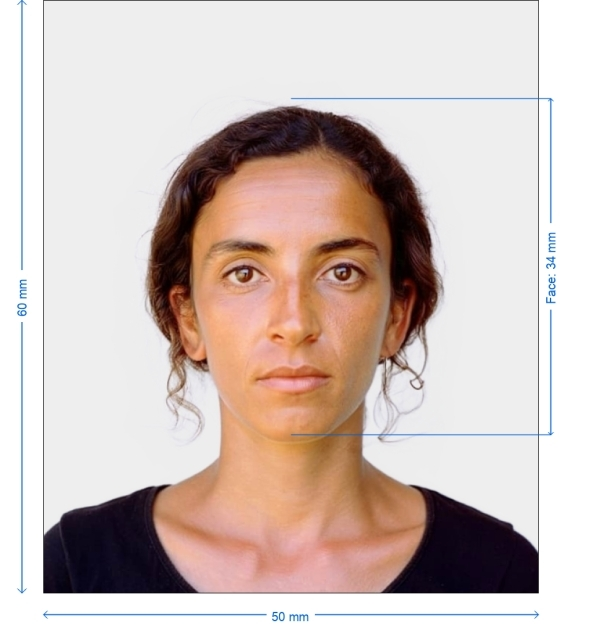
Get photo for: Turkey Passport 50x60 mm (5x6 cm)
Glissez pour repositionner · Curseurs sans défilement ci-dessous
ou collez une image depuis le presse-papiers
Cochez cette case si un problème de santé affecte votre photo — un certificat médical est requis.
Conformité
Vérification humaine
Un expert en conformité examine votre photo et fournit un rapport. Taux d’approbation de 99,2 %.
Feuille d'impression (plusieurs copies)
2x2 in · 300 dpi · JPEG · États-Unis
Traitement par lot — traitez plusieurs photos à la fois
0 chargée(s)Téléversez plusieurs photos ; elles sont toutes recadrées à la taille du document actuel avec le même fond et les mêmes réglages, puis téléchargées ensemble dans un ZIP.
Precinct Measurements
| Aspect Ratio | 35mm x 45mm (1 3/8\" x 1 3/4\") for 60mm x 50mm |
| height-to-width | 1:1.2 |
| Background | white or off white |
| Resolutions | 300 DPI |
| Lighting | should be spread equally to prevent any shadow on the background or face |
| File Format | JPEG, PNG, BMP |
| File Size | 10KB and 500KB |
| Subject Appearance | eyes wide open, mouth closed, without any smiling or frowning |
| Accessories | None of glasses |
Common Mistakes & How to Avoid Them
Small errors can lead to rejection. Keep these tips in mind:
- Incorrect dimensions Use a ruler or our online template to verify that your photo is 60mm x 50mm
- Shadows on the background Adjust the lighting or choose a brighter background
- Blurry image Clean the camera lens, use a tripod, and ensure proper focus
- Wrong facial expression Practice a neutral expression in front of a mirror before taking the photo
- Overediting Limit your adjustments to brightness and contrast only
Steps to Make Turkey Passport Photos Online
If you’d like to make your own photo for a Turkey Passport, saving you the trouble of making an appointment with a professional photographer and turning up in person, there are a few important steps you’ll need to follow. We’ve broken them down for you below:
On PhotoGov.net, first choose what sort of document you are preparing a photograph for—i.e., a passport, visa, etc.
Next, take your photograph and upload it to our Turkey Passport photo maker. Make sure you follow the necessary guidelines for creating a biometric picture.
Refine your picture using our platform. PhotoGov.net automatically optimizes your photograph to help ensure it meets the necessary criteria, such as even lighting and image centering.
Download your image. You are now ready to use the digital file as you like.
Do-It-Yourself Tips – Taking a Compliant Photo at Home
Follow these guidelines to capture a photo that meets the official requirements.
1. Lighting
- Natural Light Shoot near a large window on a cloudy day
- Artificial Light Use two softbox lights placed at 45degree angles to avoid shadows
- Avoid Strong sunlight, flash, glare, or back lighting
2. Camera Setup
- Stability Use a tripod to prevent blurring
- Distance Stand 1.5–2 meters away from the camera
- Framing Ensure that your head occupies 70–80% of the frame
3. Background
- Material A plain white wall or a wrinklefree sheet works best
- Shadows Arrange lighting so that no shadows are cast on the backdrop
4. Appearance
- Clothing Wear a collared shirt in a color that contrasts with the background (for example, navy blue against white)
- Expression Maintain a neutral face; look directly into the camera and keep your mouth closed
- Accessories Only wear glasses, hats, or jewelry if medically or religiously necessary
5. Editing Tools
- Free Software Tools like GIMP or Canva can handle basic cropping and resizing
- Avoid OverEditing Do not use filters, skin smoothing, or background replacement
Frequently Asked Questions

Rédigé par Olia Potiagaeva, rédactrice en chef Relu par l' équipe éditoriale de PhotoGov ★ 4.8 / 5.0 Google Vérifié auprès de Turkey
Nouvelle prise gratuite ou remboursement intégral
Si votre photo est refusée en raison d'une erreur de notre part.
→ Politique de remboursementVérifié selon 8 paramètres officiels
Chaque fichier est validé avant le téléchargement.
→ Contrôle de conformitéExigences revérifiées toutes les 8 semaines
Par rapport aux spécifications de Turkey, afin que le modèle ne soit jamais dépassé. Dernière vérification : 12.10.2026.
→ Sources gouvernementales officiellesPhotoGov.net respecte strictement la réglementation mondiale des photos d'identité.
Sources gouvernementales officielles
Vérifié auprès des exigences photographiques de Turkey: https://www.konsolosluk.gov.tr/Dernière vérification : 12.10.2026
Normes photographiques: konsolosluk.gov.tr